Sole trader invoice template
Invoice template for a UK sole trader: your name and business name, a unique number, supply date and total, with no VAT line. Sample lines for design work.
Templates by country
- Brand identity design
- Revision round
- Stock images at cost
Preparation guide
Example workflow
Confirm scope and quantities
Example: reconcile the approval and work record for "Brand identity design" to establish the quantity for this invoice.
Record delivery and acceptance
Check completion for every line, including "Stock images at cost". Match the delivery record to approved quantities and record who accepted the work.
Send the billing record
Send the final charges, delivery reference and due date to the customer, then reconcile payment against the invoice number.
This version is for someone trading on their own in the UK who is not registered for VAT, with sample lines from a freelance designer: a fixed design fee, extra revision rounds and stock images passed on at cost. What GOV.UK asks an invoice to show is already set out on this page. The notes here cover the practical side: the payment details a UK client needs, how to pass on a cost you paid for them, and what to check before charging for late payment.
Fields to prepare
- Deliverables and line items
- Brand identity design, Revision round, Stock images at cost: record the quantities actually supplied and the service period.
- Brand identity design
- Describe what the fee delivers, such as logo files, a colour palette and a short guidelines PDF, so the client knows what the price covered.
- Revision round
- Bill only rounds beyond those included in the design fee, and give the date each one was requested.
- Stock images at cost
- Pass stock images on at what the licence cost you, keep the receipt, and say whose name the licence is in.
- Quantity and billing unit
- Use the agreed unit, such as hours, units or a fixed project, and record both quantity and rate.
- Reference and dates
- Add the purchase reference, service period and delivery date to distinguish this work from other orders.
- Scope to agree
- Show your own name and any business name, an address for legal documents if you use one, a unique invoice number and the supply date, and leave out the VAT number and VAT line while you are not registered.
Before sending
- Does “Brand identity design” show the quantity actually supplied, not the quantity first quoted?
- Is “Revision round” charged at the rate the customer agreed to, with any change approved?
- Is “Stock images at cost” finished and accepted, or does it belong on a later invoice?
Show 4 more
- Separate additional work from the original scope and check its approval record.
- Distinguish included expenses from separately billed expenses and reconcile supporting records.
- Match completed work to the order or approval record, and confirm the payment due date and amounts already received.
- Confirm document language (en), country setting (GB), and the customer's currency and date-format requirements.
Worked example with sample figures
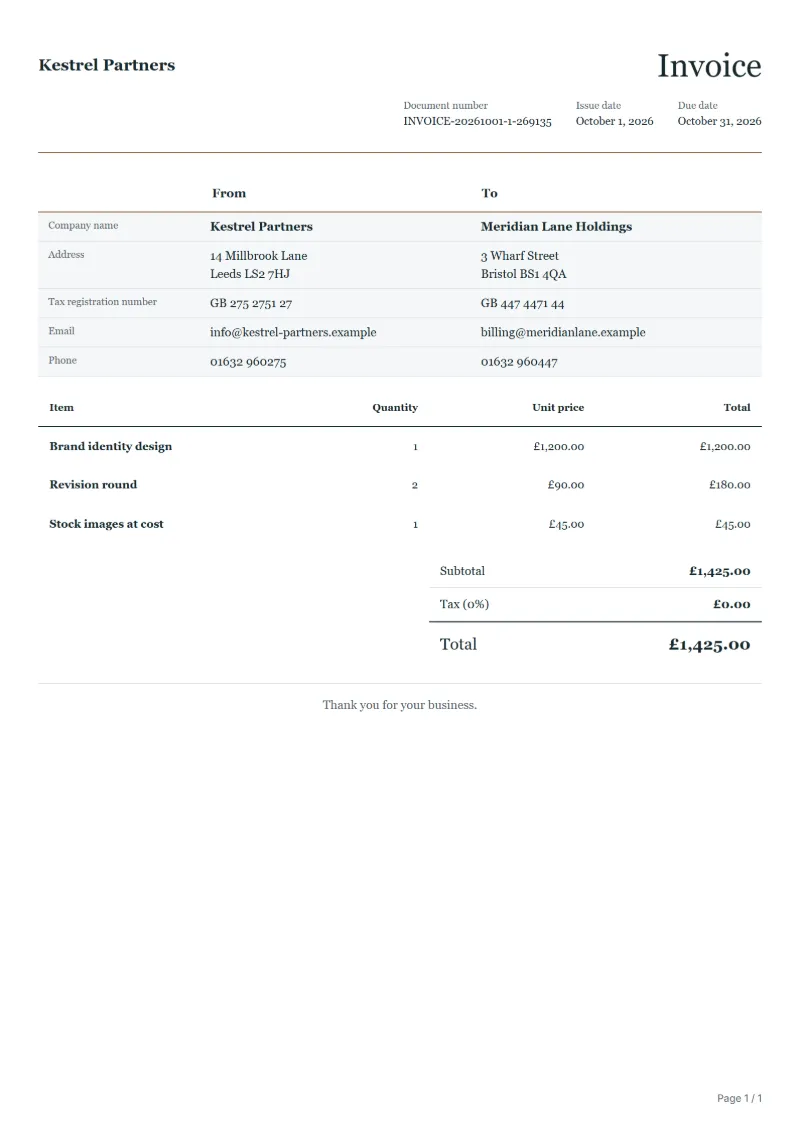
The figures below are invented to show how the template adds up: 3 lines in GBP, with no tax added.
| Item | Quantity × unit price | Amount |
|---|---|---|
| Brand identity design | 1 × £1,200.00 | £1,200.00 |
| Revision round | 2 × £90.00 | £180.00 |
| Stock images at cost | 1 × £45.00 | £45.00 |
| Total | £1,425.00 | |
Net amount £1,425.00, VAT £0.00, total payable £1,425.00.
What the document must show
These details make an invoice easier to approve and to file.
- Your business name, address and registration or tax number
- The customer's name and address
- Issue date and a document number you do not reuse
- Each line item with quantity, unit price and amount
- Tax shown separately from the net amount, and the total payable
- Payment terms: due date, bank details or accepted payment methods
The VAT here is 20%, applied to the net amount and shown as its own line.
What a UK sole trader invoice must show
GOV.UK lists what an invoice must include and adds two details for a sole trader: your own name, and an address for legal documents if you trade under a business name. QuoteBill has a field for most of these; for the others, write the detail in the notes or in the line description.
- A unique identification number
- A number you never use twice, so that each job has one invoice. The number and the date are fields of the document.
- Your name and any business name you use
- The extra detail GOV.UK asks of a sole trader. Enter your trading name as the company name in the company details, and write your own name beside it when the two differ.
- An address for legal documents
- GOV.UK asks for it if you use a business name: an address where legal documents can be delivered to you. Enter it as your address in the company details.
- Your contact information
- Email and phone, in the company details.
- The customer’s name and address
- GOV.UK says the company name and address of the customer you are invoicing. Enter them in the customer details.
- A clear description of what you are charging for
- One line for each job or item, with its quantity and price. The sample lines are for design work: replace them with what you supplied.
- The date the goods or service were provided
- GOV.UK calls it the supply date. QuoteBill has no field for it: write it in the line description or in the notes.
- The date of the invoice
- The issue date, a field of the document.
- The amounts charged and the total owed
- The totals show the net amount and the total owed. With the tax rate at 0% the two are the same figure.
- VAT amount, if applicable
- It does not apply while you are not VAT-registered: leave VAT off, as explained next.
A worked example
A freelance designer who is not VAT-registered invoices a client for one brand identity design at £1,200, two revision rounds at £90 each (£180) and stock images at cost, £45. The total owed is £1,425. There is no VAT number, no VAT line and no tax row to add up, and the notes can say when the work was delivered, since the supply date has no field of its own.
These are the template’s sample lines with their sample prices. Replace them, and the client’s details, with your own.
What changes when you are not VAT-registered
GOV.UK says you must use VAT invoices if you and your customer are both VAT-registered, and that these carry more information than non-VAT invoices. A sole trader who is not registered writes the ordinary invoice above: no VAT number and no VAT line.
GOV.UK also says you must register for VAT to start charging VAT, so do not add VAT to your lines or print a VAT number you do not have. This template starts with the tax rate at 0%, so the total is the sum of your lines.
Not charging VAT is not permanent. GOV.UK says you must register if your total taxable turnover for the last 12 months goes over £90,000, or if you expect it to in the next 30 days, and that you may register voluntarily below that. From then on, use the UK VAT invoice template, which shows the VAT on its own line.
Questions a sole trader asks
- Does the invoice have to say “sole trader”?
- GOV.UK’s list asks for your name and any business name you use, and for an address for legal documents if you use a business name. It does not list the words “sole trader”.
- Do I put my UTR or National Insurance number on it?
- GOV.UK’s list for invoices does not include either, so leave them off unless a client asks for one.
- Can I send an invoice without VAT?
- Yes, while you are not registered. GOV.UK says you must register for VAT to start charging it, so an unregistered sole trader invoices the net amount.
- Which template do I use after I register?
- The UK VAT invoice template. GOV.UK says VAT invoices must include your VAT number and show the VAT separately.
- UK VAT invoice template (VAT on its own line)
- UK invoice template with no VAT
- Guide: UK VAT invoice requirements
Official sources: GOV.UK (HMRC): Invoices - what they must include (2026-10-06)
Official sources: GOV.UK (HMRC): Charge, reclaim and record VAT (2026-10-06)
Official sources: GOV.UK (HMRC): Register for VAT (2026-10-06)
Official rate reference: HMRC: VAT rates
Full requirements: UK VAT invoice requirements: full, simplified, modified
Frequently asked questions
What payment details should I give a UK client?
Your account name, sort code and account number, the due date, and the invoice number to use as the payment reference. A client paying from abroad will also need your IBAN and BIC.
Can I charge interest if a business client pays late?
Read GOV.UK’s guidance on late commercial payments before you add any charge, and state your payment terms on the invoice from the start, so the client knows them before the due date passes.
How is the VAT worked out on this invoice?
The VAT here is 20%, applied to the net amount and shown as its own line. With nothing added, the total in the worked example above stays at the net amount of £1,425.00.
Can I change the layout and colour?
Yes. The editor offers other layouts and a document colour for the printed page. Changing them moves no figure: the lines and totals stay as they are, and the PDF, Word and Excel files follow the layout you pick.
Can I email it to the customer?
Yes, from your own mail app. With a free account, the editor’s download menu offers Email this document, which opens your mail app with a message about the document already written. QuoteBill sends nothing itself, so save the PDF and attach it before you send.
Read next
Reading for the Sole trader invoice template: How to write an invoice: a step-by-step example and Credit note vs invoice (and credit memo): how to issue one. The VAT and GST calculator works out the tax line for you.