UK VAT invoice template
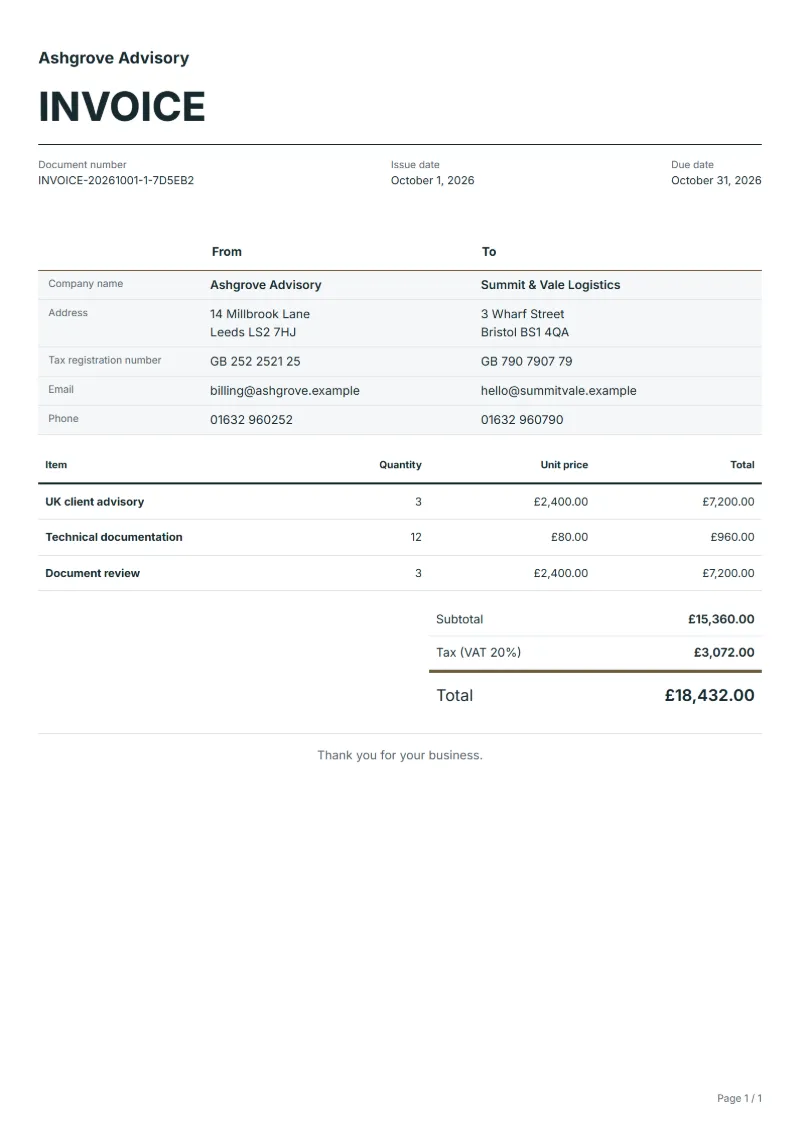
UK VAT invoice template: VAT on its own line at your rate, with your VAT number. Fill it in online; Excel and Word come with a free account.
Templates by country
- UK client advisory
- Technical documentation
- Document review
Filling in a UK VAT invoice
Example workflow
Enter the lines at net price
Start with "UK client advisory": the quantity and the price before VAT for each service.
Check the VAT line
Read down to "Document review", then check that the VAT rate and amount stand on their own line and that the total payable adds up.
Send and reconcile
Send the invoice, keep a copy with your VAT records, and reconcile payment against the invoice number.
UK businesses that buy professional services usually need a VAT invoice before they can approve payment and reclaim the VAT. This template is laid out for an advisory or technical engagement: hours of advice, written documentation and a review of the client’s documents, each priced before VAT. It fits a consultancy, an engineering adviser or a freelance technical author who is VAT-registered and bills UK business clients for work done over days or weeks.
Fields to prepare
- Deliverables and line items
- UK client advisory, Technical documentation, Document review: bill advisory time, technical writing and review as separate lines, each with its quantity and its net price, before VAT.
- UK client advisory
- Name the subject of the advice and the period, for example “Planning advice, sessions 3–7 May”, with hours as the quantity.
- Technical documentation
- Identify the documents written by title and number, and bill hours or a fixed fee per document as your engagement letter says.
- Document review
- Count review rounds as the quantity, and note whether marked-up comments or a written summary went back with each round.
- VAT number and the supply
- Show your VAT registration number if you are registered, the date of the supply and a description of each service, so the VAT can be read against what was supplied.
- Net price, VAT and total
- Enter each line at its net price. The VAT line then shows the rate and the amount, and the total payable follows.
- Scope to agree
- Record the advisory topic, the document identifiers, the revision reviewed and the number of review rounds, each on the line it belongs to.
Before sending
- Does “UK client advisory” show the quantity actually supplied, not the quantity first quoted?
- Is “Technical documentation” charged at the rate the customer agreed to, with any change approved?
- Is “Document review” finished and accepted, or does it belong on a later invoice?
Show 4 more
- Check that the price on each line excludes VAT, so the VAT is added once and only once.
- Confirm that the customer is in the United Kingdom; a customer elsewhere may need different treatment.
- Check the completed work against the date of the supply, then confirm the due date and the amounts already received.
- Confirm document language (en), country setting (GB), and the customer's currency and date-format requirements.
Worked example: advisory work with VAT
The figures are an example, in pounds. A consultancy advises a UK client for five hours, writes technical documentation for three hours and reviews documents for two hours.
| Item | Quantity × unit price | Amount |
|---|---|---|
| UK client advisory | 5 × £140.00 | £700.00 |
| Technical documentation | 3 × £95.00 | £285.00 |
| Document review | 2 × £60.00 | £120.00 |
| Subtotal | £1,105.00 | |
| VAT (20%) | £221.00 | |
| Total | £1,326.00 | |
The lines add up to £1,105.00 before VAT. VAT at 20% is £221.00, so the total payable is £1,326.00.
Common mistakes on a VAT invoice
- Adding VAT to a price that already includes it.
- Showing a single total with no VAT line, so the customer cannot see the net price or the VAT.
- Using a rate from memory instead of checking the rate that applies to the service.
- Forgetting the date of the supply when it differs from the date of the invoice.
- Putting the VAT number in the email but not on the invoice itself.
What the document must show
These details make an invoice easier to approve and to file.
- Your business name, address and registration or tax number
- The customer's name and address
- Issue date and a document number you do not reuse
- Each line item with quantity, unit price and amount
- Tax shown separately from the net amount, and the total payable
- Payment terms: due date, bank details or accepted payment methods
The VAT here is 20%, applied to the net amount and shown as its own line.
Official rate reference: HMRC: VAT rates
Full requirements: UK VAT invoice requirements: full, simplified, modified
Frequently asked questions
UK VAT invoice template: what should it include?
Start with the lines the template carries — UK client advisory, Technical documentation, Document review — and replace them with your own services at net price. Then add your VAT registration number, the customer, a number you have not used before and the dates.
How is the VAT calculated?
The VAT here is 20%, applied to the net amount and shown as its own line. The editor recalculates the VAT and the total when you change a quantity or a price.
Do I need a VAT number on the invoice?
If you are VAT-registered, put your number on it; the UK VAT requirements guide lists the details with their sources. If you are not registered you do not charge VAT, so leave the rate at 0.
Can I invoice a customer outside the UK on this template?
The template is set up for UK customers. For a customer elsewhere, check which rules apply to your supply before you charge VAT, and change the country setting if you need another tax.
How do I show the VAT separately?
The editor keeps the net amount, the VAT and the total apart and prints them as separate lines, so you only choose the rate.
How do I correct a VAT invoice I have already sent?
Issue a credit note for the original and a new invoice, quoting the original number, rather than editing the one that was sent.
Read next
Reading for the UK VAT invoice template: How to write an invoice: a step-by-step example and Invoice numbering: sequences and corrections. The VAT and GST calculator works out the tax line for you.