Free quotation generator
Download the quotation as Excel or Word with the formulas working (free for QuoteBill members), or edit it online and turn an accepted quote into an invoice.
Free generators
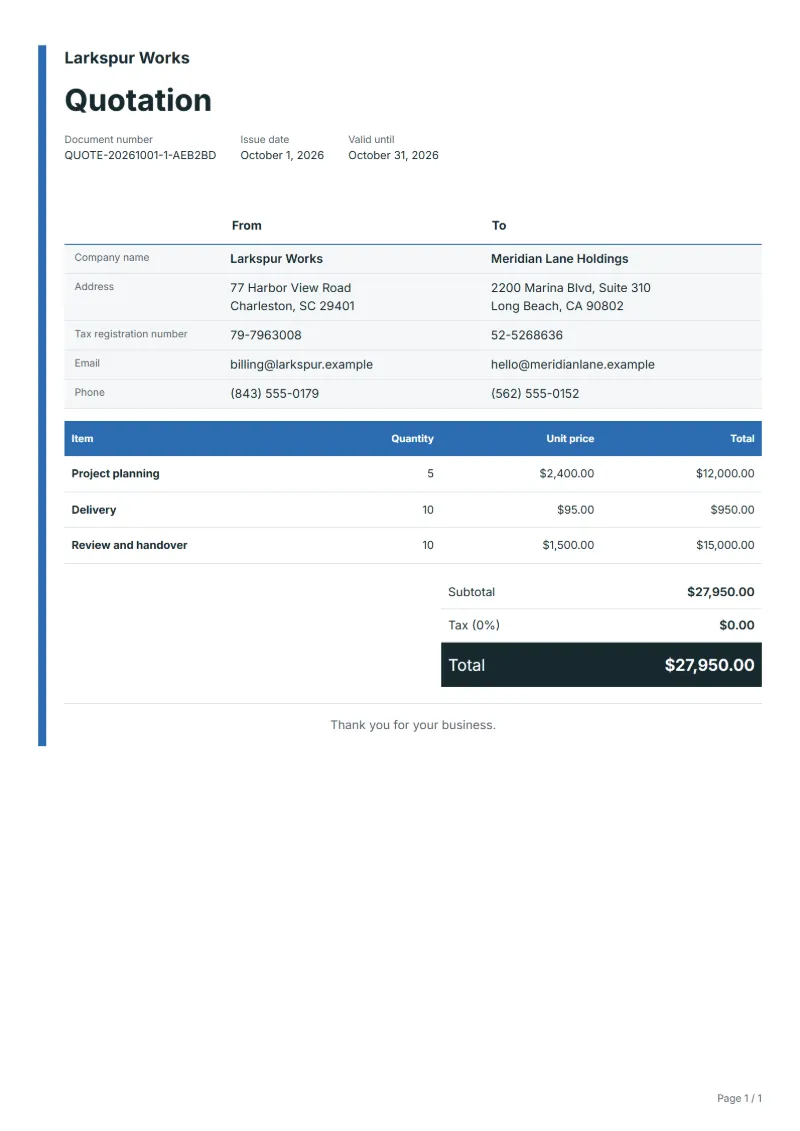
- Project planning
- Delivery
- Review and handover
Preparation guide
Example workflow
Confirm scope and quantities
Example: start with "Project planning", confirm the required quantity and client inputs, then agree completion criteria for each item.
Review and approve the quotation
Confirm acceptance evidence for "Review and handover", all line quantities, exclusions and quote validity with the customer, and retain the approved version.
Deliver and prepare billing
Match the delivery record to approved quantities and record who accepted the work. When the agreed milestone is complete, prepare an invoice using actual quantities and approved changes.
A quotation fixes a price before anyone commits, so the customer can compare offers and approve one in writing. The generator opens with three stages that describe most project work: planning, the delivery itself, and the review that ends with handover. Pricing the stages separately shows where the money goes and lets the customer postpone or drop one without reopening the whole offer. Once the customer accepts, the quotation converts into an invoice with the same lines.
Fields to prepare
- Deliverables and line items
- Project planning, Delivery, Review and handover: specify the planned quantity and delivery scope for each item.
- Project planning
- Say what planning produces, such as a written brief and a schedule, and how many meetings it includes before it counts as finished.
- Delivery
- Give the main deliverable a measurable size, like 12 web pages, 40 hours of work or 3 units, so the price has something to stand on.
- Review and handover
- State how many review rounds the price covers and what the customer receives at handover, for example source files or a short training session.
- Quantity and billing unit
- Use the agreed unit, such as hours, units or a fixed project, and record both quantity and rate.
- Reference and dates
- Add the purchase reference, service period and delivery date to distinguish this work from other orders.
- Scope to agree
- Define an output and customer review deadline for planning, delivery, and review and handover.
Before sending
- Does “Project planning” say what is included and what quantity the price assumes?
- Would the customer read “Delivery” the way you do, including what it leaves out?
- Can you still honour the price of “Review and handover” on the last day the quotation is valid?
Show 3 more
- Separate additional work from the original scope and check its approval record.
- Distinguish included expenses from separately billed expenses and reconcile supporting records.
- Check quote validity, the customer approval method and payment milestones.
Worked example with sample figures
The figures below are invented to show how the template adds up: 3 lines in USD, with an example tax rate of 8%.
| Item | Quantity × unit price | Amount |
|---|---|---|
| Project planning | 1 × $500.00 | $500.00 |
| Delivery | 1 × $1,200.00 | $1,200.00 |
| Review and handover | 2 × $150.00 | $300.00 |
| Subtotal | $2,000.00 | |
| Sales tax (8%) | $160.00 | |
| Total | $2,160.00 | |
Quoted net amount $2,000.00, sales tax $160.00, quoted total $2,160.00.
What the document must show
The details a quotation has to show, and why each one matters, are set out in the guide below.
The sales tax depends on where the work is supplied, so set the rate that applies to your customer before sending.
Official rate reference: US government: state and local taxes
Full requirements: How to write a quotation: format, example and checklist
Frequently asked questions
How long should the prices in this quotation stay valid?
Long enough for the customer’s approval process; for project work 30 days is a common choice. Print the end date on the quotation, and after it check your costs again before you agree to the same price.
What if the customer wants only one of the three stages?
Remove the stages they do not want and send the result as a revised quotation that names the one it replaces. Keeping every version means both sides can see which offer was accepted when the invoice is prepared.
Should the quotation ask for a deposit before work starts?
If you need money up front, say so in the payment terms: the share due on acceptance and when the rest falls due, for example at handover. Once the customer accepts, invoice the deposit on its own and the balance when the stage is delivered.
How is the sales tax worked out on this quotation?
The worked example above uses an example rate of 8%: $160.00 on a net amount of $2,000.00, for a total of $2,160.00. The editor recalculates all three when you change a quantity, a price or the country.
How do I turn an approved quotation into an invoice?
Open the approved quotation and convert it. The original stays unchanged, and the invoice carries the same line items so the customer can match the two documents.
Read next
Reading for the Free quotation generator: How to write a quotation: format, example and checklist and Quote to invoice: how to convert a quote, step by step. The VAT and GST calculator adds tax to your quoted prices.