Donation receipt template
Donation receipt template for charities, clubs and schools: each gift with its date and fund, any benefit the donor received, and who accepted it.
Templates by industry
- Gift to the general fund
- Gift designated for the scholarship fund
- Benefit dinner ticket, meal valued separately
Preparation guide
Example workflow
Match the payment to the invoice
Example: check the payment for "Gift to the general fund" against the invoice it settles: the invoice number, the amount received and any balance still owed.
Record the payment
Enter the payment date, the payment method and the amount received, and check each line this payment covers, down to "Benefit dinner ticket, meal valued separately".
Send the receipt
Send the receipt to the customer and mark the invoice as paid; if a balance remains, keep the invoice open for it.
A donation receipt tells a supporter that their gift arrived and where it went. Donors keep it for their own records, for an employer that matches gifts, and sometimes for a tax return, so the date, the amount and the fund matter more than warm words. This template keeps unrestricted gifts, gifts tied to a fund and tickets that came with a meal on separate lines, which is where most questions from donors start.
Fields to prepare
- Deliverables and line items
- Gift to the general fund, Gift designated for the scholarship fund, Benefit dinner ticket, meal valued separately: the lines this payment covers, as they appear on the invoice it settles.
- Gift to the general fund
- Write the date the money reached you, not the date of the pledge; donors match it with their bank statement.
- Gift designated for the scholarship fund
- Name the fund exactly as your appeal did, so you can show later that the gift went where the donor asked.
- Benefit dinner ticket, meal valued separately
- Give the ticket price and, in the notes, a fair value of the meal; the donor needs both to work out what part was a gift.
- Payment details
- Record the payment date, the method (bank transfer, card or cash) and the amount received, exactly as it arrived.
- Invoice reference
- Quote the number of the invoice this payment settles; for a part payment, note the balance still owed.
- Scope to agree
- Record each gift with the date it arrived and the fund it is for, describe anything the donor received in return, and leave tax claims to the donor and their adviser.
Before sending
- Does “Gift to the general fund” match the line on the invoice this payment settles?
- Has the money for “Gift designated for the scholarship fund” actually arrived, in full or in part?
- Is “Benefit dinner ticket, meal valued separately” shown at the amount received, with any balance still owed noted?
Show 3 more
- Confirm the money has actually arrived before you issue the receipt.
- Check that the amount received matches the invoice, and note any difference as a balance or an overpayment.
- Quote the invoice number it settles, and keep receipt numbers in a sequence of their own.
Worked example: a supporter who also buys dinner tickets
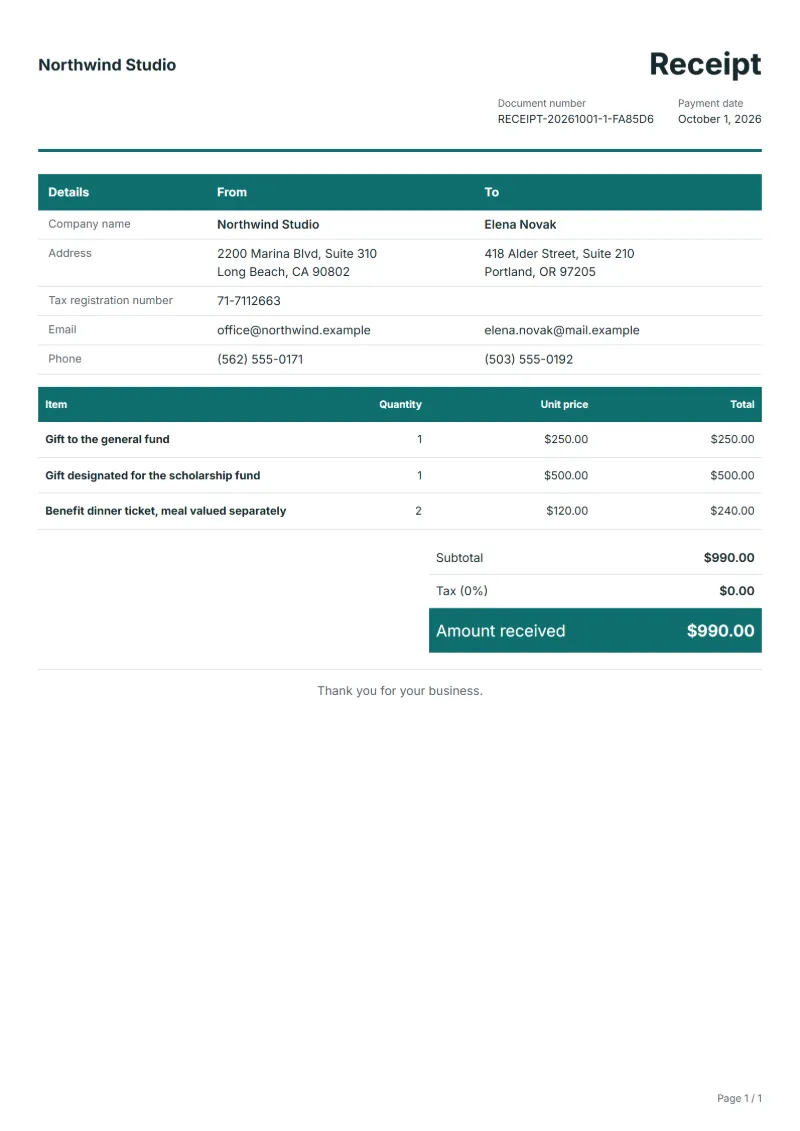
The figures are an example, in dollars. A supporter gives $250 to the general fund and $500 to the scholarship fund, and buys two places at the benefit dinner for $120 each; the organisation values the meal at $45 a seat.
| Item | Quantity × unit price | Amount |
|---|---|---|
| Gift to the general fund | 1 × $250.00 | $250.00 |
| Gift designated for the scholarship fund | 1 × $500.00 | $500.00 |
| Benefit dinner ticket, meal valued separately | 2 × $120.00 | $240.00 |
| Invoice total | $990.00 | |
| Received | $990.00 | |
| Still owed | $0.00 | |
The receipt confirms $990.00 received. The value of the two meals goes in the notes, not off the ticket line, so the donor, or their adviser, can work out how much of the tickets counts as a gift.
Common mistakes on donation receipts
- Calling the full ticket price a donation when the donor received a meal or goods for it.
- Dating the receipt on the day of the pledge instead of the day the money arrived.
- Putting a gift for a named fund on the same line as unrestricted money.
- Printing a promise of tax relief that your organisation cannot give.
- Valuing donated goods yourself instead of describing them.
What the document must show
These details make a receipt easier to approve and to file.
- Your business name and address, and your tax number if you are registered
- Receipt number and issue date (the date the payment arrived)
- Who paid
- How they paid: bank transfer, card or cash
- What the payment is for, and the number of the invoice it settles
- The amount received, with any tax it includes shown separately
- For a part payment, the balance still owed
The sales tax depends on where the work is supplied, so set the rate that applies to your customer before sending.
Official rate reference: US government: state and local taxes
Frequently asked questions
Can one receipt cover all of a donor’s gifts in a year?
Yes. An annual summary is common: give each gift its own line with the date, so the donor can tick them off against their statements, and number the summary like any other receipt.
How do I record a gift of goods rather than money?
Describe the goods, how many and their condition, and put no price of your own on them unless the donor gave one. The receipt then confirms what arrived without valuing it for them.
Can the receipt say the gift is tax-deductible?
Only if your organisation is allowed to issue such receipts and your country’s rules are met; some countries prescribe an official form. Check with your tax office before printing any such statement.
What do I write when the donor got something back, like a dinner?
Describe what they received and a fair value for it in the notes. Many tax systems treat only the amount above that value as a gift, so leaving it out can mislead the donor.
Who should sign a donation receipt?
Someone your organisation has authorised to accept money, usually the treasurer or an office holder. Their name and role on the receipt tell the donor whom to ask about it.
How is tax calculated on this template?
The sales tax depends on where the work is supplied, so set the rate that applies to your customer before sending. The editor keeps the net amount, the tax and the total apart, and recalculates all three when you change a quantity, a unit price or the country setting.
Can I email it to the customer?
Yes, from your own mail app. With a free account, the editor’s download menu offers Email this document, which opens your mail app with a message about the document already written. QuoteBill sends nothing itself, so save the PDF and attach it before you send.
Read next
Reading for the Donation receipt template: What a receipt must show (and receipt vs invoice) and Deposit invoice: bill upfront, then invoice the balance. To add tax or check a total, use the VAT and GST calculator.