Ireland VAT invoice template
Irish VAT invoice template with your VAT number, a sequential number and VAT at 23% or the reduced rate that applies, on its own line. Excel, Word or PDF.
Templates by country
- Software licence
- Implementation
- Training day
Preparation guide
Example workflow
Confirm scope and quantities
Example: reconcile the approval and work record for "Software licence" to establish the quantity for this invoice.
Record delivery and acceptance
Check completion for every line, including "Training day". Match the delivery record to approved quantities and record who accepted the work.
Send the billing record
Send the final charges, delivery reference and due date to the customer, then reconcile payment against the invoice number.
This VAT invoice suits an Irish software or IT business that sells a licence, installs it and trains the client’s staff on one invoice. VAT at 23% is shown on its own line under your VAT number, and every invoice takes the next number in an unbroken series. When the client is a business in another EU member state, the treatment usually changes: the reverse charge may apply, and the client’s VAT number then has to appear on the invoice.
Fields to prepare
- Deliverables and line items
- Software licence, Implementation, Training day: record the quantities actually supplied and the service period.
- Software licence
- State the licence type, the number of users and the term, such as twelve months from go-live, so the client knows what renews and when.
- Implementation
- Bill implementation by the day or as a fixed fee tied to an agreed milestone, and name that milestone in the description.
- Training day
- Give the date, the number of attendees and whether it is on site or remote; attendees beyond the agreed group are often charged per head.
- Quantity and billing unit
- Use the agreed unit, such as hours, units or a fixed project, and record both quantity and rate.
- Reference and dates
- Add the purchase reference, service period and delivery date to distinguish this work from other orders.
- Scope to agree
- Show your VAT number, a unique sequential number and the rate applied, and the customer's VAT number for a supply to another EU business.
Before sending
- Does “Software licence” show the quantity actually supplied, not the quantity first quoted?
- Is “Implementation” charged at the rate the customer agreed to, with any change approved?
- Is “Training day” finished and accepted, or does it belong on a later invoice?
Show 4 more
- Separate additional work from the original scope and check its approval record.
- Distinguish included expenses from separately billed expenses and reconcile supporting records.
- Match completed work to the order or approval record, and confirm the payment due date and amounts already received.
- Confirm document language (en), country setting (IE), and the customer's currency and date-format requirements.
Worked example with sample figures
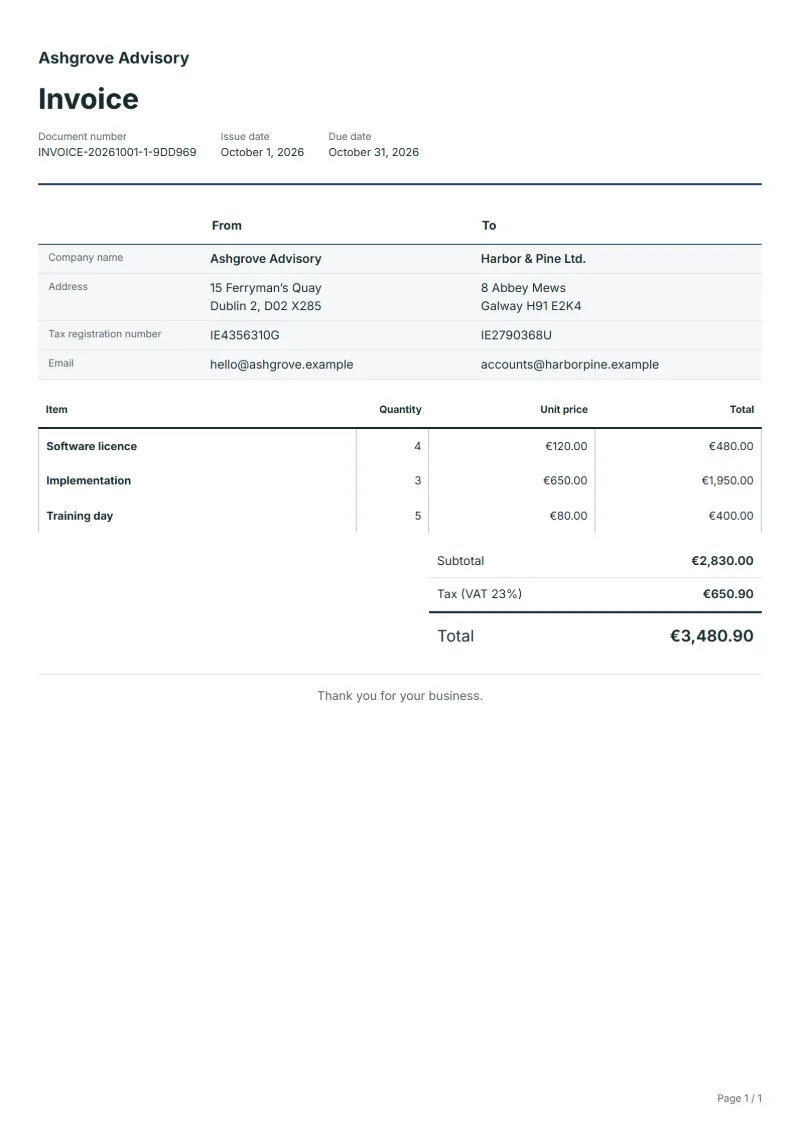
The figures below are invented to show how the template adds up: 3 lines in EUR, with VAT at 23%.
| Item | Quantity × unit price | Amount |
|---|---|---|
| Software licence | 4 × €120.00 | €480.00 |
| Implementation | 3 × €650.00 | €1,950.00 |
| Training day | 5 × €80.00 | €400.00 |
| Subtotal | €2,830.00 | |
| VAT (23%) | €650.90 | |
| Total | €3,480.90 | |
Net amount €2,830.00, VAT €650.90, total payable €3,480.90.
What the document must show
These details make an invoice easier to approve and to file.
- Your business name, address and registration or tax number
- The customer's name and address
- Issue date and a document number you do not reuse
- Each line item with quantity, unit price and amount
- Tax shown separately from the net amount, and the total payable
- Payment terms: due date, bank details or accepted payment methods
- Irish VAT invoices need a unique sequential number, your VAT number and the VAT rate and amount; QuoteBill applies one rate per document, so split a sale with mixed rates into separate invoices.
The VAT here is 23%, applied to the net amount and shown as its own line.
Official rate reference: European Commission: VAT rates
Frequently asked questions
How do I invoice items that carry different VAT rates?
QuoteBill applies one rate per document, so put the items at 23% on one invoice and those at a reduced rate on a second one, each with its own number. Check the rate for each item with Revenue before you split them.
What changes when the client is a business in another EU country?
Business services to a VAT-registered client elsewhere in the EU are usually taxed in the client’s country under the reverse charge. Set the rate to 0%, add both VAT numbers and a reverse charge note, and confirm the treatment with Revenue or your adviser.
How is the VAT worked out on this invoice?
In the worked example above, VAT at 23% on the net amount of €2,830.00 is €650.90, so the total is €3,480.90. The editor recalculates all three when you change a quantity, a price or the country.
Can I add my logo and signature?
Yes. The From section of the editor has a place for your company logo and for a signature or seal image. Uploading a picture needs a free account, and a member can keep both in settings so that every new document starts with them.
Can I change the layout and colour?
Yes. The editor offers other layouts and a document colour for the printed page. Changing them moves no figure: the lines and totals stay as they are, and the PDF, Word and Excel files follow the layout you pick.
Read next
Reading for the Ireland VAT invoice template: How to write an invoice: a step-by-step example and Invoice numbering: sequences and corrections. The VAT and GST calculator works out the tax line for you.