Lawn care route work order template
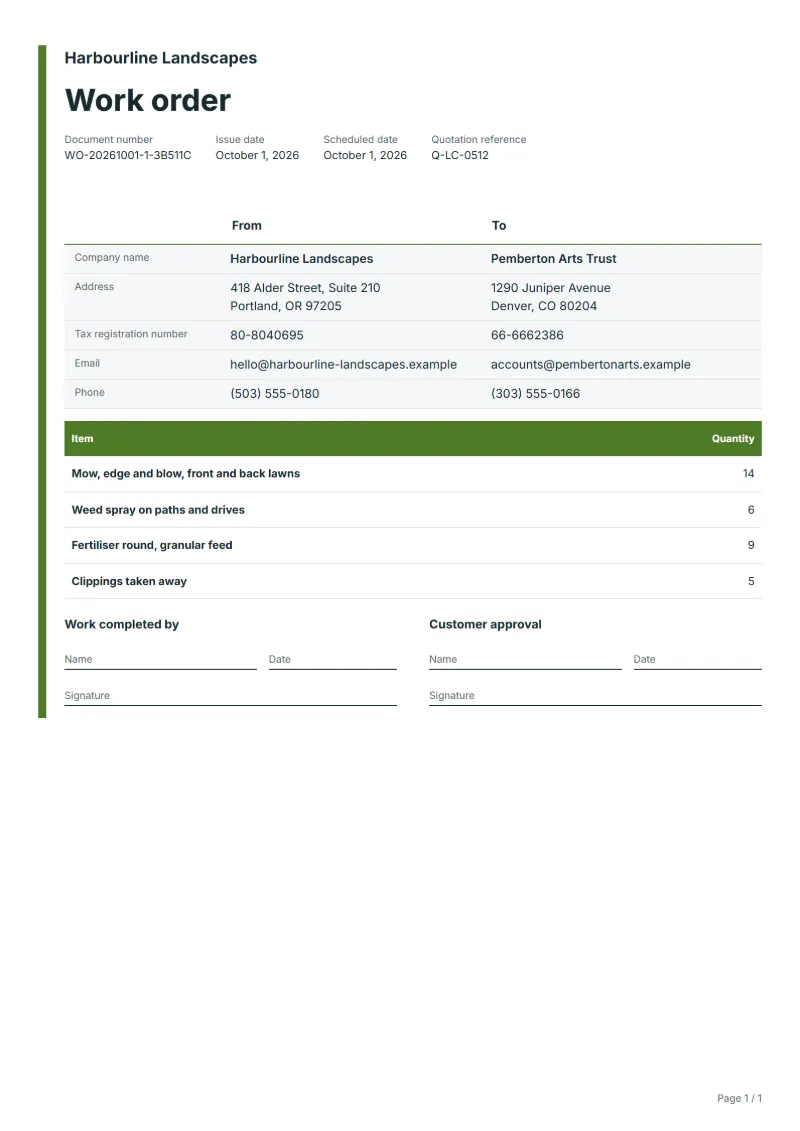
Lawn care route work order template: mowing, weed spraying, feeding and clippings counted across a day’s stops, with skipped stops and products logged.
Templates by industry
- Mow, edge and blow, front and back lawns
- Weed spray on paths and drives
- Fertiliser round, granular feed
- Clippings taken away
Preparation guide
Example workflow
Plan the job
Example: start with "Mow, edge and blow, front and back lawns", set the scheduled date, assign the technician and note how to access the site.
Do the work
Record the time and materials actually used, including "Clippings taken away", and anything found that needs a separate quote.
Sign off and bill
Have the technician and the customer sign the completion lines, then make the invoice from the work order so the lines carry over.
A lawn care crew’s day is a route: fourteen gardens in an order that saves driving, each with its own list of jobs. This work order gives the crew the day in quantities, how many lawns to mow, how many drives to spray, how many feeds to put down, with the stop list behind it. Prices stay with the customers’ own invoices. What matters here is what was done at each stop, what was skipped because of rain or a locked gate, and which products went down where.
Fields to prepare
- Deliverables and line items
- Mow, edge and blow, front and back lawns, Weed spray on paths and drives, Fertiliser round, granular feed, Clippings taken away: describe the work and materials planned for each line, with the time or quantity expected.
- Mow, edge and blow, front and back lawns
- Count lawns by stop and note any where the grass was too wet or too long to cut cleanly.
- Weed spray on paths and drives
- Give the product and the stops treated, and keep to the pet and play areas each customer asked you to avoid.
- Fertiliser round, granular feed
- Record the feed used and the stops it went to, so no garden gets it twice in a season.
- Clippings taken away
- Note which stops want clippings left and which taken away, since that changes the time at each.
- Job site and schedule
- Give the job site address, the scheduled date and the person assigned, with any access or safety instructions.
- Time and materials
- Record the hours worked and the materials used on each line, as done rather than as planned.
- Scope to agree
- List the stops in route order with the service due at each, mark any stop skipped and why, record products applied, and keep gate codes off the printed copy.
Before sending
- Is it clear who does “Mow, edge and blow, front and back lawns”, where and when?
- Are the materials for “Weed spray on paths and drives” listed and on site before the job starts?
- Is there a sign-off for “Fertiliser round, granular feed” so the time can be invoiced afterwards?
Show 4 more
- Is it clear who does “Clippings taken away”, where and when?
- Check the job site address, the scheduled date, who is assigned, and any access or safety instructions.
- Agree with the customer which tasks are included, and note anything found on site that needs a separate quote.
- Have the customer check and sign off the work before you make the invoice.
Worked example with sample figures
The quantities below are invented to show how the template is filled in: 4 lines, counted in units, with no prices.
| Item | Quantity |
|---|---|
| Mow, edge and blow, front and back lawns | 14 |
| Weed spray on paths and drives | 6 |
| Fertiliser round, granular feed | 9 |
| Clippings taken away | 5 |
| Total | 34 |
34 units in 4 lines.
- The job follows quotation Q-LC-0512.
What the document must show
These details make a work order easier to approve and to file.
- Work order number and date
- The customer's name and job site address
- Scheduled date and the person assigned
- Each task and the materials needed
- Time or quantity per line, and prices if shown
- Sign-off lines for the worker and the customer
This document prints quantities without prices, so no tax appears on it unless you switch its line columns to prices and totals.
Frequently asked questions
How do I mark a stop that was skipped?
Leave it out of the counts and write the stop, the reason and when it will be done instead. The office can then tell the customer before they notice.
Where do customer gate codes go?
Not on the printed work order. Keep them in your route app or a separate secure list, and note on the order only that access was arranged.
Does this work order show prices or tax?
This document prints quantities without prices, so no tax appears on it unless you switch its line columns to prices and totals. The worked example above counts 34 units and nothing else.
Is this template free?
Yes. You can fill in this template and print it or save it as a PDF without an account, and there is no payment step and no watermark on the document. Saving it to your account and downloading Excel or Word files need a free account.
Can I add my logo and signature?
Yes. The From section of the editor has a place for your company logo and for a signature or seal image. Uploading a picture needs a free account, and a member can keep both in settings so that every new document starts with them.
Read next
Reading for the Lawn care route work order template: How to write a statement of work (SOW), with an example and Quote to invoice: how to convert a quote, step by step. When the job is signed off, record it on the Acceptance certificate template.