Acceptance certificate template
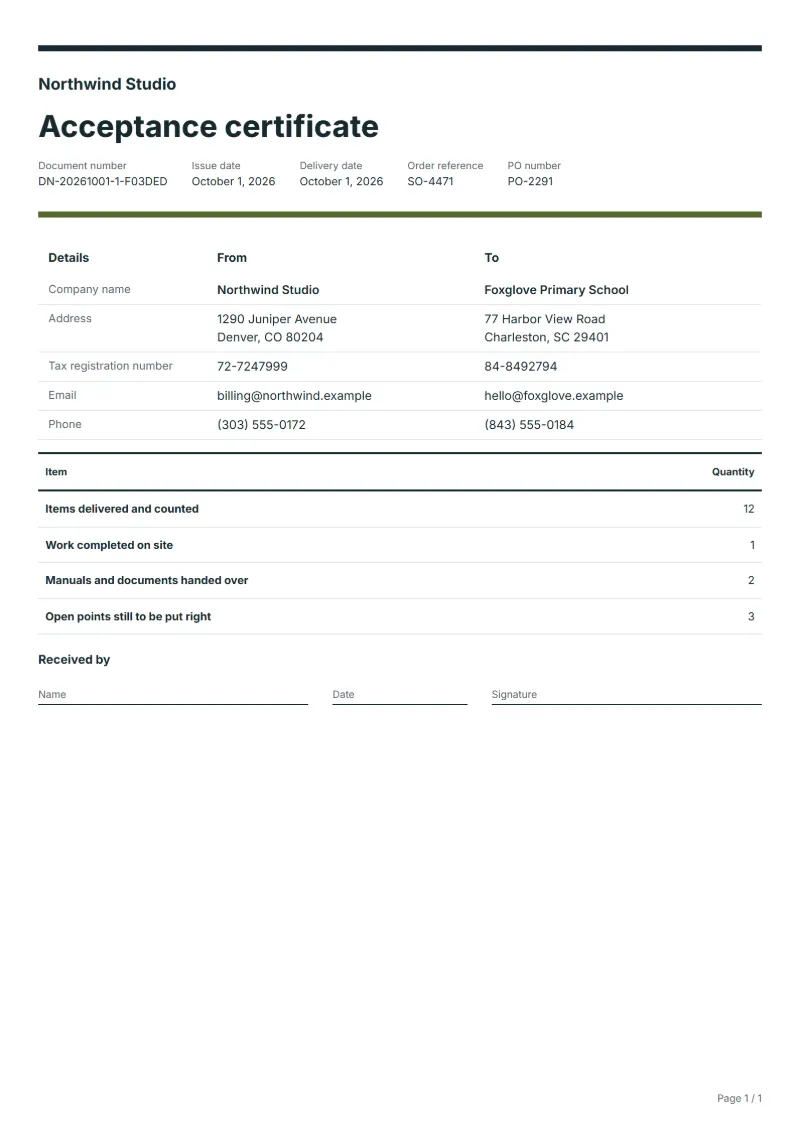
Acceptance certificate in which the client confirms in writing that goods or work were delivered and accepted: items, date, remarks and signature lines.
Free generators
- Items delivered and counted
- Work completed on site
- Manuals and documents handed over
- Open points still to be put right
Preparation guide
Example workflow
Check what was handed over
Example: go through "Items delivered and counted" and the other lines with the client, and note the quantity or extent each one was checked at.
Record the open points
Go through every line down to "Open points still to be put right", then write what is still to be put right, with who will do it and by when.
Get it signed
Ask the client to sign and date the certificate, and keep the signed copy with the order or contract.
Installers, fit-out contractors and IT suppliers use this certificate at the end of a job, when the client walks through the result with them. Unlike a signature for goods received, which only says they arrived, it records that the work was checked and what is still open. In many contracts the signed date starts the warranty period or allows the final invoice, so read your contract and date the signature on the day of the inspection, not later.
Fields to prepare
- Deliverables and line items
- Items delivered and counted, Work completed on site, Manuals and documents handed over, Open points still to be put right: for each item or piece of work handed over, the quantity or extent the client checked.
- Items delivered and counted
- Count with the client present and write the number you both saw; a gap against the order becomes an open point.
- Work completed on site
- Describe the work by area or system, for example ‘lighting, second floor’, so the signature covers something specific.
- Manuals and documents handed over
- List each document handed over, such as manuals, test reports and warranty cards; missing paperwork is easy to dispute later.
- Open points still to be put right
- Number each open point and name who fixes it and by when; the quantity then shows how many remain.
- Handover and check
- Name the order, contract or site the handover belongs to, the date it was checked and who checked it for the client.
- Open points and signatures
- List anything still to be put right with an agreed date, and leave a line for each side to sign and date.
- Scope to agree
- List what was delivered and counted, the date it was checked and any open points to put right, then have the client sign. It records only what the parties write, and the printed title can be changed in the editor.
Before sending
- Go through each item or piece of work with the client, against the order or contract, before anyone signs.
- Write the open points down one by one, each with who puts it right and by when, not as a general remark.
- Keep the signed copy with the order or contract, and invoice separately once the work is accepted.
Worked example with sample figures
The quantities below are invented to show how the template is filled in: 4 lines, counted in units, with no prices.
| Item | Quantity |
|---|---|
| Items delivered and counted | 12 |
| Work completed on site | 1 |
| Manuals and documents handed over | 2 |
| Open points still to be put right | 3 |
| Total | 18 |
18 units in 4 lines.
- Reference: SO-4471.
- Buyer’s order number: PO-2291.
What the document must show
These details make an acceptance certificate easier to approve and to file.
- Your business name and the client's name
- The order, contract or site the handover belongs to
- The date the delivery or work was checked
- Each item or piece of work handed over, with its quantity or extent
- Open points still to be put right, with who puts them right and by when
- Signature lines and dates for both sides
This document prints quantities without prices, so no tax appears on it unless you switch its line columns to prices and totals.
Frequently asked questions
Can the client refuse to sign because of minor defects?
That depends on your contract. A common approach is to sign with the defects listed as open points and a date to fix them, so the handover is recorded and the remaining work is clear to both sides.
Who should sign on the client’s side?
Someone with authority to accept the work under the contract, often the project manager it names. Print their name and role beside the signature, so the acceptance cannot be questioned later.
Does this document show prices or tax?
This document prints quantities without prices, so no tax appears on it unless you switch its line columns to prices and totals. The worked example above counts 18 units and nothing else.
Does signing an acceptance certificate mean the client has paid?
No. It records that the goods or work were handed over and checked, and what is still open. Payment is asked for on the invoice, which you issue separately.
Can I add my logo and signature?
Yes. The From section of the editor has a place for your company logo and for a signature or seal image. Uploading a picture needs a free account, and a member can keep both in settings so that every new document starts with them.
Read next
Reading for the Acceptance certificate template: How to write a statement of work (SOW), with an example and Quote, proforma, invoice, receipt, credit note: which to use. Once the work is accepted, bill it with the Free invoice generator.