Mobile mechanic invoice template
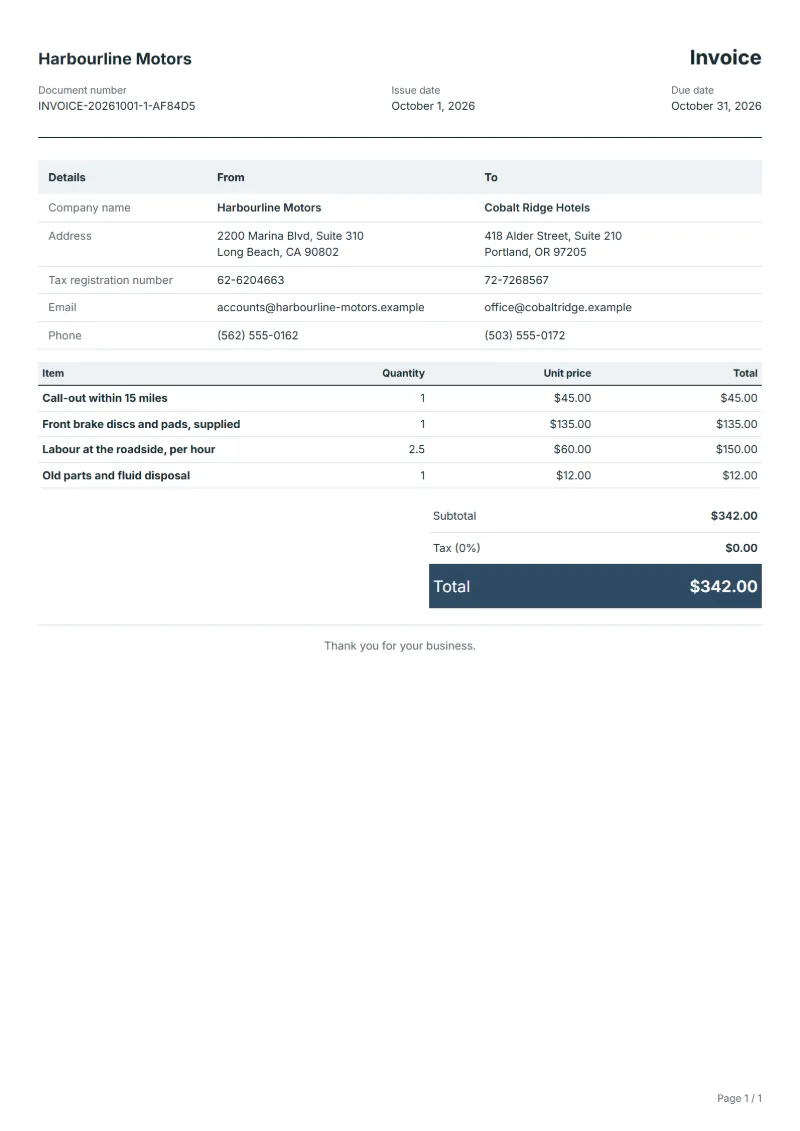
Mobile mechanic invoice template: call-out, parts with numbers, labour hours at the roadside and disposal, with the registration and mileage of the car.
Templates by industry
- Call-out within 15 miles
- Front brake discs and pads, supplied
- Labour at the roadside, per hour
- Old parts and fluid disposal
Preparation guide
Example workflow
Confirm scope and quantities
Example: reconcile the approval and work record for "Call-out within 15 miles" to establish the quantity for this invoice.
Record delivery and acceptance
Check completion for every line, including "Old parts and fluid disposal". Deliver the service record, materials used, unresolved issues and the agreed next visit date.
Send the billing record
Send the final charges, delivery reference and due date to the customer, then reconcile payment against the invoice number.
A mobile mechanic works on a driveway or at a roadside, often with the customer watching, and is paid on the spot or soon after. The invoice has to stand in for the workshop job card: it records the vehicle, the mileage and where the work was done, separates the call-out fee from the hours worked, and lists each part with the number from the box. Old parts and fluids taken away are a line too, since the customer will not see where they went.
Fields to prepare
- Deliverables and line items
- Call-out within 15 miles, Front brake discs and pads, supplied, Labour at the roadside, per hour, Old parts and fluid disposal: record the quantities actually supplied and the service period.
- Call-out within 15 miles
- State the radius the call-out covers and add distance beyond it as a separate line, as your price list says.
- Front brake discs and pads, supplied
- Give the part numbers and brand from the packaging, and whether the customer supplied any part themselves.
- Labour at the roadside, per hour
- Book hours in the units you quoted, and add time lost to rain or a seized bolt only if the customer agreed to pay for it.
- Old parts and fluid disposal
- Say what you took away, such as brake parts and old fluid, so the customer knows it was disposed of properly.
- Assets and visits
- Record the asset or area, visit dates, visit count and access arrangements.
- Labor and materials used
- Separate labor hours, quantities of parts or consumables, and work outside the recurring scope.
- Scope to agree
- Write the registration, the mileage and the address where the work was done, keep the call-out apart from labour, and list each part with its number and who supplied it.
Before sending
- Does “Call-out within 15 miles” show the quantity actually supplied, not the quantity first quoted?
- Is “Front brake discs and pads, supplied” charged at the rate the customer agreed to, with any change approved?
- Is “Labour at the roadside, per hour” finished and accepted, or does it belong on a later invoice?
Show 4 more
- Does “Old parts and fluid disposal” show the quantity actually supplied, not the quantity first quoted?
- Match extra parts and return-visit charges to approved work.
- Record the initial condition and the post-service checks.
- Match completed work to the order or approval record, and confirm the payment due date and amounts already received.
Worked example: front brakes changed on a driveway
The figures are an example, in dollars, with an example tax rate of 8%. A mobile mechanic drives to a customer’s home, fits front discs and pads in two and a half hours and takes the old parts away.
- Call-out: one fee for the trip, within the stated radius.
- Parts: discs and pads as one supplied set, with the part numbers in the description.
- Labour: 2.5 hours, booked in half hours.
| Item | Quantity × unit price | Amount |
|---|---|---|
| Call-out within 15 miles | 1 × $45.00 | $45.00 |
| Front brake discs and pads, supplied | 1 × $135.00 | $135.00 |
| Labour at the roadside, per hour | 2.5 × $60.00 | $150.00 |
| Old parts and fluid disposal | 1 × $12.00 | $12.00 |
| Subtotal | $342.00 | |
| Sales tax (8%) | $27.36 | |
| Total | $369.36 | |
The four lines add up to $342.00; tax at 8% is $27.36, so the customer pays $369.36. The registration and mileage go at the top, next to the address where the car was parked.
Mistakes mobile mechanics make on invoices
- Folding the call-out into the labour rate, so a short job looks expensive.
- Writing "brake parts" without part numbers.
- Leaving out the mileage the customer needs for the service record.
- Not saying what happened to the old parts and fluids.
What the document must show
These details make an invoice easier to approve and to file.
- Your business name, address and registration or tax number
- The customer's name and address
- Issue date and a document number you do not reuse
- Each line item with quantity, unit price and amount
- Tax shown separately from the net amount, and the total payable
- Payment terms: due date, bank details or accepted payment methods
The sales tax depends on where the work is supplied, so set the rate that applies to your customer before sending.
Official rate reference: US government: state and local taxes
Frequently asked questions
What if the job could not be finished on the driveway?
Bill the call-out and the time spent, describe what is left and why, for example a part that was out of stock, and put the return visit on a new invoice.
Should I give the old parts back to the customer?
Offer them before you leave and note on the invoice whether the customer kept them or you took them away for disposal.
How do I charge for driving beyond my free radius?
Add a separate line for the extra distance at your mileage rate, so the customer sees why this call-out cost more than the last one.
Does the invoice need the registration and the mileage?
Yes. They tie the work to one car on one date, and the customer will want them for the service history or when the car is sold.
How is tax calculated on this template?
The sales tax depends on where the work is supplied, so set the rate that applies to your customer before sending. The editor keeps the net amount, the tax and the total apart, and recalculates all three when you change a quantity, a unit price or the country setting.
Can I add my logo and signature?
Yes. The From section of the editor has a place for your company logo and for a signature or seal image. Uploading a picture needs a free account, and a member can keep both in settings so that every new document starts with them.
Read next
Reading for the Mobile mechanic invoice template: How to write an invoice: a step-by-step example and Credit note vs invoice (and credit memo): how to issue one. The VAT and GST calculator works out the tax line for you.