Pool opening and closing work order template
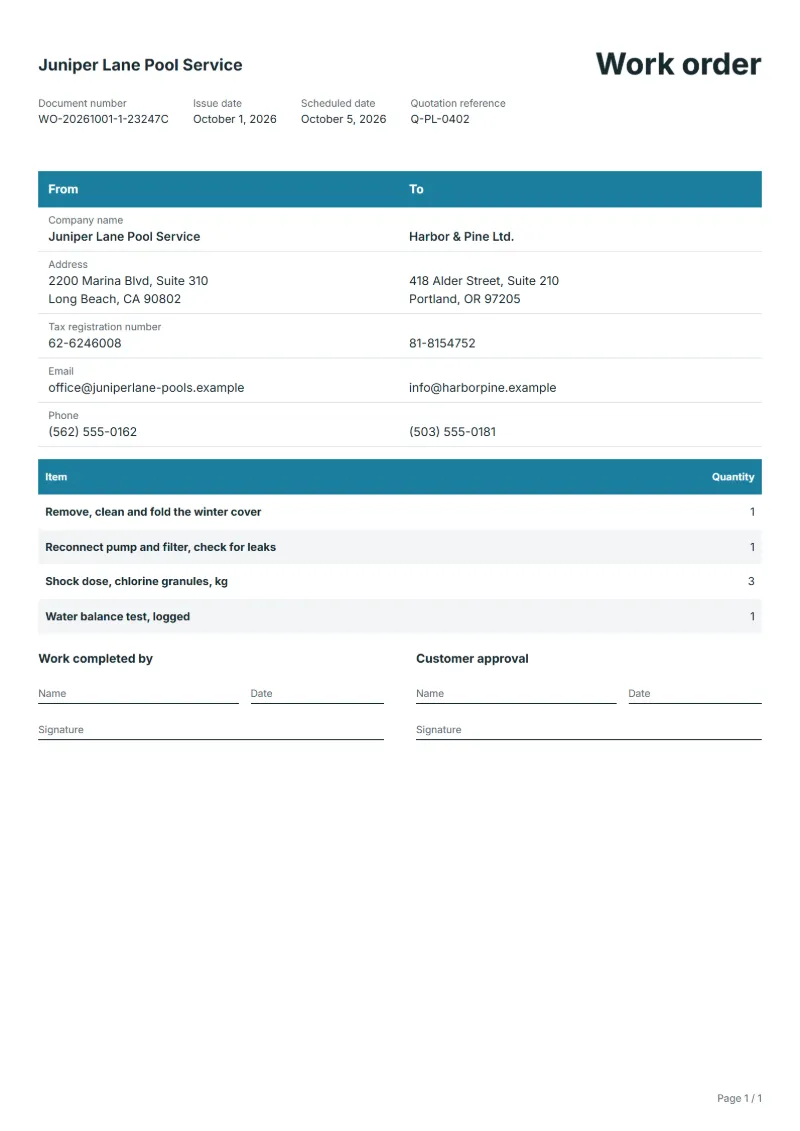
Pool opening and closing work order template: cover, pump and filter, shock dosing and water tests as counts, with readings and the chemicals logged.
Templates by industry
- Remove, clean and fold the winter cover
- Reconnect pump and filter, check for leaks
- Shock dose, chlorine granules, kg
- Water balance test, logged
Preparation guide
Example workflow
Plan the job
Example: start with "Remove, clean and fold the winter cover", set the scheduled date, assign the technician and note how to access the site.
Do the work
Record the time and materials actually used, including "Water balance test, logged", and anything found that needs a separate quote.
Sign off and bill
Have the technician and the customer sign the completion lines, then make the invoice from the work order so the lines carry over.
Opening a pool in spring and closing it in autumn are the two visits where most things go wrong: a cracked pump housing after frost, a cover full of leaves, water gone green over the winter. This work order lists the tasks as quantities for the technician to tick off, without prices, since the visit is usually priced as a package. It leaves room for the condition found, the readings before and after dosing, and each chemical added, which the owner will want to see.
Fields to prepare
- Deliverables and line items
- Remove, clean and fold the winter cover, Reconnect pump and filter, check for leaks, Shock dose, chlorine granules, kg, Water balance test, logged: describe the work and materials planned for each line, with the time or quantity expected.
- Remove, clean and fold the winter cover
- Note any tear in the cover and whether water had to be pumped off before it came away.
- Reconnect pump and filter, check for leaks
- Record any crack or leak found when the pump was restarted, since frost damage shows up here first.
- Shock dose, chlorine granules, kg
- Give the kilograms added and the pool volume, so the dose can be checked against the label.
- Water balance test, logged
- Write the readings, such as chlorine, pH and alkalinity, before and after, and when they should be retested.
- Job site and schedule
- Give the job site address, the scheduled date and the person assigned, with any access or safety instructions.
- Time and materials
- Record the hours worked and the materials used on each line, as done rather than as planned.
- Scope to agree
- Record the state of the cover and the equipment when you arrive, the readings before and after dosing, and every chemical added with its quantity.
Before sending
- Is it clear who does “Remove, clean and fold the winter cover”, where and when?
- Are the materials for “Reconnect pump and filter, check for leaks” listed and on site before the job starts?
- Is there a sign-off for “Shock dose, chlorine granules, kg” so the time can be invoiced afterwards?
Show 4 more
- Is it clear who does “Water balance test, logged”, where and when?
- Check the job site address, the scheduled date, who is assigned, and any access or safety instructions.
- Agree with the customer which tasks are included, and note anything found on site that needs a separate quote.
- Have the customer check and sign off the work before you make the invoice.
Worked example with sample figures
The quantities below are invented to show how the template is filled in: 4 lines, counted in units, with no prices.
| Item | Quantity |
|---|---|
| Remove, clean and fold the winter cover | 1 |
| Reconnect pump and filter, check for leaks | 1 |
| Shock dose, chlorine granules, kg | 3 |
| Water balance test, logged | 1 |
| Total | 6 |
6 units in 4 lines.
- The job follows quotation Q-PL-0402.
- The job is booked 4 days ahead.
What the document must show
These details make a work order easier to approve and to file.
- Work order number and date
- The customer's name and job site address
- Scheduled date and the person assigned
- Each task and the materials needed
- Time or quantity per line, and prices if shown
- Sign-off lines for the worker and the customer
This document prints quantities without prices, so no tax appears on it unless you switch its line columns to prices and totals.
Frequently asked questions
What changes on the work order when closing the pool instead?
The tasks reverse: lowering the water, blowing out lines, adding winter chemicals and fitting the cover. Keep the same layout so the spring visit can compare with what was left.
Why record the chemicals added?
The owner or the next technician needs to know what is already in the water before adding more, and the record shows the dose matched the pool volume.
Does this work order show prices or tax?
This document prints quantities without prices, so no tax appears on it unless you switch its line columns to prices and totals. The worked example above counts 6 units and nothing else.
Can I add my logo and signature?
Yes. The From section of the editor has a place for your company logo and for a signature or seal image. Uploading a picture needs a free account, and a member can keep both in settings so that every new document starts with them.
How is the document numbered?
QuoteBill gives each new document a unique number of its own. A member can switch to numbers in sequence in settings, such as WO-2026-0001: one sequence for each kind of document, starting again every calendar year. A number you type yourself is kept as it is.
Read next
Reading for the Pool opening and closing work order template: How to write a statement of work (SOW), with an example and Estimate vs quote: what binds you, with a remodeling example. When the job is signed off, record it on the Acceptance certificate template.