Cleaning work order template
Cleaning work order template: rooms and tasks in order, hours per task, products and equipment, access, and the checklist the client signs off.
Templates by industry
- Deep kitchen clean
- Carpet shampooing
- Window washing
Preparation guide
Example workflow
Plan the job
Example: start with "Deep kitchen clean", set the scheduled date, assign the technician and note how to access the site.
Do the work
Record the time and materials actually used, including "Window washing", and anything found that needs a separate quote.
Sign off and bill
Have the technician and the customer sign the completion lines, then make the invoice from the work order so the lines carry over.
Cleaning companies send this work order with the team for a one-off deep clean or a first visit to a new client. It lists the rooms in the order they will be done and the hours planned for each task, so the supervisor can see at a glance whether the job is on time. Because deep clean means different things to different people, each line spells out what is included, and the client signs a checklist at the end instead of a vague job done.
Fields to prepare
- Deliverables and line items
- Deep kitchen clean, Carpet shampooing, Window washing: describe the work and materials planned for each line, with the time or quantity expected.
- Deep kitchen clean
- List what the deep clean covers, such as inside the oven, extractor filters and inside cupboards, because clients and cleaners rarely mean the same thing.
- Carpet shampooing
- Give the area in square metres or the rooms, the drying time, and who moves the furniture before the machine goes in.
- Window washing
- Say inside, outside or both, which floors, and whether frames and sills are included or only the glass.
- Job site and schedule
- Give the job site address, the scheduled date and the person assigned, with any access or safety instructions.
- Time and materials
- Record the hours worked and the materials used on each line, as done rather than as planned.
- Scope to agree
- List the rooms in the order they are cleaned, the products and equipment to bring, how the team gets in, and the checklist the client signs off.
Before sending
- Is it clear who does “Deep kitchen clean”, where and when?
- Are the materials for “Carpet shampooing” listed and on site before the job starts?
- Is there a sign-off for “Window washing” so the time can be invoiced afterwards?
Show 3 more
- Check the job site address, the scheduled date, who is assigned, and any access or safety instructions.
- Agree with the customer which tasks are included, and note anything found on site that needs a separate quote.
- Have the customer check and sign off the work before you make the invoice.
Worked example with sample figures
The figures below are invented to show how the template adds up: 3 lines in USD, with an example tax rate of 8%.
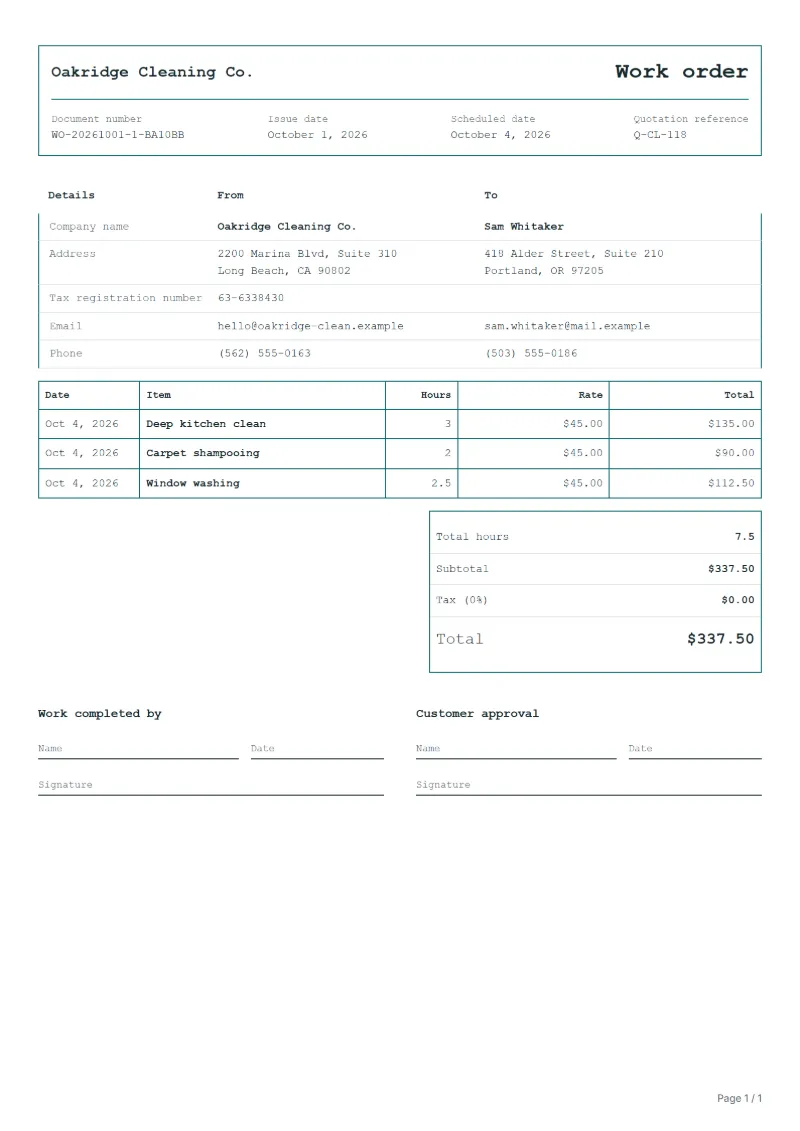
| Item | Hours × rate | Amount |
|---|---|---|
| Deep kitchen clean | 3 × $45.00 | $135.00 |
| Carpet shampooing | 2 × $45.00 | $90.00 |
| Window washing | 2.5 × $45.00 | $112.50 |
| Subtotal | $337.50 | |
| Sales tax (8%) | $27.00 | |
| Total | $364.50 | |
Planned work $337.50 before tax, $364.50 with sales tax.
- Hours in total: 7.5.
- The job follows quotation Q-CL-118.
- The job is booked 3 days ahead.
What the document must show
These details make a work order easier to approve and to file.
- Work order number and date
- The customer's name and job site address
- Scheduled date and the person assigned
- Each task and the materials needed
- Time or quantity per line, and prices if shown
- Sign-off lines for the worker and the customer
The sales tax depends on where the work is supplied, so set the rate that applies to your customer before sending.
Official rate reference: US government: state and local taxes
Frequently asked questions
The job took longer than the hours on the work order. What do we bill?
Record the actual hours on each line. If they will run past what the client accepted, call before carrying on and note the approval; heavier soiling than described is a fair reason, but it has to be agreed rather than discovered on the invoice.
Where do we write keys and alarm codes?
Not on the work order, which travels with the team and may be left on site. Write how access works, such as key collected from reception, and keep codes in a secure place the team can reach.
The client finds a missed spot after we have left. How is the return visit recorded?
Open a new work order at no charge that quotes the original and names the spot. A checklist signed at the end of the first visit keeps these cases rare, because both sides walked the rooms together.
How is the sales tax worked out on this work order?
The worked example above uses an example rate of 8%: $27.00 on a net amount of $337.50, for a total of $364.50. The editor recalculates all three when you change a quantity, a price or the country.
Can I change the layout and colour?
Yes. The editor offers other layouts and a document colour for the printed page. Changing them moves no figure: the lines and totals stay as they are, and the PDF, Word and Excel files follow the layout you pick.
Read next
Reading for the Cleaning work order template: How to write a statement of work (SOW), with an example and Quote to invoice: how to convert a quote, step by step. When the job is signed off, record it on the Acceptance certificate template.