IT support work order template
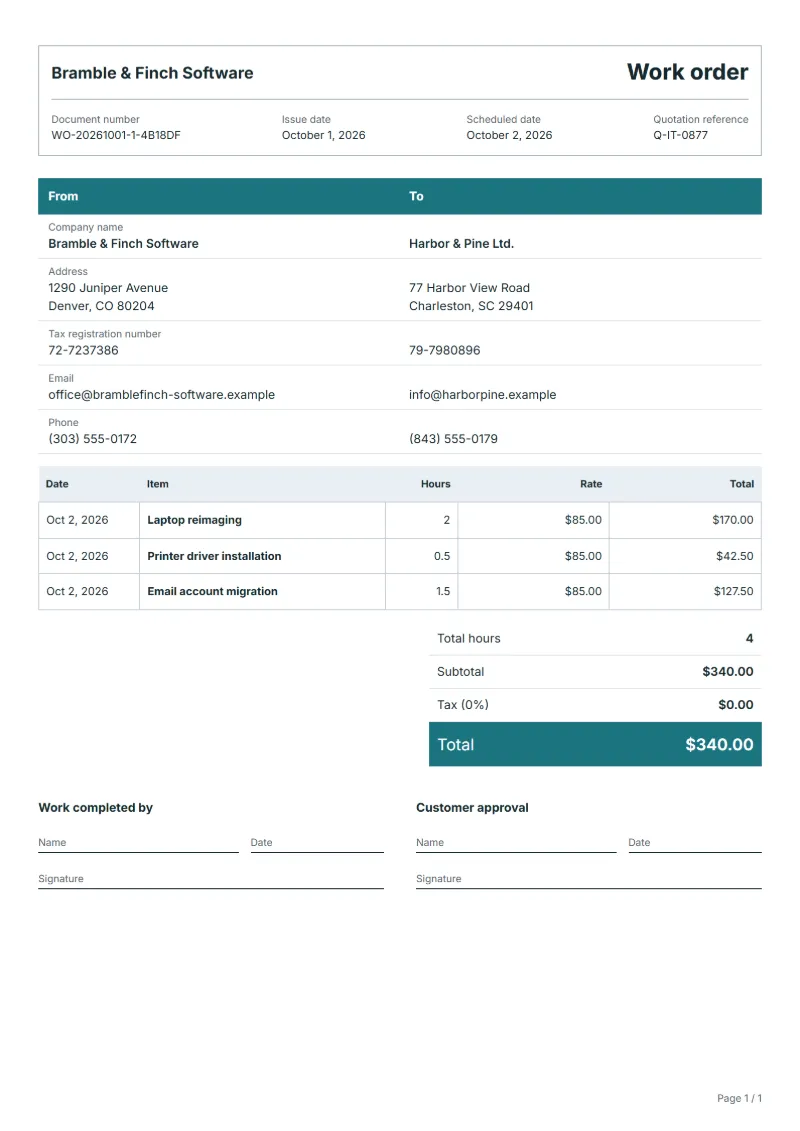
IT support work order template: ticket number, user and device, hours per task on site or remote, and what was handed back, signed by technician and user.
Templates by industry
- Laptop reimaging
- Printer driver installation
- Email account migration
Preparation guide
Example workflow
Plan the job
Example: start with "Laptop reimaging", set the scheduled date, assign the technician and note how to access the site.
Do the work
Record the time and materials actually used, including "Email account migration", and anything found that needs a separate quote.
Sign off and bill
Have the technician and the customer sign the completion lines, then make the invoice from the work order so the lines carry over.
IT support providers and in-house technicians use this work order to turn a ticket into a visit or a remote session with a clear list of tasks. Each task is booked by the hour, and the order names the user, the device and the ticket it belongs to, so the time can be checked against the helpdesk record. Before wiping or migrating anything, the technician confirms what data must survive; afterwards the user signs that the laptop, printer or mailbox works as before.
Fields to prepare
- Deliverables and line items
- Laptop reimaging, Printer driver installation, Email account migration: describe the work and materials planned for each line, with the time or quantity expected.
- Laptop reimaging
- Confirm and note that the user’s files are backed up or synced before the wipe, and record the device serial and the image version installed.
- Printer driver installation
- Name the printer model and the driver version installed, and note that a test page printed from the user’s own account.
- Email account migration
- Give the mailbox size, the old and new system and the cut-over time, and check that mail works on the user’s phone as well.
- Job site and schedule
- Give the job site address, the scheduled date and the person assigned, with any access or safety instructions.
- Time and materials
- Record the hours worked and the materials used on each line, as done rather than as planned.
- Scope to agree
- Give the ticket number, the user and device affected, the remote or on-site time per task, and what was handed back to the user.
Before sending
- Is it clear who does “Laptop reimaging”, where and when?
- Are the materials for “Printer driver installation” listed and on site before the job starts?
- Is there a sign-off for “Email account migration” so the time can be invoiced afterwards?
Show 3 more
- Check the job site address, the scheduled date, who is assigned, and any access or safety instructions.
- Agree with the customer which tasks are included, and note anything found on site that needs a separate quote.
- Have the customer check and sign off the work before you make the invoice.
Worked example with sample figures
The figures below are invented to show how the template adds up: 3 lines in USD, with an example tax rate of 8%.
| Item | Hours × rate | Amount |
|---|---|---|
| Laptop reimaging | 2 × $85.00 | $170.00 |
| Printer driver installation | 0.5 × $85.00 | $42.50 |
| Email account migration | 1.5 × $85.00 | $127.50 |
| Subtotal | $340.00 | |
| Sales tax (8%) | $27.20 | |
| Total | $367.20 | |
Planned work $340.00 before tax, $367.20 with sales tax.
- Hours in total: 4.
- The job follows quotation Q-IT-0877.
- The job is booked for the next day.
What the document must show
These details make a work order easier to approve and to file.
- Work order number and date
- The customer's name and job site address
- Scheduled date and the person assigned
- Each task and the materials needed
- Time or quantity per line, and prices if shown
- Sign-off lines for the worker and the customer
The sales tax depends on where the work is supplied, so set the rate that applies to your customer before sending.
Official rate reference: US government: state and local taxes
Frequently asked questions
How should remote time and on-site visits be shown?
Keep them apart, either on separate lines or with remote or on site in each description, because many support agreements price them differently. If your terms include a minimum charge or travel time for a visit, add it as its own line so the user sees it.
The user was not there to sign. What counts as sign-off?
A confirmation from the user in the ticket or by email works, as long as you note on the work order who confirmed, how and when. Attach or quote that message before turning the work order into an invoice.
Some tasks fall under our support contract. Do they still go on the work order?
Yes, so the visit is fully recorded, but mark them as covered by the contract, either at zero or with a note. Bill only the tasks outside it, and name the contract so the client’s finance team understands the split.
How is the sales tax worked out on this work order?
The worked example above uses an example rate of 8%: $27.20 on a net amount of $340.00, for a total of $367.20. The editor recalculates all three when you change a quantity, a price or the country.
How is the document numbered?
QuoteBill gives each new document a unique number of its own. A member can switch to numbers in sequence in settings, such as WO-2026-0001: one sequence for each kind of document, starting again every calendar year. A number you type yourself is kept as it is.
Read next
Reading for the IT support work order template: How to write a statement of work (SOW), with an example and Estimate vs quote: what binds you, with a remodeling example. When the job is signed off, record it on the Acceptance certificate template.