Software licence purchase order template
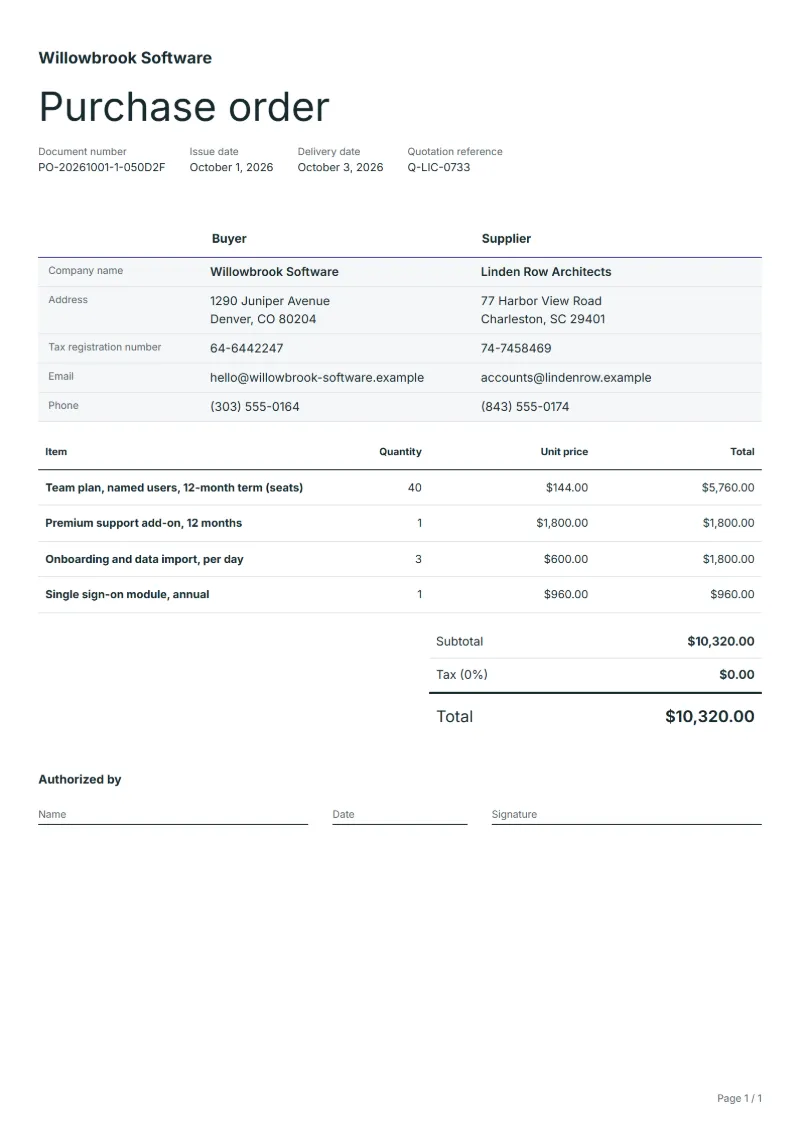
Software licence purchase order template: seats, support and onboarding priced on separate lines, with the licence metric, term dates and renewal terms stated.
Templates by industry
- Team plan, named users, 12-month term (seats)
- Premium support add-on, 12 months
- Onboarding and data import, per day
- Single sign-on module, annual
Preparation guide
Example workflow
Match the quotation
Example: take "Team plan, named users, 12-month term (seats)" from the supplier's quotation and copy its quantity, unit price and specification exactly.
Approve and send
Confirm the delivery date and address for every line, including "Single sign-on module, annual", then sign the authorized-by line and send the order.
Receive and reconcile
When the goods arrive, check them against the order, then match the supplier's invoice to the order number before paying.
Buying software is not buying a box. The order is for a right to use, counted in seats, for a stated term, usually under the vendor’s own licence terms. That is why a software licence order must say how users are counted, when the term starts and ends, and what happens at renewal; a vague line gets you a price today and a surprise next year. This template prices seats, support and setup on separate lines.
Fields to prepare
- Deliverables and line items
- Team plan, named users, 12-month term (seats), Premium support add-on, 12 months, Onboarding and data import, per day, Single sign-on module, annual: state the quantity, unit and agreed price for each line, as the supplier quoted it.
- Team plan, named users, 12-month term (seats)
- Say whether a seat is a named person or a login that can be shared out; replacing a leaver is free on some plans and a new seat on others, so state the vendor’s rule.
- Premium support add-on, 12 months
- Write the support hours and the response time the add-on promises, and whether it covers every seat or only a named group of administrators.
- Onboarding and data import, per day
- Scope the days: what is imported, from which system and in what number of records. An open-ended setup line is where a budget goes first.
- Single sign-on module, annual
- Check that the plan you are buying includes the module or can accept it; some vendors sell single sign-on only on their top tier.
- Supplier and quotation
- Name the supplier and quote the number of the quotation this order accepts, so each price can be traced to the offer.
- Delivery
- Give the delivery date, the address the goods go to, the shipping method and who receives them.
- Scope to agree
- State the licence metric (named or concurrent users), the number of seats, the start and end dates of the term, and whether it renews on its own.
Before sending
- Does “Team plan, named users, 12-month term (seats)” match the supplier’s quotation in specification, quantity and price?
- Are a delivery date and a receiver agreed for “Premium support add-on, 12 months”?
- Has the budget holder approved the spend on “Onboarding and data import, per day”?
Show 4 more
- Does “Single sign-on module, annual” match the supplier’s quotation in specification, quantity and price?
- Check the supplier's quotation number, the delivery date and address, and who approved the order.
- Check that each quantity, unit and unit price matches the supplier's quotation.
- Give the order a number of its own, so the supplier can quote it on the delivery note and the invoice.
Worked example: forty seats for a year, with support and setup
The figures are an example, in dollars, with an example tax rate of 8%. A company buys 40 named-user seats for twelve months, the support add-on, three days of onboarding and a single sign-on module.
| Item | Quantity × unit price | Amount |
|---|---|---|
| Team plan, named users, 12-month term (seats) | 40 × $144.00 | $5,760.00 |
| Premium support add-on, 12 months | 1 × $1,800.00 | $1,800.00 |
| Onboarding and data import, per day | 3 × $600.00 | $1,800.00 |
| Single sign-on module, annual | 1 × $960.00 | $960.00 |
| Subtotal | $10,320.00 | |
| Sales tax (8%) | $825.60 | |
| Total | $11,145.60 | |
The four lines come to $10,320.00; tax at 8% is $825.60, so the order total is $11,145.60. The seat line is the one that moves: five more seats in month six would be a second order for those five, ending on the same date as the first.
Common mistakes on a software licence order
- Writing “40 licences” without saying whether they are named users or concurrent logins.
- Leaving the start date open, so the term starts on the order date while setup is still weeks away.
- Missing the cancellation notice date of an automatic renewal and paying for a second year.
- Buying a module the plan cannot accept, then finding it needs a higher tier.
- Leaving the onboarding days unscoped, which turns a fixed price into a time-and-materials bill.
What the document must show
These details make a purchase order easier to approve and to file.
- Your company name and address as the buyer
- The supplier's name and address
- Order number and date
- Each item with quantity, unit price and amount
- Delivery date, delivery address and shipping method
- Payment terms and the total, with tax shown separately
- Who authorized the order
The sales tax depends on where the work is supplied, so set the rate that applies to your customer before sending.
Official rate reference: US government: state and local taxes
Frequently asked questions
Should the order say when the licence term starts?
Yes: a fixed date or “on activation”, plus the end date. If setup takes three weeks and the term runs from the order date, you pay for months you cannot use. Many buyers choose activation so the full period is theirs.
How do I add seats in the middle of the term?
Place a second order for the extra seats that quotes the first order’s number and ends on the same date, and ask the vendor to price the part-year. One end date for every seat makes the renewal a single decision.
Does an automatic renewal belong on the order?
Write whether the licence renews, the notice you must give to stop it and any cap on the renewal price. Vendor terms often renew silently; a line in the order puts the cancellation date in the buyer’s calendar rather than the vendor’s.
Who receives the keys and the admin rights?
Name a person or a role mailbox that receives the keys, the admin rights and the vendor’s notices. An order that names nobody sends the activation mail to whoever signed it, and that person may leave first.
Does this order replace the vendor’s licence terms?
Usually not: the vendor’s terms still govern how the software may be used. Use the notes to say which version of the terms you reviewed and to cite any changes your legal team agreed in writing. This is not legal advice.
How is tax calculated on this template?
The sales tax depends on where the work is supplied, so set the rate that applies to your customer before sending. The editor keeps the net amount, the tax and the total apart, and recalculates all three when you change a quantity, a unit price or the country setting.
Is a purchase order the same as an invoice?
No. The buyer sends a purchase order to ask for goods or services at agreed prices; the supplier sends an invoice to ask for payment. Quote the order number on the invoice so the two can be matched.
Read next
Reading for the Software licence purchase order template: Quote, proforma, invoice, receipt, credit note: which to use and Invoice numbering: sequences and corrections. When the goods arrive, match them to this order with the Delivery note template.