Canadian HST invoice template
Canadian GST/HST invoice template: set the rate for where you supply, on its own line, with your registration number. Excel and Word need a free account.
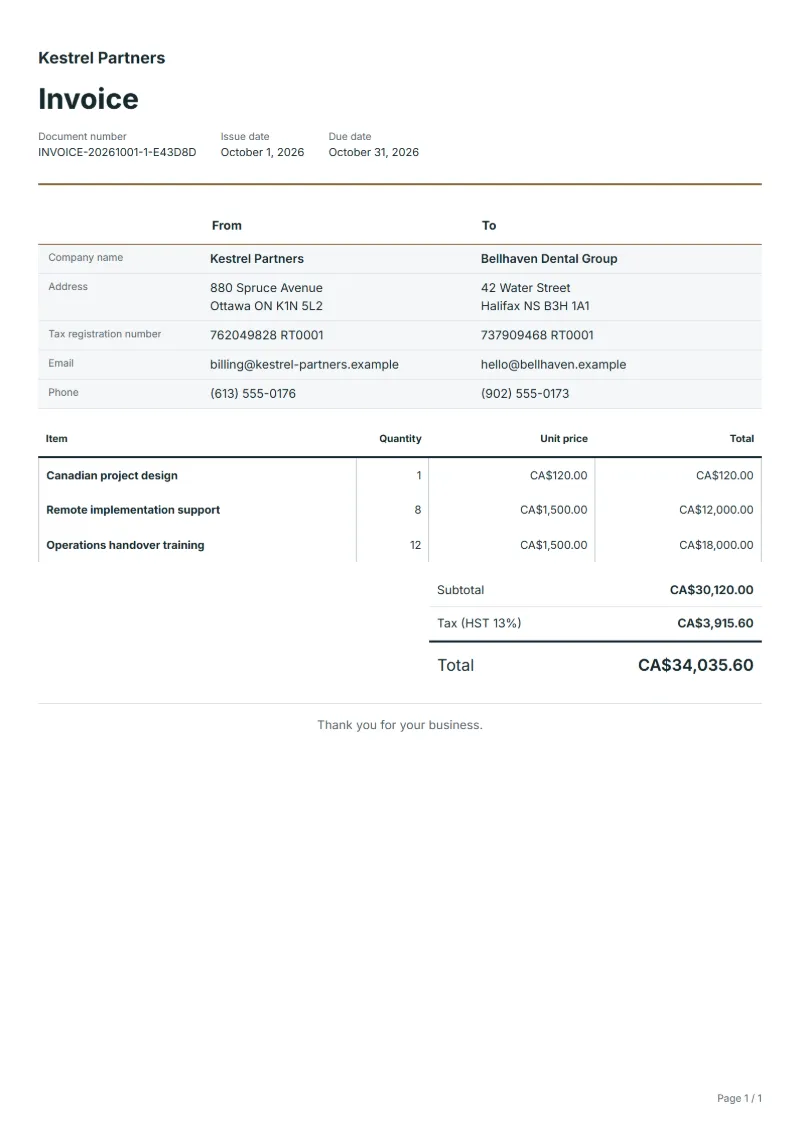
Templates by country
- Canadian project design
- Remote implementation support
- Operations handover training
Preparation guide
Example workflow
Confirm scope and quantities
Example: reconcile the approval and work record for "Canadian project design" to establish the quantity for this invoice.
Record delivery and acceptance
Check completion for every line, including "Operations handover training". Deliver the agreed test results and configuration notes, and assign owners for outstanding items.
Send the billing record
Send the final charges, delivery reference and due date to the customer, then reconcile payment against the invoice number.
Canadian sales tax on a service depends on where the service is supplied, so the same project can carry GST in one province and HST in another. This template is laid out for a software or systems project delivered partly remotely: a design phase, implementation support and training for the team who will run the system. Set the rate for the customer’s province before sending, and keep your GST/HST registration number in your company details so it prints on every invoice.
Fields to prepare
- Deliverables and line items
- Canadian project design, Remote implementation support, Operations handover training: record the quantities actually supplied and the service period.
- Canadian project design
- Name the design deliverable and its version, such as “architecture document v2”, and the weeks it covered.
- Remote implementation support
- Bill remote hours with their dates, and note the customer’s province, which you need when you choose the tax rate.
- Operations handover training
- State the number of training sessions and attendees, and whether they took place online or at the customer’s site.
- Environment and dependencies
- Record target systems, integration counts, data volume and who supplies test access.
- Acceptance and support
- Set acceptance scenarios, the review window, support duration after handover and excluded work.
- Scope to agree
- Separate the project design version, remote implementation hours and audience and sessions for operations training.
Before sending
- Does “Canadian project design” show the quantity actually supplied, not the quantity first quoted?
- Is “Remote implementation support” charged at the rate the customer agreed to, with any change approved?
- Is “Operations handover training” finished and accepted, or does it belong on a later invoice?
Show 4 more
- Separate third-party service charges from implementation fees.
- Agree who handles the production transition and what recovery work is included if it fails.
- Match completed work to the order or approval record, and confirm the payment due date and amounts already received.
- Confirm document language (en), country setting (CA), and the customer's currency and date-format requirements.
Worked example with sample figures
The figures below are invented to show how the template adds up: 3 lines in CAD, with an example tax rate of 8%.
| Item | Quantity × unit price | Amount |
|---|---|---|
| Canadian project design | 1 × CA$120.00 | CA$120.00 |
| Remote implementation support | 8 × CA$1,500.00 | CA$12,000.00 |
| Operations handover training | 12 × CA$1,500.00 | CA$18,000.00 |
| Subtotal | CA$30,120.00 | |
| Sales tax (8%) | CA$2,409.60 | |
| Total | CA$32,529.60 | |
Net amount CA$30,120.00, sales tax CA$2,409.60, total payable CA$32,529.60.
What the document must show
These details make an invoice easier to approve and to file.
- Your business name, address and registration or tax number
- The customer's name and address
- Issue date and a document number you do not reuse
- Each line item with quantity, unit price and amount
- Tax shown separately from the net amount, and the total payable
- Payment terms: due date, bank details or accepted payment methods
- In Canada, an invoice that lets a GST/HST registrant claim an input tax credit shows the supplier’s name, the date and the total; from CAD 30 also the supplier’s GST/HST registration number and the tax charged (or that it is included); from CAD 150 also the buyer’s name, the payment terms and a description of each supply. Whether GST, HST or a provincial tax applies depends on where the supply is made.
The sales tax depends on where the work is supplied, so set the rate that applies to your customer before sending.
Official rate reference: CRA: GST/HST and provincial rates
Frequently asked questions
My customer has offices in two provinces. Which rate do I use?
That depends on where the service counts as supplied, which the CRA’s place-of-supply rules decide. Check them for your case; if parts of the work go to different provinces, issue separate invoices, since a document here carries one tax rate.
How do I bill a fixed-price project in instalments?
Issue one invoice per instalment, naming the milestone reached, such as “design approved”, each with its own tax at the customer’s rate. Every payment then matches one invoice, which keeps the customer’s records and yours simple.
What if I am a small supplier and not registered?
Then you do not charge GST or HST, so set the rate to 0. The CRA explains when registration becomes required as your sales grow, so check your position before the first invoice of a larger contract.
How is the sales tax worked out on this invoice?
The worked example above uses an example rate of 8%: CA$2,409.60 on a net amount of CA$30,120.00, for a total of CA$32,529.60. The editor recalculates all three when you change a quantity, a price or the country.
Can I add my logo and signature?
Yes. The From section of the editor has a place for your company logo and for a signature or seal image. Uploading a picture needs a free account, and a member can keep both in settings so that every new document starts with them.
Read next
Reading for the Canadian HST invoice template: How to write an invoice: a step-by-step example and Credit note vs invoice (and credit memo): how to issue one. The VAT and GST calculator works out the tax line for you.