India GST invoice format
GST invoice format for India: GST on its own line at your rate, your GSTIN, HSN or SAC codes in the lines. Not an IRP e-invoice. Excel, Word: free account.
Templates by country
- Application development services
- Integration testing
- Deployment support
Preparation guide
Example workflow
Confirm scope and quantities
Example: reconcile the approval and work record for "Application development services" to establish the quantity for this invoice.
Record delivery and acceptance
Check completion for every line, including "Deployment support". Deliver the agreed test results and configuration notes, and assign owners for outstanding items.
Send the billing record
Send the final charges, delivery reference and due date to the customer, then reconcile payment against the invoice number.
Software and IT service firms in India bill clients on a GST tax invoice, and the first details a client’s accounts team checks are the two GSTINs, the SAC code of the service and the place of supply. This template is laid out for an application project, with development, integration testing and deployment support as the stages a client usually signs off one by one. Invoicing each stage on sign-off keeps every invoice small enough to approve without a long query.
Fields to prepare
- Deliverables and line items
- Application development services, Integration testing, Deployment support: record the quantities actually supplied and the service period.
- Application development services
- Write the SAC code in the line text and name the module or sprint delivered, such as “Sprint 4: payments module”.
- Integration testing
- State which systems were tested together and attach the test summary; bill by days or as a fixed fee per test cycle.
- Deployment support
- Give the release version and environment, for example “v2.3 to production”, and the support hours after go-live.
- Environment and dependencies
- Record target systems, integration counts, data volume and who supplies test access.
- Acceptance and support
- Set acceptance scenarios, the review window, support duration after handover and excluded work.
- Scope to agree
- Link application features to the systems covered by integration testing, deployment environments and supported releases.
Before sending
- Does “Application development services” show the quantity actually supplied, not the quantity first quoted?
- Is “Integration testing” charged at the rate the customer agreed to, with any change approved?
- Is “Deployment support” finished and accepted, or does it belong on a later invoice?
Show 4 more
- Separate third-party service charges from implementation fees.
- Agree who handles the production transition and what recovery work is included if it fails.
- Match completed work to the order or approval record, and confirm the payment due date and amounts already received.
- Confirm document language (en), country setting (IN), and the customer's currency and date-format requirements.
Worked example with sample figures
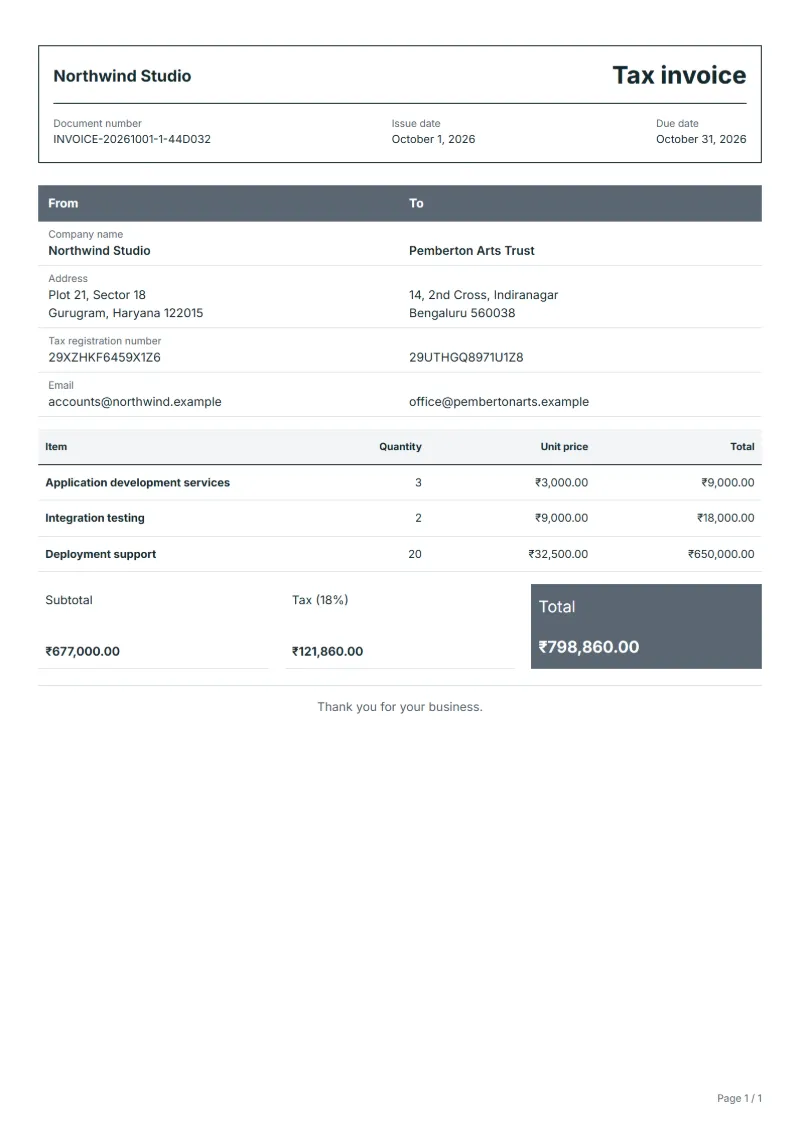
The figures below are invented to show how the template adds up: 3 lines in INR, with an example tax rate of 8%.
| Item | Quantity × unit price | Amount |
|---|---|---|
| Application development services | 3 × ₹3,000.00 | ₹9,000.00 |
| Integration testing | 2 × ₹9,000.00 | ₹18,000.00 |
| Deployment support | 20 × ₹32,500.00 | ₹650,000.00 |
| Subtotal | ₹677,000.00 | |
| GST (8%) | ₹54,160.00 | |
| Total | ₹731,160.00 | |
Net amount ₹677,000.00, GST ₹54,160.00, total payable ₹731,160.00.
What the document must show
These details make an invoice easier to approve and to file.
- Your business name, address and registration or tax number
- The customer's name and address
- Issue date and a document number you do not reuse
- Each line item with quantity, unit price and amount
- Tax shown separately from the net amount, and the total payable
- Payment terms: due date, bank details or accepted payment methods
- An Indian GST tax invoice (Rule 46 of the CGST Rules) shows the supplier’s GSTIN and, if registered, the recipient’s, the HSN or SAC code, the place of supply, the tax as CGST and SGST or as IGST, the invoice number and date, the taxable value, and the tax rate and amount.
- In India, invoices may have to be issued as e-invoices (IRP e-invoice (IRN)). A document made in QuoteBill is a printable copy, not a registered e-invoice. Check the rules that apply to you.
The GST depends on where the work is supplied, so set the rate that applies to your customer before sending.
Required details in India
Rule 46 of the CGST Rules lists what a GST tax invoice must carry. QuoteBill has a field for some of these; for the others, write the detail in the notes or in the customer field.
- GSTIN of the supplier
- Your Goods and Services Tax Identification Number, with your name and address. Enter it as your tax registration number in the company details.
- GSTIN or UIN of the recipient
- Shown when the recipient is registered. Enter it as the customer’s tax registration number.
- Invoice number and date
- A serial number of at most sixteen characters that is unique within the financial year, and the date of issue. Both are fields of the document.
- HSN or SAC code
- The Harmonised System code for goods, or the SAC code for services; the number of digits depends on your turnover. QuoteBill has no field for it: write it in the line description.
- Taxable value
- The value of the supply after any discount, kept apart from the tax. The totals show the net amount and the tax separately.
- Tax rate and amount: CGST and SGST, or IGST
- The rate and amount of central, State or integrated tax. QuoteBill shows one tax line at one rate, so write the CGST and SGST split, or the IGST, in the notes.
- Place of supply
- With the name of the State when the sale crosses a State border, and the delivery address if it differs. QuoteBill has no field for it: write it in the notes.
- Reverse charge
- Whether the tax is payable on a reverse-charge basis. QuoteBill has no field for it: write yes or no in the notes.
Official source: CBIC, CGST Rules 2017, Rule 46 (2026-10-06)
Official rate reference: PwC Worldwide Tax Summaries: India - Corporate - Other taxes (GST)
Frequently asked questions
My client is in another State. What changes on the invoice?
The place of supply decides the tax type: a supply across a State border is generally taxed as IGST, one within the State as CGST plus SGST. Write the State and the tax split in the notes, as the requirements above describe.
How do I bill a milestone the client has not yet signed off?
Wait for the sign-off if the contract ties payment to it, then quote the date of the sign-off email or document on the line. Billing early rarely speeds things up, because accounts teams hold invoices that have no approval behind them.
My client deducts tax at source. Does the invoice change?
No. The invoice still shows the full fee and the GST. The payment arrives lower by the amount deducted, and you match the difference against the TDS certificate the client issues; check the rate and timing with your tax adviser.
How is the GST worked out on this invoice?
The worked example above uses an example rate of 8%: ₹54,160.00 on a net amount of ₹677,000.00, for a total of ₹731,160.00. The editor recalculates all three when you change a quantity, a price or the country.
Can I email it to the customer?
Yes, from your own mail app. With a free account, the editor’s download menu offers Email this document, which opens your mail app with a message about the document already written. QuoteBill sends nothing itself, so save the PDF and attach it before you send.
Read next
Reading for the India GST invoice format: How to write an invoice: a step-by-step example and Invoice numbering: sequences and corrections. The VAT and GST calculator works out the tax line for you.