Handyman invoice
Invoice template for handymen and home repair services: call-out visit, repair labor and replacement materials. Fill it in online or download Excel or Word.
Templates by industry
- Call-out visit
- Repair labor
- Replacement materials
Preparation guide
Example workflow
Confirm scope and quantities
Example: reconcile the approval and work record for "Call-out visit" to establish the quantity for this invoice.
Record delivery and acceptance
Check completion for every line, including "Replacement materials". Deliver the service record, materials used, unresolved issues and the agreed next visit date.
Send the billing record
Send the final charges, delivery reference and due date to the customer, then reconcile payment against the invoice number.
A handyman's day is a string of small jobs, and the invoice is often written at the customer's kitchen table or sent the same evening. A short, predictable layout of visit, time worked and parts helps. One visit often covers several tasks for the same household, such as rehanging a door, fixing a dripping tap and putting up a shelf; listing them in the labor line shows the customer what each hour bought.
Fields to prepare
- Deliverables and line items
- Call-out visit, Repair labor, Replacement materials: record the quantities actually supplied and the service period.
- Call-out visit
- Give the date and address, and say whether the call-out fee includes a first block of working time, so nothing is counted twice in the labor line.
- Repair labor
- Write the time actually worked in the unit you charge, such as half hours, and list each task done during the visit in the description.
- Replacement materials
- List parts with quantity and price, such as a hinge set or a tap cartridge, keep the receipts if you bill at cost, and mark parts the customer supplied.
- Assets and visits
- Record the asset or area, visit dates, visit count and access arrangements.
- Labor and materials used
- Separate labor hours, quantities of parts or consumables, and work outside the recurring scope.
- Scope to agree
- Separate the call-out fee from working time, and state the minimum charge and how materials are billed.
Before sending
- Does “Call-out visit” show the quantity actually supplied, not the quantity first quoted?
- Is “Repair labor” charged at the rate the customer agreed to, with any change approved?
- Is “Replacement materials” finished and accepted, or does it belong on a later invoice?
Show 3 more
- Match extra parts and return-visit charges to approved work.
- Record the initial condition and the post-service checks.
- Match completed work to the order or approval record, and confirm the payment due date and amounts already received.
Worked example with sample figures
The figures below are invented to show how the template adds up: 3 lines in USD, with an example tax rate of 8%.
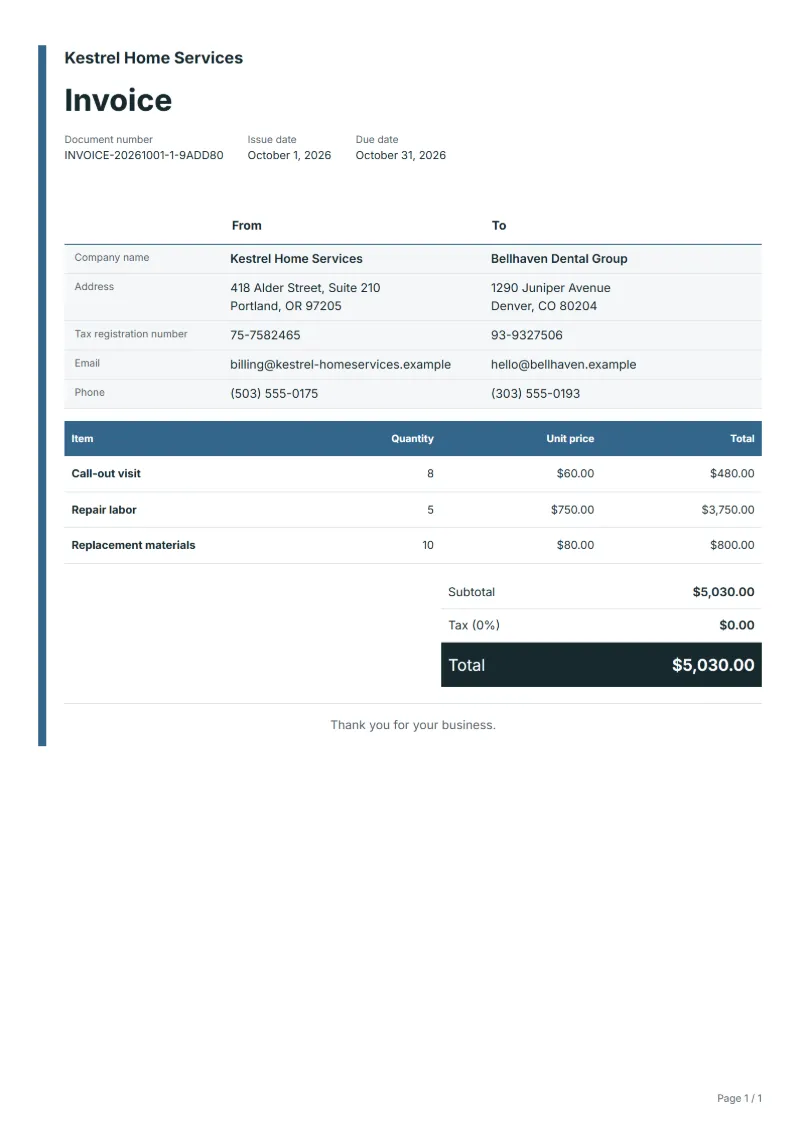
| Item | Quantity × unit price | Amount |
|---|---|---|
| Call-out visit | 8 × $60.00 | $480.00 |
| Repair labor | 5 × $750.00 | $3,750.00 |
| Replacement materials | 10 × $80.00 | $800.00 |
| Subtotal | $5,030.00 | |
| Sales tax (8%) | $402.40 | |
| Total | $5,432.40 | |
Net amount $5,030.00, sales tax $402.40, total payable $5,432.40.
What the document must show
The details an invoice has to show, and why each one matters, are set out in the guide below.
The sales tax depends on where the work is supplied, so set the rate that applies to your customer before sending.
Official rate reference: US government: state and local taxes
Full requirements: How to write an invoice: a step-by-step example
Frequently asked questions
What if I need to come back with a part I did not have?
Bill the first visit as done and say in the notes that a return visit is needed and why. Whether the second call-out is charged is your choice, but state the rule: waived for a common part you should have carried, charged for a part ordered specially.
Can I invoice a job the customer added while I was there?
Yes. Add it as a separate task in the labor description or as its own line, and note that it was requested on the day. If it used materials, list them separately so the customer sees the extra job in full.
How is the sales tax worked out on this invoice?
The worked example above uses an example rate of 8%: $402.40 on a net amount of $5,030.00, for a total of $5,432.40. The editor recalculates all three when you change a quantity, a price or the country.
Can I download it as Excel, Word or PDF?
Yes. A PDF needs no account: fill in the template and use Print / PDF. The Excel and Word files download from this page with a free account, and the spreadsheet keeps its formulas, so changing a quantity updates the tax and the total.
Can I add my logo and signature?
Yes. The From section of the editor has a place for your company logo and for a signature or seal image. Uploading a picture needs a free account, and a member can keep both in settings so that every new document starts with them.
Read next
Reading for the Handyman invoice: How to write an invoice: a step-by-step example and Invoice numbering: sequences and corrections. The VAT and GST calculator works out the tax line for you.