Post-construction cleaning quotation template
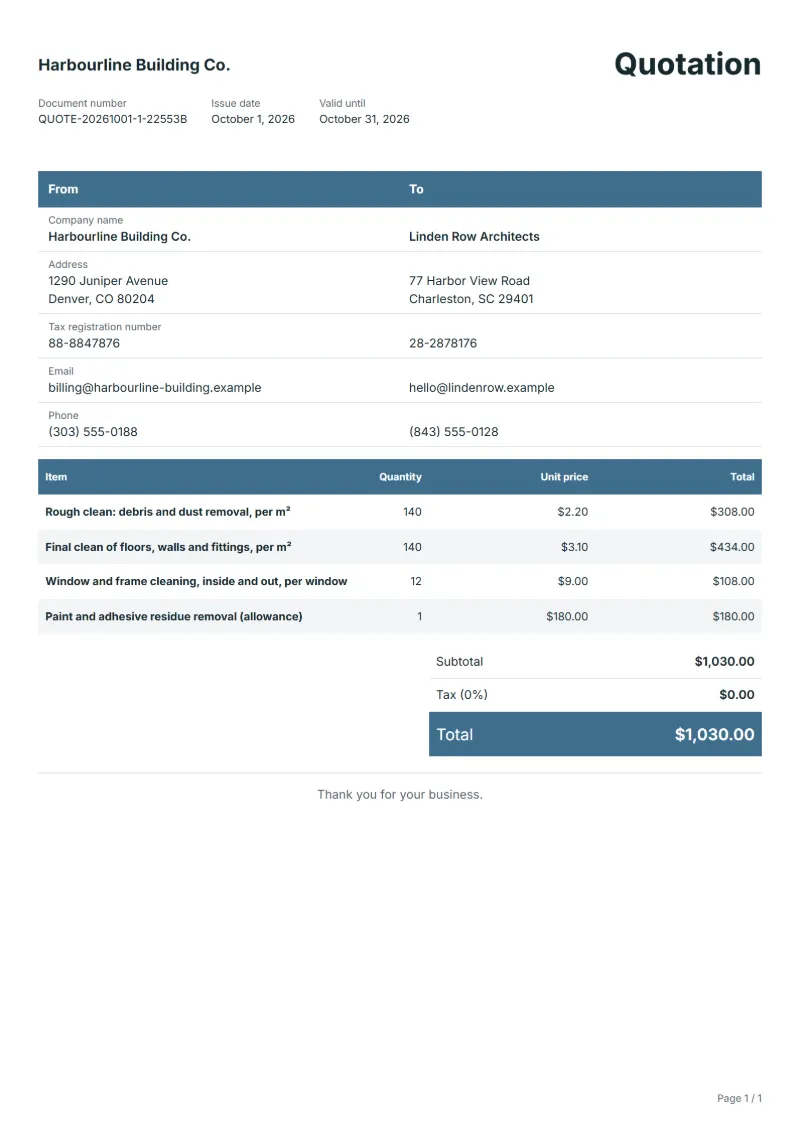
Post-construction cleaning quotation template: rough and final clean per m², windows counted, and an allowance for paint and adhesive residue.
Templates by industry
- Rough clean: debris and dust removal, per m²
- Final clean of floors, walls and fittings, per m²
- Window and frame cleaning, inside and out, per window
- Paint and adhesive residue removal (allowance)
Preparation guide
Example workflow
Confirm scope and quantities
Example: start with "Rough clean: debris and dust removal, per m²", confirm the required quantity and client inputs, then agree completion criteria for each item.
Review and approve the quotation
Confirm acceptance evidence for "Paint and adhesive residue removal (allowance)", all line quantities, exclusions and quote validity with the customer, and retain the approved version.
Deliver and prepare billing
Deliver the service record, materials used, unresolved issues and the agreed next visit date. When the agreed milestone is complete, prepare an invoice using actual quantities and approved changes.
Cleaning after builders is a different job from regular cleaning: fine plaster dust settles everywhere, labels and protective film stay on new fittings, and paint spots sit on glass and floors. Builders, developers and homeowners order it just before handover or moving in, often against a fixed date. This quotation template splits the rough clean from the final clean, prices windows separately and keeps an allowance for residue that only shows once the dust is gone.
Fields to prepare
- Deliverables and line items
- Rough clean: debris and dust removal, per m², Final clean of floors, walls and fittings, per m², Window and frame cleaning, inside and out, per window, Paint and adhesive residue removal (allowance): specify the planned quantity and delivery scope for each item.
- Rough clean: debris and dust removal, per m²
- Say whether the rough clean includes carrying debris out and who provides the skip; some builders expect it, others do not.
- Final clean of floors, walls and fittings, per m²
- List what the final clean covers, such as inside cupboards, light fittings, skirting boards and vents, so nothing is assumed.
- Window and frame cleaning, inside and out, per window
- Count windows and glazed doors, and note any that need a ladder or access equipment.
- Paint and adhesive residue removal (allowance)
- Name a sum for scraping paint and adhesive and a rate beyond it, because the amount shows only after the first pass.
- Assets and visits
- Record the asset or area, visit dates, visit count and access arrangements.
- Labor and materials used
- Separate labor hours, quantities of parts or consumables, and work outside the recurring scope.
- Scope to agree
- Price the rough and final cleans by floor area, count the windows, and say whether stubborn paint, plaster or adhesive is included or charged as found.
Before sending
- Does “Rough clean: debris and dust removal, per m²” say what is included and what quantity the price assumes?
- Would the customer read “Final clean of floors, walls and fittings, per m²” the way you do, including what it leaves out?
- Can you still honour the price of “Window and frame cleaning, inside and out, per window” on the last day the quotation is valid?
Show 4 more
- Does “Paint and adhesive residue removal (allowance)” say what is included and what quantity the price assumes?
- Match extra parts and return-visit charges to approved work.
- Record the initial condition and the post-service checks.
- Check quote validity, the customer approval method and payment milestones.
Worked example with sample figures
The figures below are invented to show how the template adds up: 4 lines in USD, with an example tax rate of 8%.
| Item | Quantity × unit price | Amount |
|---|---|---|
| Rough clean: debris and dust removal, per m² | 140 × $2.20 | $308.00 |
| Final clean of floors, walls and fittings, per m² | 140 × $3.10 | $434.00 |
| Window and frame cleaning, inside and out, per window | 12 × $9.00 | $108.00 |
| Paint and adhesive residue removal (allowance) | 1 × $180.00 | $180.00 |
| Subtotal | $1,030.00 | |
| Sales tax (8%) | $82.40 | |
| Total | $1,112.40 | |
Quoted net amount $1,030.00, sales tax $82.40, quoted total $1,112.40.
What the document must show
The details a quotation has to show, and why each one matters, are set out in the guide below.
The sales tax depends on where the work is supplied, so set the rate that applies to your customer before sending.
Official rate reference: US government: state and local taxes
Full requirements: How to write a quotation: format, example and checklist
Frequently asked questions
Can the clean start while other trades are still on site?
Say in the quotation that the final clean starts once all trades have finished in each area, because dust from later work lands on cleaned surfaces. A return visit after late work can be priced as a separate touch-up.
Who provides water, power and waste disposal?
On a building site that is not obvious. State that you need running water and power on site, and whether the builder’s skip may be used or you take waste away yourself at a charge.
How is the sales tax worked out on this quotation?
The worked example above uses an example rate of 8%: $82.40 on a net amount of $1,030.00, for a total of $1,112.40. The editor recalculates all three when you change a quantity, a price or the country.
Can I add my logo and signature?
Yes. The From section of the editor has a place for your company logo and for a signature or seal image. Uploading a picture needs a free account, and a member can keep both in settings so that every new document starts with them.
How is the document numbered?
QuoteBill gives each new document a unique number of its own. A member can switch to numbers in sequence in settings, such as QUO-2026-0001: one sequence for each kind of document, starting again every calendar year. A number you type yourself is kept as it is.
Read next
Reading for the Post-construction cleaning quotation template: How to write a quotation: format, example and checklist and Quote to invoice: how to convert a quote, step by step. The VAT and GST calculator adds tax to your quoted prices.