Fleet vehicle service work order template
Fleet vehicle service work order template: interval service, wear parts and checks per vehicle, with fleet number, odometer, approvals and next service due.
Templates by industry
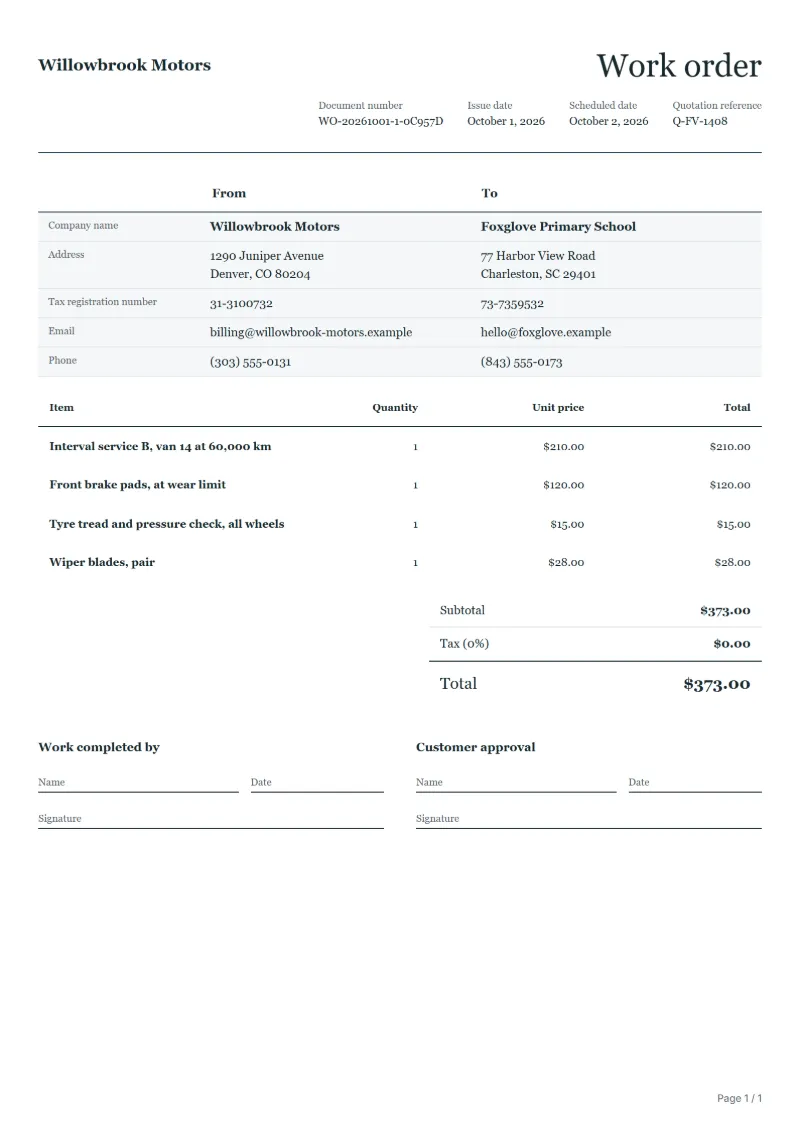
- Interval service B, van 14 at 60,000 km
- Front brake pads, at wear limit
- Tyre tread and pressure check, all wheels
- Wiper blades, pair
Preparation guide
Example workflow
Plan the job
Example: start with "Interval service B, van 14 at 60,000 km", set the scheduled date, assign the technician and note how to access the site.
Do the work
Record the time and materials actually used, including "Wiper blades, pair", and anything found that needs a separate quote.
Sign off and bill
Have the technician and the customer sign the completion lines, then make the invoice from the work order so the lines carry over.
A fleet manager does not want to hear about every brake pad, but does want to know that nothing above an agreed amount was done without asking. This work order is written for that arrangement: one vehicle per order, identified by fleet number, registration and odometer; the scheduled service and the wear parts found at their limit as priced lines; and any extra work above the approval limit held until someone at the fleet says yes. The next service due goes at the end.
Fields to prepare
- Deliverables and line items
- Interval service B, van 14 at 60,000 km, Front brake pads, at wear limit, Tyre tread and pressure check, all wheels, Wiper blades, pair: describe the work and materials planned for each line, with the time or quantity expected.
- Interval service B, van 14 at 60,000 km
- Name the service by the maker’s or the fleet’s schedule and write the odometer reading on arrival.
- Front brake pads, at wear limit
- Record the pad thickness measured, so the fleet can see the replacement was due and not early.
- Tyre tread and pressure check, all wheels
- Give tread depth and pressure per wheel; a tyre near the limit is flagged to the fleet rather than replaced unasked.
- Wiper blades, pair
- Small items like wipers fall within most approval limits; list them anyway so the fleet’s parts records stay complete.
- Job site and schedule
- Give the job site address, the scheduled date and the person assigned, with any access or safety instructions.
- Time and materials
- Record the hours worked and the materials used on each line, as done rather than as planned.
- Scope to agree
- Use one work order per vehicle with its fleet number, registration and odometer reading, follow the fleet’s approval limit for extra work, and record the next service due.
Before sending
- Is it clear who does “Interval service B, van 14 at 60,000 km”, where and when?
- Are the materials for “Front brake pads, at wear limit” listed and on site before the job starts?
- Is there a sign-off for “Tyre tread and pressure check, all wheels” so the time can be invoiced afterwards?
Show 4 more
- Is it clear who does “Wiper blades, pair”, where and when?
- Check the job site address, the scheduled date, who is assigned, and any access or safety instructions.
- Agree with the customer which tasks are included, and note anything found on site that needs a separate quote.
- Have the customer check and sign off the work before you make the invoice.
Worked example: a van in for its interval service
The figures are an example, in dollars. A workshop carries out service B on van 14, replaces front pads that have reached their limit, checks the tyres and fits new wipers. The battery then fails its test and costs more than the fleet’s approval limit.
- Planned: four lines within the schedule.
- Extra: the battery is quoted to the fleet manager, who approves it by phone.
| Item | Quantity × unit price | Amount |
|---|---|---|
| Interval service B, van 14 at 60,000 km | 1 × $210.00 | $210.00 |
| Front brake pads, at wear limit | 1 × $120.00 | $120.00 |
| Tyre tread and pressure check, all wheels | 1 × $15.00 | $15.00 |
| Wiper blades, pair | 1 × $28.00 | $28.00 |
| Total | $373.00 | |
The planned work comes to $373.00. The battery adds 1 at $98.00, an approved extra of $98.00, and the revised total is $471.00. The approver’s name and time go beside the line.
Where fleet work orders go wrong
- Putting several vehicles on one order, so their histories mix.
- Doing work above the approval limit without asking.
- Replacing tyres near the limit without telling the fleet.
- Leaving out the odometer reading or the next service due.
What the document must show
These details make a work order easier to approve and to file.
- Work order number and date
- The customer's name and job site address
- Scheduled date and the person assigned
- Each task and the materials needed
- Time or quantity per line, and prices if shown
- Sign-off lines for the worker and the customer
The sales tax depends on where the work is supplied, so set the rate that applies to your customer before sending.
Official rate reference: US government: state and local taxes
Frequently asked questions
Should every vehicle have its own work order?
Yes. One order per vehicle keeps each van’s history separate, and the fleet can file it against the fleet number without splitting your paperwork.
How do I deal with a defect the driver reported?
Copy the driver’s description into the work order, say what you found, and either fix it within the approval limit or ask before going further.
Who approves work beyond the service schedule?
The person the fleet names, usually the fleet manager. Write their name, the time and the amount approved next to the extra work.
What should I record for the next service?
The odometer reading or date at which it is due, whichever comes first under the fleet’s schedule, and anything you advised watching before then.
How is tax calculated on this template?
The sales tax depends on where the work is supplied, so set the rate that applies to your customer before sending. The editor keeps the net amount, the tax and the total apart, and recalculates all three when you change a quantity, a unit price or the country setting.
How is the document numbered?
QuoteBill gives each new document a unique number of its own. A member can switch to numbers in sequence in settings, such as WO-2026-0001: one sequence for each kind of document, starting again every calendar year. A number you type yourself is kept as it is.
Read next
Reading for the Fleet vehicle service work order template: How to write a statement of work (SOW), with an example and Quote to invoice: how to convert a quote, step by step. When the job is signed off, record it on the Acceptance certificate template.