Device repair intake work order template
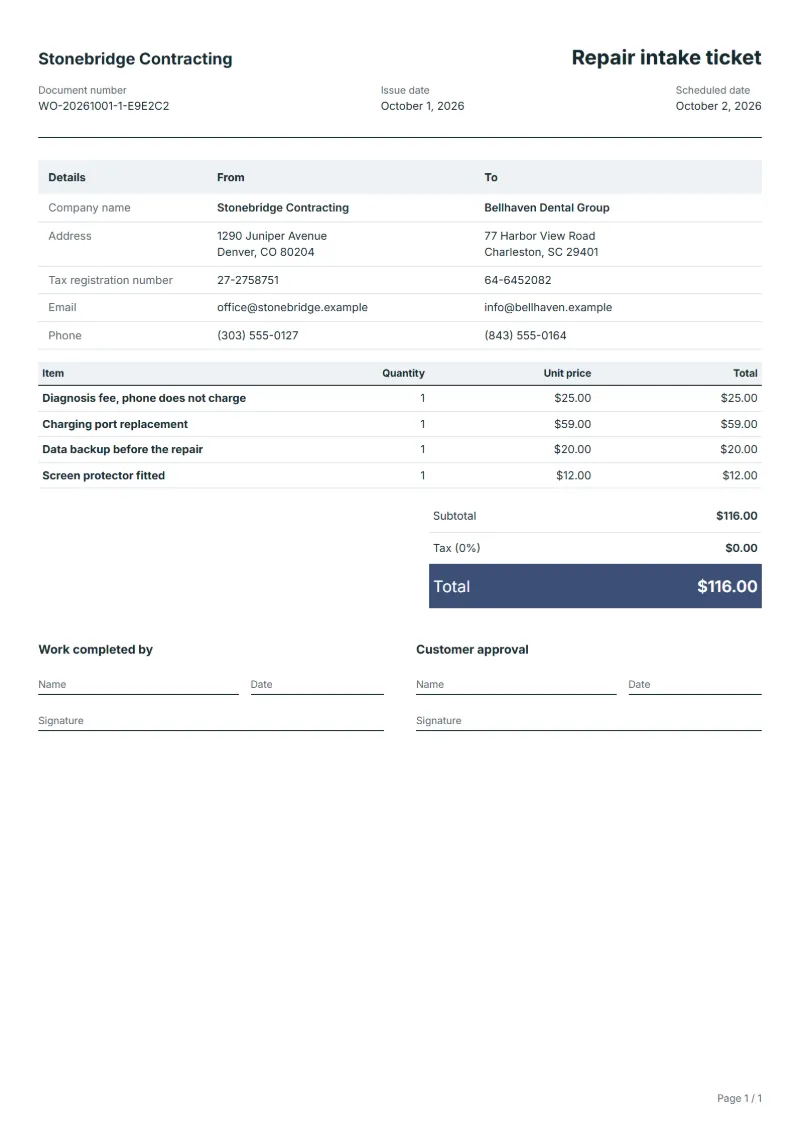
Device repair intake work order template: diagnosis, repair, backup and extras priced at the counter, with IMEI, condition on intake and accessories received.
Templates by industry
- Diagnosis fee, phone does not charge
- Charging port replacement
- Data backup before the repair
- Screen protector fitted
Preparation guide
Example workflow
Plan the job
Example: start with "Diagnosis fee, phone does not charge", set the scheduled date, assign the technician and note how to access the site.
Do the work
Record the time and materials actually used, including "Screen protector fitted", and anything found that needs a separate quote.
Sign off and bill
Have the technician and the customer sign the completion lines, then make the invoice from the work order so the lines carry over.
At a repair counter, the work order is written with the customer standing there, and it becomes their receipt for the device. It has to capture the state of the phone before anyone opens it: scratches, a cracked back, a bent frame. This template prints as a repair intake ticket with the priced work agreed at the counter, the IMEI and the accessories handed in. It never holds the passcode, and it says how a repair costing more than the ticket will be approved.
Fields to prepare
- Deliverables and line items
- Diagnosis fee, phone does not charge, Charging port replacement, Data backup before the repair, Screen protector fitted: describe the work and materials planned for each line, with the time or quantity expected.
- Diagnosis fee, phone does not charge
- Write the symptom in the customer’s words and say whether the diagnosis fee is kept if they decline the repair.
- Charging port replacement
- Name the part and whether it is original or compatible, and how long you guarantee it.
- Data backup before the repair
- Record what was backed up and where, or that the customer declined a backup and accepted the risk.
- Screen protector fitted
- List small extras separately so the customer can refuse them without affecting the repair.
- Job site and schedule
- Give the job site address, the scheduled date and the person assigned, with any access or safety instructions.
- Time and materials
- Record the hours worked and the materials used on each line, as done rather than as planned.
- Scope to agree
- Record the device, its serial or IMEI and its condition at intake, list accessories handed in, never write the passcode, and agree how extra work will be approved.
Before sending
- Is it clear who does “Diagnosis fee, phone does not charge”, where and when?
- Are the materials for “Charging port replacement” listed and on site before the job starts?
- Is there a sign-off for “Data backup before the repair” so the time can be invoiced afterwards?
Show 4 more
- Is it clear who does “Screen protector fitted”, where and when?
- Check the job site address, the scheduled date, who is assigned, and any access or safety instructions.
- Agree with the customer which tasks are included, and note anything found on site that needs a separate quote.
- Have the customer check and sign off the work before you make the invoice.
Worked example: a phone that will not charge
The figures are an example, in dollars. A customer hands in a phone that will not charge; the counter writes a ticket for the diagnosis, a charging port, a backup and a screen protector. On the bench, the technician finds the battery swollen.
- At the counter: four priced lines, the IMEI, the scratches on the frame and the case handed in.
- On the bench: the swollen battery is reported to the customer with its price.
- Approval: the customer agrees by message, and the time is noted.
| Item | Quantity × unit price | Amount |
|---|---|---|
| Diagnosis fee, phone does not charge | 1 × $25.00 | $25.00 |
| Charging port replacement | 1 × $59.00 | $59.00 |
| Data backup before the repair | 1 × $20.00 | $20.00 |
| Screen protector fitted | 1 × $12.00 | $12.00 |
| Total | $116.00 | |
The ticket comes to $116.00. The battery adds 1 at $79.00, an approved extra of $79.00, so the revised total is $195.00, which the customer pays on collection.
Mistakes at the repair counter
- Writing the customer’s passcode on the ticket.
- Not recording existing damage, so it is blamed on the repair.
- Going ahead with a dearer repair without the customer’s yes.
- Forgetting the SIM card or case that came in with the phone.
What the document must show
These details make a work order easier to approve and to file.
- Work order number and date
- The customer's name and job site address
- Scheduled date and the person assigned
- Each task and the materials needed
- Time or quantity per line, and prices if shown
- Sign-off lines for the worker and the customer
The sales tax depends on where the work is supplied, so set the rate that applies to your customer before sending.
Official rate reference: US government: state and local taxes
Frequently asked questions
Should I write the passcode on the ticket?
No. Record only whether the customer will unlock the device in person for testing, or whether testing is limited to what works without unlocking.
How do I record damage that was already there?
Describe it on the ticket at intake, such as scratches, a dent or a cracked back, and have the customer sign. A photo referred to in the notes helps.
The repair will cost more than the ticket says: what now?
Stop, contact the customer with the new price and the reason, and continue only after they agree. Write who agreed, when and how.
What about a SIM card or case handed in with the phone?
List every accessory on the ticket, or remove the SIM and hand it back at the counter, so nothing is disputed at collection.
How is tax calculated on this template?
The sales tax depends on where the work is supplied, so set the rate that applies to your customer before sending. The editor keeps the net amount, the tax and the total apart, and recalculates all three when you change a quantity, a unit price or the country setting.
How does a work order become an invoice?
When the job is done, open the work order and make an invoice from it. The lines, customer and prices carry over, and the work order stays as the record of what was agreed and done.
Read next
Reading for the Device repair intake work order template: How to write a statement of work (SOW), with an example and Estimate vs quote: what binds you, with a remodeling example. When the job is signed off, record it on the Acceptance certificate template.