Deposit invoice template
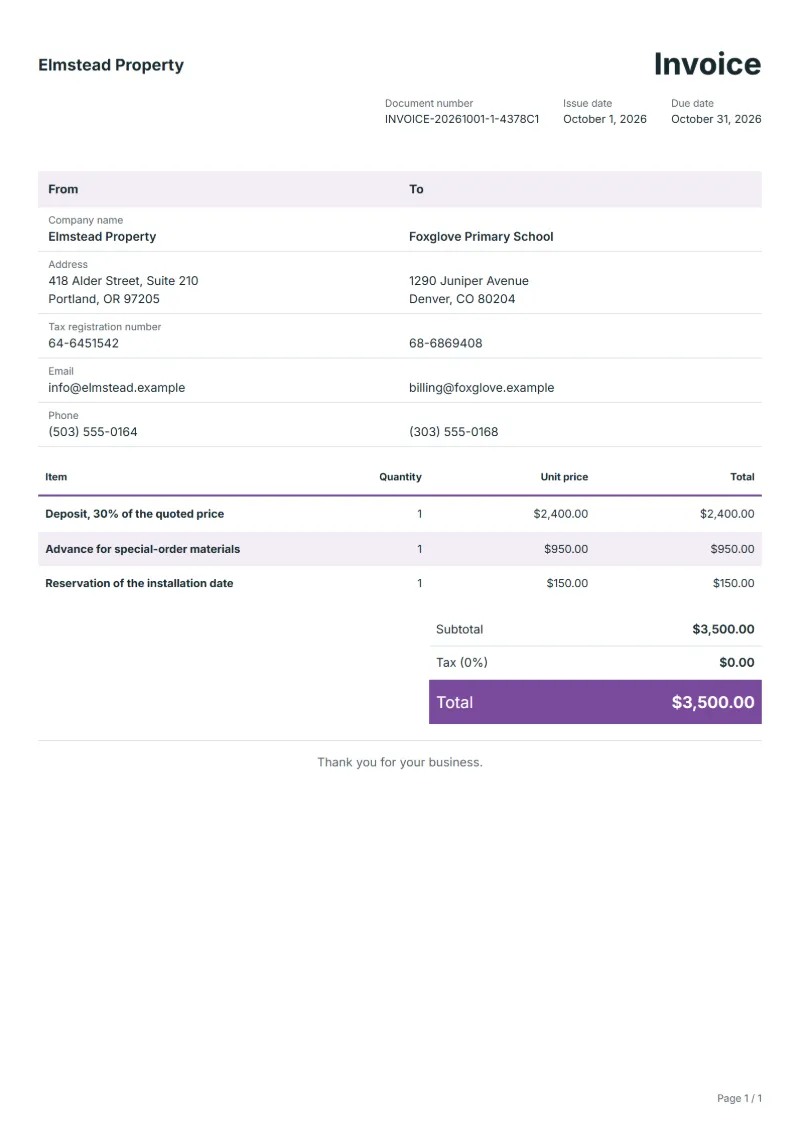
Deposit invoice template: ask for part of the price before work starts, name the accepted quote and the percentage, and set when the balance is due.
Templates by industry
- Deposit, 30% of the quoted price
- Advance for special-order materials
- Reservation of the installation date
Preparation guide
Example workflow
Confirm scope and quantities
Example: reconcile the approval and work record for "Deposit, 30% of the quoted price" to establish the quantity for this invoice.
Record delivery and acceptance
Check completion for every line, including "Reservation of the installation date". Match the delivery record to approved quantities and record who accepted the work.
Send the billing record
Send the final charges, delivery reference and due date to the customer, then reconcile payment against the invoice number.
A deposit invoice asks for part of the price before the work starts or the goods are made, usually once the client has accepted a quotation. It protects you against materials bought for a job that is then cancelled, and it secures the client’s place in your schedule. This template names the accepted quotation, the share being invoiced and the advance for special-order items, so the final invoice can later deduct exactly what was paid.
Fields to prepare
- Deliverables and line items
- Deposit, 30% of the quoted price, Advance for special-order materials, Reservation of the installation date: record the quantities actually supplied and the service period.
- Deposit, 30% of the quoted price
- Give the percentage and the quotation number it is taken from, so the client sees the deposit is not an extra charge.
- Advance for special-order materials
- List special-order materials only if you order them as soon as the deposit arrives, and keep the supplier’s quote on file.
- Reservation of the installation date
- A reservation fee should say which date it holds and whether it is set against the final price.
- Quantity and billing unit
- Use the agreed unit, such as hours, units or a fixed project, and record both quantity and rate.
- Reference and dates
- Add the purchase reference, service period and delivery date to distinguish this work from other orders.
- Scope to agree
- Quote the quotation or order the deposit belongs to, state the percentage and when the balance falls due, and say whether the deposit is refundable.
Before sending
- Does “Deposit, 30% of the quoted price” show the quantity actually supplied, not the quantity first quoted?
- Is “Advance for special-order materials” charged at the rate the customer agreed to, with any change approved?
- Is “Reservation of the installation date” finished and accepted, or does it belong on a later invoice?
Show 3 more
- Separate additional work from the original scope and check its approval record.
- Distinguish included expenses from separately billed expenses and reconcile supporting records.
- Match completed work to the order or approval record, and confirm the payment due date and amounts already received.
Worked example with sample figures
The figures below are invented to show how the template adds up: 3 lines in USD, with an example tax rate of 8%.
| Item | Quantity × unit price | Amount |
|---|---|---|
| Deposit, 30% of the quoted price | 1 × $2,400.00 | $2,400.00 |
| Advance for special-order materials | 1 × $950.00 | $950.00 |
| Reservation of the installation date | 1 × $150.00 | $150.00 |
| Subtotal | $3,500.00 | |
| Sales tax (8%) | $280.00 | |
| Total | $3,780.00 | |
Net amount $3,500.00, sales tax $280.00, total payable $3,780.00.
What the document must show
The details an invoice has to show, and why each one matters, are set out in the guide below.
The sales tax depends on where the work is supplied, so set the rate that applies to your customer before sending.
Official rate reference: US government: state and local taxes
Full requirements: How to write an invoice: a step-by-step example
Frequently asked questions
How do I take the deposit off the final invoice?
Bill the full price on the final invoice and show the deposit as received, with this invoice’s number and the amount, so the balance due is right.
Does a deposit invoice carry tax?
That depends on your country’s rules for advance payments. Check with your tax office or adviser before you send it, and use the same rate on the final invoice.
How is the sales tax worked out on this invoice?
The worked example above uses an example rate of 8%: $280.00 on a net amount of $3,500.00, for a total of $3,780.00. The editor recalculates all three when you change a quantity, a price or the country.
Is this template free?
Yes. You can fill in this template and print it or save it as a PDF without an account, and there is no payment step and no watermark on the document. Saving it to your account and downloading Excel or Word files need a free account.
Can I add my logo and signature?
Yes. The From section of the editor has a place for your company logo and for a signature or seal image. Uploading a picture needs a free account, and a member can keep both in settings so that every new document starts with them.
Read next
Reading for the Deposit invoice template: How to write an invoice: a step-by-step example and Credit note vs invoice (and credit memo): how to issue one. The VAT and GST calculator works out the tax line for you.