Packing slip template
Free packing slip template: order number, items and quantities packed, package count and tracking number, with no prices shown. Excel, Word or PDF.
Free generators
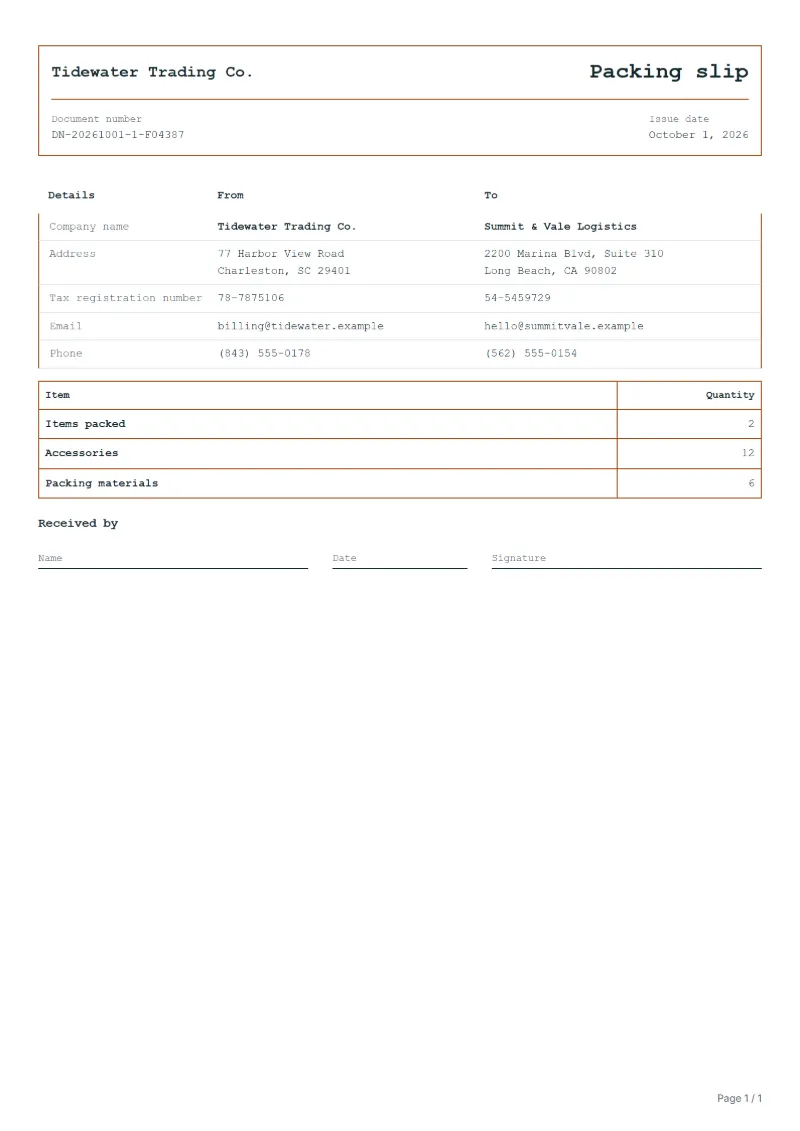
- Items packed
- Accessories
- Packing materials
Preparation guide
Example workflow
Pick and pack
Example: count "Items packed" and the other lines against the order, and note anything that ships later.
Ship with the note
Put the note in or on the shipment with the tracking number and package count, and check "Packing materials" is listed.
Get it signed
Ask the recipient to sign and date the received-by line, and keep the signed copy as proof of delivery.
A packing slip goes inside the parcel, on top of the goods, so whoever opens it can check the contents without looking up the order. Online shops and small wholesalers use it for orders sent by courier, often to someone other than the buyer, such as a gift recipient; that is one reason it carries no prices. When an order is split over several boxes, number the boxes and say which items each one holds.
Fields to prepare
- Deliverables and line items
- Items packed, Accessories, Packing materials: record the quantity actually shipped for each line; prices stay off the note.
- Items packed
- Write the product name and variant, such as size or colour, as the customer ordered it, not your internal stock code alone.
- Accessories
- List accessories that ship loose, such as cables or brackets, so the customer does not throw them away with the filling.
- Packing materials
- Use this line only for packaging the recipient keeps or returns, such as a pallet or a reusable crate; plain boxes and filling can stay off.
- Order and delivery
- Quote the order or invoice number the delivery belongs to, the delivery date and the address the goods go to.
- Shipment
- Give the number of packages, the carrier or shipping method and the tracking number.
- Scope to agree
- Give the order number and each item and quantity packed, with the carton it is in, so the parcel can be checked on arrival.
Before sending
- Was “Items packed” counted when it was packed, and does the count match the order?
- If “Accessories” ships short, does the note say how many follow and when?
- Will the receiver be able to check “Packing materials” against this note on arrival?
Show 3 more
- Check the delivery address, the number of packages and the order or invoice number the delivery belongs to.
- Count each line against the order, and list anything that ships later rather than leaving it off.
- Leave prices off the note unless the customer asks for them; they belong on the invoice.
Worked example with sample figures
The quantities below are invented to show how the template is filled in: 3 lines, counted in units, with no prices.
| Item | Quantity |
|---|---|
| Items packed | 2 |
| Accessories | 12 |
| Packing materials | 6 |
| Total | 20 |
20 units in 3 lines.
What the document must show
These details make a packing slip easier to approve and to file.
- Your company name and address
- The customer's name and delivery address
- Note number and delivery date
- The order or invoice it belongs to
- Each item with the quantity delivered
- Packages and carrier or tracking number
- A line for the recipient's signature and date
This document prints quantities without prices, so no tax appears on it unless you switch its line columns to prices and totals.
Frequently asked questions
How do I mark an order that ships in several boxes?
Number the boxes on the outside, such as 1 of 3, and either put a slip in each box listing only what it holds or one slip in the first box listing every box. Enter the total package count in the shipment details.
Is a packing slip the same as an export packing list?
No. A packing slip lets the recipient check a parcel. An export packing list gives customs and carriers the weight, dimensions and marks of each package and is prepared together with the export invoice.
Does this packing slip show prices or tax?
This document prints quantities without prices, so no tax appears on it unless you switch its line columns to prices and totals. The worked example above counts 20 units and nothing else.
Can I add my logo and signature?
Yes. The From section of the editor has a place for your company logo and for a signature or seal image. Uploading a picture needs a free account, and a member can keep both in settings so that every new document starts with them.
How is the document numbered?
QuoteBill gives each new document a unique number of its own. A member can switch to numbers in sequence in settings, such as DN-2026-0001: one sequence for each kind of document, starting again every calendar year. A number you type yourself is kept as it is.
Read next
Reading for the Packing slip template: Quote, proforma, invoice, receipt, credit note: which to use and Unpaid invoice: follow-ups, part payments and statements. The order this delivery answers is written on the Purchase order template.