Philippines invoice template
Philippine invoice template with 12% VAT shown separately and your TIN, for billing; BIR-registered invoices are issued separately. Excel, Word or PDF.
Templates by country
- Professional services
- Materials
- Transport
Preparation guide
Example workflow
Confirm scope and quantities
Example: reconcile the approval and work record for "Professional services" to establish the quantity for this invoice.
Record delivery and acceptance
Check completion for every line, including "Transport". Match the delivery record to approved quantities and record who accepted the work.
Send the billing record
Send the final charges, delivery reference and due date to the customer, then reconcile payment against the invoice number.
This invoice is a billing copy for a Philippine business that charges professional fees, materials and transport to a client. It shows your TIN and registered name with VAT at 12% on its own line, so the client can check the amount before paying. The invoice the BIR recognises for tax purposes still has to come from your authorised printed invoices or registered system, so issue that one as well and quote its number on this copy.
Fields to prepare
- Deliverables and line items
- Professional services, Materials, Transport: record the quantities actually supplied and the service period.
- Professional services
- Describe the service and the period, and check whether the client will withhold tax on the fee, since they then pay you the net amount.
- Materials
- Bill materials bought for the client at the agreed price, and keep the supplier receipts in case the client asks about the cost behind them.
- Transport
- Say what the transport covers, such as delivering materials or your team’s travel, and give the route or the number of trips.
- Quantity and billing unit
- Use the agreed unit, such as hours, units or a fixed project, and record both quantity and rate.
- Reference and dates
- Add the purchase reference, service period and delivery date to distinguish this work from other orders.
- Scope to agree
- Show your TIN and registered name with 12% VAT on its own line, and issue the BIR-registered invoice from your authorised system.
Before sending
- Does “Professional services” show the quantity actually supplied, not the quantity first quoted?
- Is “Materials” charged at the rate the customer agreed to, with any change approved?
- Is “Transport” finished and accepted, or does it belong on a later invoice?
Show 4 more
- Separate additional work from the original scope and check its approval record.
- Distinguish included expenses from separately billed expenses and reconcile supporting records.
- Match completed work to the order or approval record, and confirm the payment due date and amounts already received.
- Confirm document language (en), country setting (PH), and the customer's currency and date-format requirements.
Worked example with sample figures
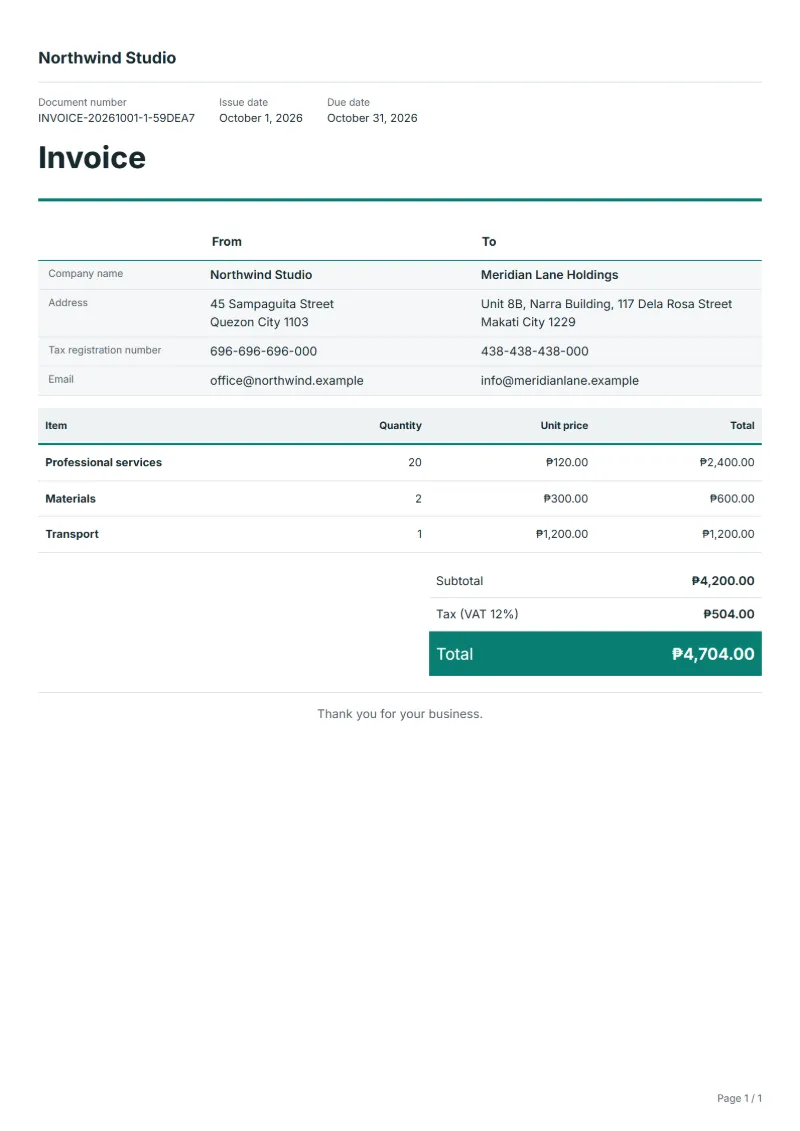
The figures below are invented to show how the template adds up: 3 lines in PHP, with VAT at 12%.
| Item | Quantity × unit price | Amount |
|---|---|---|
| Professional services | 20 × ₱120.00 | ₱2,400.00 |
| Materials | 2 × ₱300.00 | ₱600.00 |
| Transport | 1 × ₱1,200.00 | ₱1,200.00 |
| Subtotal | ₱4,200.00 | |
| VAT (12%) | ₱504.00 | |
| Total | ₱4,704.00 | |
Net amount ₱4,200.00, VAT ₱504.00, total payable ₱4,704.00.
What the document must show
These details make an invoice easier to approve and to file.
- Your business name, address and registration or tax number
- The customer's name and address
- Issue date and a document number you do not reuse
- Each line item with quantity, unit price and amount
- Tax shown separately from the net amount, and the total payable
- Payment terms: due date, bank details or accepted payment methods
- Official invoices must come from BIR-authorised printed invoices or a registered invoicing system, so use this template as a billing copy; VAT-registered sellers show 12% VAT separately.
- In the Philippines, invoices may have to be issued as e-invoices (BIR EIS). A document made in QuoteBill is a printable copy, not a registered e-invoice. Check the rules that apply to you.
The VAT here is 12%, applied to the net amount and shown as its own line.
Official rate reference: BIR Revenue Regulations No. 10-2025
Frequently asked questions
The client paid less than the invoice because of withholding tax. What now?
Corporate clients in the Philippines often withhold part of a professional fee and pay it to the BIR for you. Ask for the certificate of tax withheld (BIR Form 2307), record the shortfall as tax withheld rather than an unpaid balance, and keep the certificate for your own return.
Do I still need a BIR-registered invoice if I send this one?
Yes. This template is a billing copy for your client. The invoice for tax purposes comes from your BIR-authorised printed invoices or a registered invoicing or e-invoicing system; quote its number on this copy so the two can be matched.
How is the VAT worked out on this invoice?
In the worked example above, VAT at 12% on the net amount of ₱4,200.00 is ₱504.00, so the total is ₱4,704.00. The editor recalculates all three when you change a quantity, a price or the country.
Is this template free?
Yes. You can fill in this template and print it or save it as a PDF without an account, and there is no payment step and no watermark on the document. Saving it to your account and downloading Excel or Word files need a free account.
Can I download it as Excel, Word or PDF?
Yes. A PDF needs no account: fill in the template and use Print / PDF. The Excel and Word files download from this page with a free account, and the spreadsheet keeps its formulas, so changing a quantity updates the tax and the total.
Read next
Reading for the Philippines invoice template: How to write an invoice: a step-by-step example and Invoice numbering: sequences and corrections. The VAT and GST calculator works out the tax line for you.