Calibration work order template
Calibration work order template: torque wrenches, gauges and meters priced per instrument, with as-found and as-left results, certificates and due dates.
Templates by industry
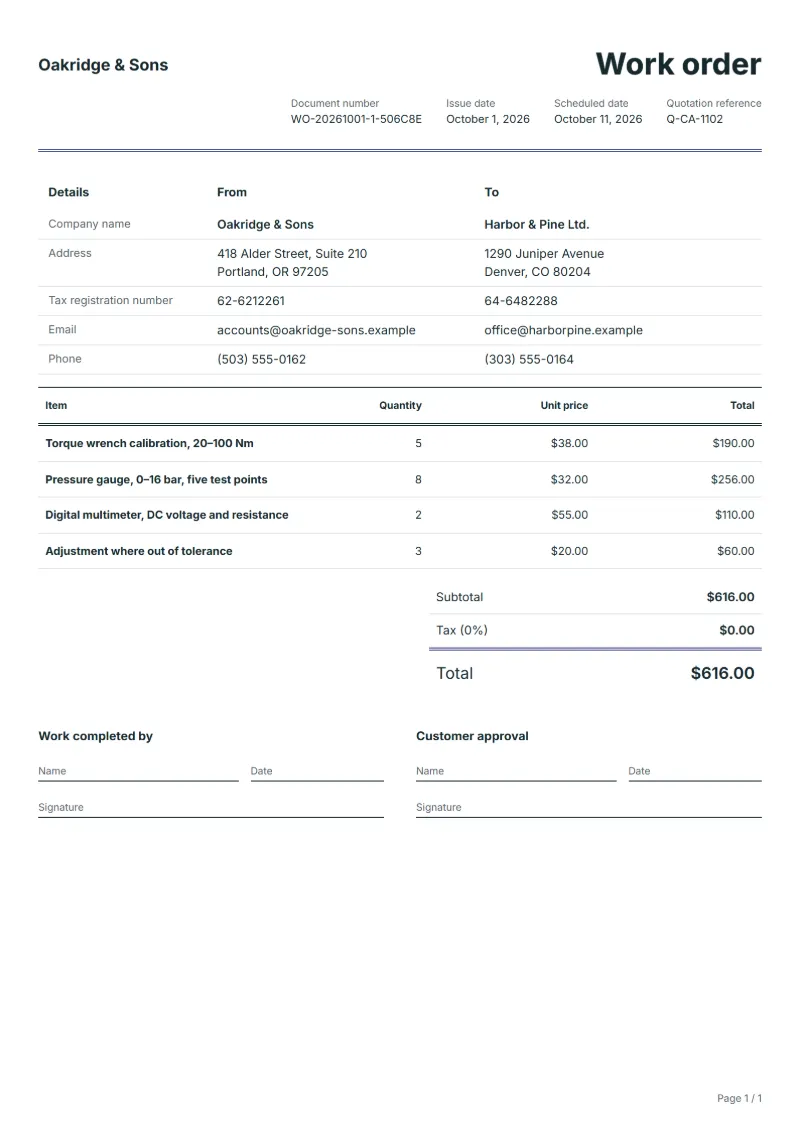
- Torque wrench calibration, 20–100 Nm
- Pressure gauge, 0–16 bar, five test points
- Digital multimeter, DC voltage and resistance
- Adjustment where out of tolerance
Preparation guide
Example workflow
Plan the job
Example: start with "Torque wrench calibration, 20–100 Nm", set the scheduled date, assign the technician and note how to access the site.
Do the work
Record the time and materials actually used, including "Adjustment where out of tolerance", and anything found that needs a separate quote.
Sign off and bill
Have the technician and the customer sign the completion lines, then make the invoice from the work order so the lines carry over.
A calibration job arrives as a box of instruments with asset tags, and leaves as a stack of certificates. The work order sits between the two. This template prices calibration per instrument type, as most labs do, and adds adjustment only for instruments found outside tolerance. For each instrument it leaves room for the as-found and as-left readings, the certificate number and the next due date, because the customer’s quality system will ask for all of them when it files the results.
Fields to prepare
- Deliverables and line items
- Torque wrench calibration, 20–100 Nm, Pressure gauge, 0–16 bar, five test points, Digital multimeter, DC voltage and resistance, Adjustment where out of tolerance: describe the work and materials planned for each line, with the time or quantity expected.
- Torque wrench calibration, 20–100 Nm
- List each wrench by asset number and the points tested, and whether it was checked in both directions.
- Pressure gauge, 0–16 bar, five test points
- Give the test points, the reference used and the largest error found, as-found and as-left.
- Digital multimeter, DC voltage and resistance
- Name the functions and ranges checked; a meter checked on voltage only should not be certified for current.
- Adjustment where out of tolerance
- Charge adjustment per instrument only where it was out of tolerance, and say so on its certificate.
- Job site and schedule
- Give the job site address, the scheduled date and the person assigned, with any access or safety instructions.
- Time and materials
- Record the hours worked and the materials used on each line, as done rather than as planned.
- Scope to agree
- Identify each instrument by asset number and serial, record as-found and as-left results against the tolerance, and give the certificate number and next due date.
Before sending
- Is it clear who does “Torque wrench calibration, 20–100 Nm”, where and when?
- Are the materials for “Pressure gauge, 0–16 bar, five test points” listed and on site before the job starts?
- Is there a sign-off for “Digital multimeter, DC voltage and resistance” so the time can be invoiced afterwards?
Show 4 more
- Is it clear who does “Adjustment where out of tolerance”, where and when?
- Check the job site address, the scheduled date, who is assigned, and any access or safety instructions.
- Agree with the customer which tasks are included, and note anything found on site that needs a separate quote.
- Have the customer check and sign off the work before you make the invoice.
Worked example with sample figures
The figures below are invented to show how the template adds up: 4 lines in USD, with an example tax rate of 8%.
| Item | Quantity × unit price | Amount |
|---|---|---|
| Torque wrench calibration, 20–100 Nm | 5 × $38.00 | $190.00 |
| Pressure gauge, 0–16 bar, five test points | 8 × $32.00 | $256.00 |
| Digital multimeter, DC voltage and resistance | 2 × $55.00 | $110.00 |
| Adjustment where out of tolerance | 3 × $20.00 | $60.00 |
| Subtotal | $616.00 | |
| Sales tax (8%) | $49.28 | |
| Total | $665.28 | |
Planned work $616.00 before tax, $665.28 with sales tax.
- The job follows quotation Q-CA-1102.
- The job is booked 10 days ahead.
What the document must show
These details make a work order easier to approve and to file.
- Work order number and date
- The customer's name and job site address
- Scheduled date and the person assigned
- Each task and the materials needed
- Time or quantity per line, and prices if shown
- Sign-off lines for the worker and the customer
The sales tax depends on where the work is supplied, so set the rate that applies to your customer before sending.
Official rate reference: US government: state and local taxes
Frequently asked questions
What is the difference between as-found and as-left results?
As-found is what the instrument read when it arrived; as-left is after any adjustment. The customer needs both, because a bad as-found result can affect work already done with that instrument.
What do I do with an instrument that cannot be adjusted into tolerance?
Record the result, label it as failed or limited as your procedure says, tell the customer, and do not issue a certificate that implies it passed.
How is the sales tax worked out on this work order?
The worked example above uses an example rate of 8%: $49.28 on a net amount of $616.00, for a total of $665.28. The editor recalculates all three when you change a quantity, a price or the country.
Can I change the layout and colour?
Yes. The editor offers other layouts and a document colour for the printed page. Changing them moves no figure: the lines and totals stay as they are, and the PDF, Word and Excel files follow the layout you pick.
How is the document numbered?
QuoteBill gives each new document a unique number of its own. A member can switch to numbers in sequence in settings, such as WO-2026-0001: one sequence for each kind of document, starting again every calendar year. A number you type yourself is kept as it is.
Read next
Reading for the Calibration work order template: How to write a statement of work (SOW), with an example and Quote to invoice: how to convert a quote, step by step. When the job is signed off, record it on the Acceptance certificate template.