Drone aerial survey invoice template
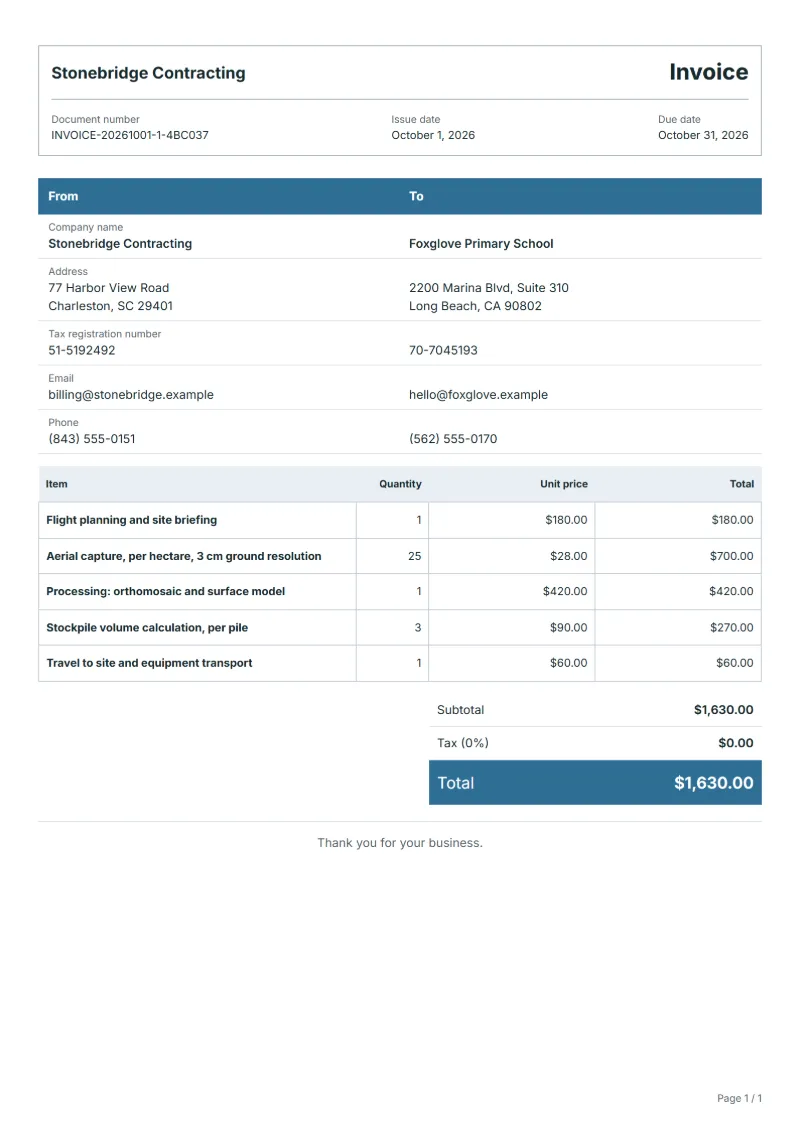
Drone aerial survey invoice template: flight planning, capture per hectare, image processing and stockpile volumes on separate lines; deliverables in the notes.
Templates by industry
- Flight planning and site briefing
- Aerial capture, per hectare, 3 cm ground resolution
- Processing: orthomosaic and surface model
- Stockpile volume calculation, per pile
- Travel to site and equipment transport
Preparation guide
Example workflow
Confirm scope and quantities
Example: reconcile the approval and work record for "Flight planning and site briefing" to establish the quantity for this invoice.
Record delivery and acceptance
Check completion for every line, including "Travel to site and equipment transport". Link subject identifiers to results and deliver observations and agreed follow-up actions.
Send the billing record
Send the final charges, delivery reference and due date to the customer, then reconcile payment against the invoice number.
A drone survey is sold by the area flown, but most of the work begins after landing, when the images are processed into a map, a surface model or a volume figure. This invoice therefore keeps planning, capture per hectare, processing and each calculated product on separate lines, so the client can see that the data is paid for once and not per image. Permissions, the pilot’s qualification and the accuracy achieved go in the notes, where an engineer or an authority will look for them.
Fields to prepare
- Deliverables and line items
- Flight planning and site briefing, Aerial capture, per hectare, 3 cm ground resolution, Processing: orthomosaic and surface model, Stockpile volume calculation, per pile, Travel to site and equipment transport: record the quantities actually supplied and the service period.
- Flight planning and site briefing
- Describe the site and what the client wants from it; planning is billed because it decides how many hectares fit into the weather window.
- Aerial capture, per hectare, 3 cm ground resolution
- Bill per hectare actually flown, give the ground resolution and say whether ground control points were set; resolution decides what the map is good for.
- Processing: orthomosaic and surface model
- Name each product and its format, for example a GeoTIFF orthomosaic, a point cloud or a surface model, and the coordinate system used.
- Stockpile volume calculation, per pile
- Count the piles measured and say which base surface the volume was calculated from; a different base gives a different figure.
- Travel to site and equipment transport
- Charge travel by distance or as a fixed amount, and add battery charging or generator hire only if the site has no power.
- Subjects and quantities
- Record sample, asset or site counts, identifiers, test items and accessible areas.
- Method and report
- Specify agreed methods, report format, delivery deadline and whether retesting is included.
- Scope to agree
- State the area flown and the ground resolution, list what is delivered and in which file formats, and say how many control points and repeat flights the price includes.
Before sending
- Does “Flight planning and site briefing” show the quantity actually supplied, not the quantity first quoted?
- Is “Aerial capture, per hectare, 3 cm ground resolution” charged at the rate the customer agreed to, with any change approved?
- Is “Processing: orthomosaic and surface model” finished and accepted, or does it belong on a later invoice?
Show 5 more
- Does “Stockpile volume calculation, per pile” show the quantity actually supplied, not the quantity first quoted?
- Is “Travel to site and equipment transport” charged at the rate the customer agreed to, with any change approved?
- Separate visit, collection and transport costs from analysis and reporting.
- Document inaccessible areas and excluded tests before work starts.
- Match completed work to the order or approval record, and confirm the payment due date and amounts already received.
Worked example: surveying a quarry stockpile area
The figures are an example in dollars, with an example tax rate of 8%. An operator plans and flies 25 hectares at 3 cm resolution, processes an orthomosaic and a surface model, calculates three stockpile volumes and travels to the site.
| Item | Quantity × unit price | Amount |
|---|---|---|
| Flight planning and site briefing | 1 × $180.00 | $180.00 |
| Aerial capture, per hectare, 3 cm ground resolution | 25 × $28.00 | $700.00 |
| Processing: orthomosaic and surface model | 1 × $420.00 | $420.00 |
| Stockpile volume calculation, per pile | 3 × $90.00 | $270.00 |
| Travel to site and equipment transport | 1 × $60.00 | $60.00 |
| Subtotal | $1,630.00 | |
| Sales tax (8%) | $130.40 | |
| Total | $1,760.40 | |
The five lines come to $1,630.00; tax at 8% is $130.40, so the client pays $1,760.40. The accuracy check, the file formats handed over and the permission reference are in the notes.
Common mistakes on a drone survey invoice
- Billing flying time and ignoring the processing, which is often most of the work.
- Leaving out the ground resolution, so nobody knows what was promised.
- Giving a volume without saying which base surface it was calculated from.
- Not naming file formats and coordinate system, so the client cannot open or place the data.
- Omitting the permission to fly from the notes when the site needed one.
What the document must show
These details make an invoice easier to approve and to file.
- Your business name, address and registration or tax number
- The customer's name and address
- Issue date and a document number you do not reuse
- Each line item with quantity, unit price and amount
- Tax shown separately from the net amount, and the total payable
- Payment terms: due date, bank details or accepted payment methods
The sales tax depends on where the work is supplied, so set the rate that applies to your customer before sending.
Official rate reference: US government: state and local taxes
Frequently asked questions
What if bad weather forces a second flight?
Settle in advance who carries that cost. If the client moved the date, bill the extra visit as travel and capture; if the weather alone caused it, many operators absorb it. Write the rule in the notes.
How do I show the accuracy that was achieved?
Give the ground resolution and, if you checked it, the accuracy against control points, in the notes. Do not state accuracy you did not verify, since clients use the figures for earthworks and for payment.
Are the raw images billed, or simply handed over?
The contract decides. If the raw images are delivered, show them as a line of their own or say they are included, and name the transfer method and how long you keep a copy.
Where do I put the permission to fly?
If the flight needed permission from an aviation authority or the landowner, give the reference or the name of the person who agreed in the notes. Rules differ by country, so check what applies where you fly.
Should volume calculations be billed per pile or per report?
Per pile is clearer when the number can change, because a repeat survey of the same stockpiles is priced at the same rate. A flat report fee suits a client who wants one summary figure.
How is tax calculated on this template?
The sales tax depends on where the work is supplied, so set the rate that applies to your customer before sending. The editor keeps the net amount, the tax and the total apart, and recalculates all three when you change a quantity, a unit price or the country setting.
Can I add my logo and signature?
Yes. The From section of the editor has a place for your company logo and for a signature or seal image. Uploading a picture needs a free account, and a member can keep both in settings so that every new document starts with them.
Read next
Reading for the Drone aerial survey invoice template: How to write an invoice: a step-by-step example and Invoice numbering: sequences and corrections. The VAT and GST calculator works out the tax line for you.