CAD drafting invoice template
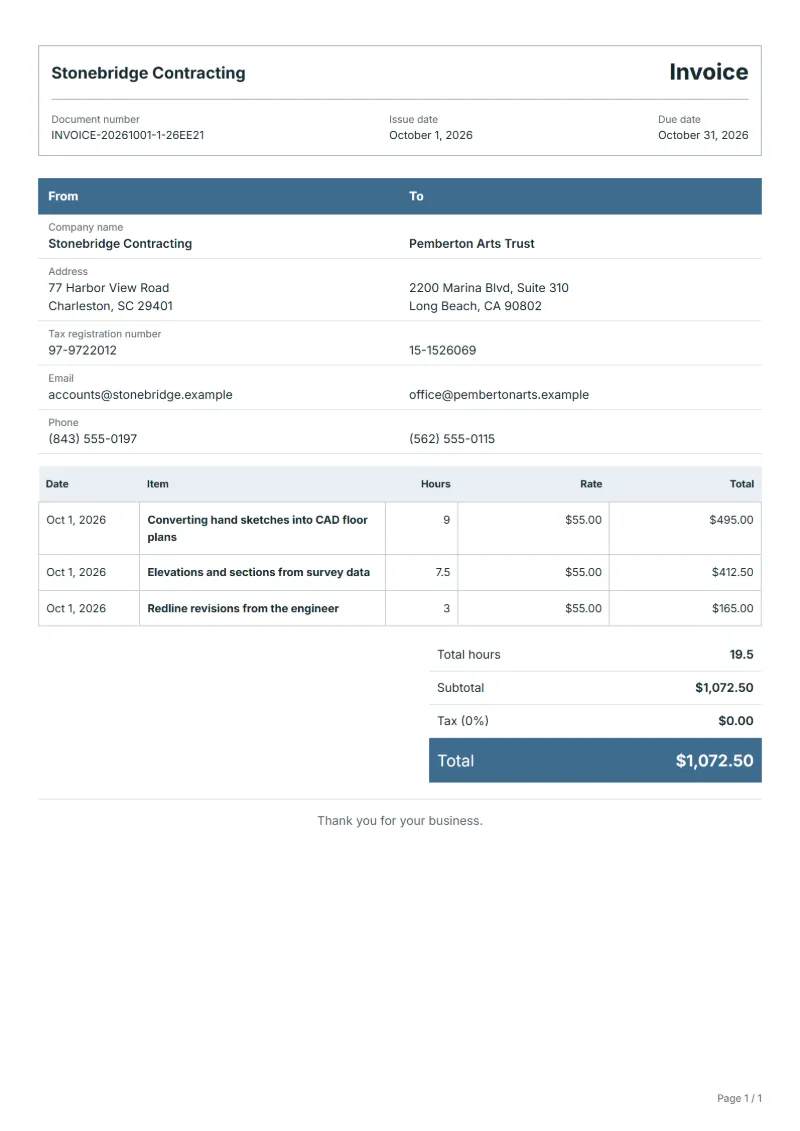
CAD drafting invoice template billed by the hour: sketches turned into floor plans, elevations and sections from survey data, and redline revisions, with dates.
Templates by industry
- Converting hand sketches into CAD floor plans
- Elevations and sections from survey data
- Redline revisions from the engineer
Preparation guide
Example workflow
Confirm scope and quantities
Example: reconcile the approval and work record for "Converting hand sketches into CAD floor plans" to establish the quantity for this invoice.
Record delivery and acceptance
Check completion for every line, including "Redline revisions from the engineer". Confirm completed quantities, site photos, agreed test results and any remaining remedial work.
Send the billing record
Send the final charges, delivery reference and due date to the customer, then reconcile payment against the invoice number.
Drafters who work for architects, builders and engineers are usually paid by the hour, and the person approving the invoice wants to know which sheets the hours went into. This template records the time against the type of drawing: turning a designer's sketches into clean floor plans, building elevations and sections from a measured survey, and working in an engineer's redlines. Every line carries a date, so the invoice reads like a short drawing log.
Fields to prepare
- Deliverables and line items
- Converting hand sketches into CAD floor plans, Elevations and sections from survey data, Redline revisions from the engineer: record the quantities actually supplied and the service period.
- Converting hand sketches into CAD floor plans
- List the sheets produced, such as ground floor and first floor, and note the scale and paper size of each.
- Elevations and sections from survey data
- Name the survey the drawings were based on and its date; time spent waiting for missing measurements is not billed.
- Redline revisions from the engineer
- Bill revision hours per marked-up set and quote the date written on the engineer's markup.
- Site and measured quantities
- Record the site, work zones, areas, lengths or counts, and access hours.
- Materials and work stages
- Specify materials, labor, removal, disposal and making-good allowances, and completion criteria for each stage.
- Scope to agree
- Log hours per drawing sheet, name the file format and layer standard delivered, and bill revisions only when they come from a marked-up set.
Before sending
- Does “Converting hand sketches into CAD floor plans” show the quantity actually supplied, not the quantity first quoted?
- Is “Elevations and sections from survey data” charged at the rate the customer agreed to, with any change approved?
- Is “Redline revisions from the engineer” finished and accepted, or does it belong on a later invoice?
Show 3 more
- Agree how quantity changes following measurement or drawing revisions will be approved.
- Confirm client-supplied materials and work that other contractors must finish first.
- Match completed work to the order or approval record, and confirm the payment due date and amounts already received.
Worked example with sample figures
The figures below are invented to show how the template adds up: 3 lines in USD, with an example tax rate of 8%.
| Item | Hours × rate | Amount |
|---|---|---|
| Converting hand sketches into CAD floor plans | 9 × $55.00 | $495.00 |
| Elevations and sections from survey data | 7.5 × $55.00 | $412.50 |
| Redline revisions from the engineer | 3 × $55.00 | $165.00 |
| Subtotal | $1,072.50 | |
| Sales tax (8%) | $85.80 | |
| Total | $1,158.30 | |
Net amount $1,072.50, sales tax $85.80, total payable $1,158.30.
- Hours in total: 19.5.
What the document must show
The details an invoice has to show, and why each one matters, are set out in the guide below.
The sales tax depends on where the work is supplied, so set the rate that applies to your customer before sending.
Official rate reference: US government: state and local taxes
Full requirements: How to write an invoice: a step-by-step example
Frequently asked questions
The client wants the drawings in a second CAD format. Is that extra?
Converting and checking files in another format takes time, so bill it as hours on its own line unless your quote included both formats.
Can I bill a site visit to take missing measurements myself?
Yes, if the client agreed to it before you went. Put the visit on its own line with the date, and keep it apart from drawing hours so the client sees why it was needed.
How is the sales tax worked out on this invoice?
The worked example above uses an example rate of 8%: $85.80 on a net amount of $1,072.50, for a total of $1,158.30. The editor recalculates all three when you change a quantity, a price or the country.
Can I change the layout and colour?
Yes. The editor offers other layouts and a document colour for the printed page. Changing them moves no figure: the lines and totals stay as they are, and the PDF, Word and Excel files follow the layout you pick.
Can I email it to the customer?
Yes, from your own mail app. With a free account, the editor’s download menu offers Email this document, which opens your mail app with a message about the document already written. QuoteBill sends nothing itself, so save the PDF and attach it before you send.
Read next
Reading for the CAD drafting invoice template: How to write an invoice: a step-by-step example and Credit note vs invoice (and credit memo): how to issue one. The VAT and GST calculator works out the tax line for you.