ABN invoice template
ABN invoice template for an Australian sole trader or small business that charges no GST: your ABN, the issue date and priced lines, with sample garden visits.
Templates by country
- Fortnightly lawn and garden visit
- Mulch and plants
- Green waste removal
Preparation guide
Example workflow
Confirm scope and quantities
Example: reconcile the approval and work record for "Fortnightly lawn and garden visit" to establish the quantity for this invoice.
Record delivery and acceptance
Check completion for every line, including "Green waste removal". Match the delivery record to approved quantities and record who accepted the work.
Send the billing record
Send the final charges, delivery reference and due date to the customer, then reconcile payment against the invoice number.
This version is for an Australian sole trader or small business with an ABN that does not charge GST, shown with the lines of a gardener who visits every fortnight. Regular work suits one invoice per visit or one a month; pick a rhythm and keep it, so customers know when to expect it. Beyond the ATO’s list on this page, what customers mostly ask is how to pay you and why no GST appears.
Fields to prepare
- Deliverables and line items
- Fortnightly lawn and garden visit, Mulch and plants, Green waste removal: record the quantities actually supplied and the service period.
- Fortnightly lawn and garden visit
- Give the visit dates in the description, for example 4 and 18 March, so two visits at the per-visit price are easy to check.
- Mulch and plants
- List materials bought for the job with the quantity, such as cubic metres of mulch and the number of plants, at the price you charge.
- Green waste removal
- Say whether it covers a trailer load or a tip fee, since customers weigh it against putting the waste in their own green bin.
- Quantity and billing unit
- Use the agreed unit, such as hours, units or a fixed project, and record both quantity and rate.
- Reference and dates
- Add the purchase reference, service period and delivery date to distinguish this work from other orders.
- Scope to agree
- Put your ABN on every invoice, with the issue date and the quantity and price of each item. From $1,000 add the customer’s name or ABN, and leave out the words “Tax invoice” when you do not charge GST.
Before sending
- Does “Fortnightly lawn and garden visit” show the quantity actually supplied, not the quantity first quoted?
- Is “Mulch and plants” charged at the rate the customer agreed to, with any change approved?
- Is “Green waste removal” finished and accepted, or does it belong on a later invoice?
Show 4 more
- Separate additional work from the original scope and check its approval record.
- Distinguish included expenses from separately billed expenses and reconcile supporting records.
- Match completed work to the order or approval record, and confirm the payment due date and amounts already received.
- Confirm document language (en), country setting (AU), and the customer's currency and date-format requirements.
Worked example with sample figures
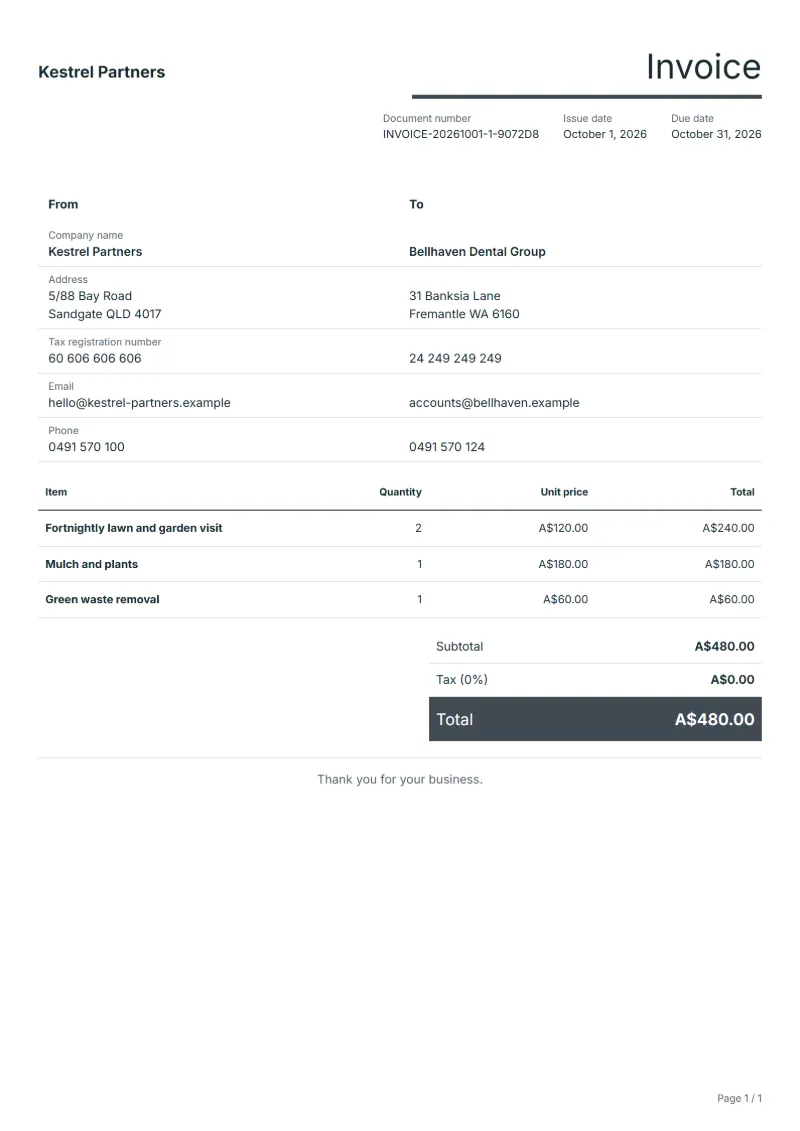
The figures below are invented to show how the template adds up: 3 lines in AUD, with no tax added.
| Item | Quantity × unit price | Amount |
|---|---|---|
| Fortnightly lawn and garden visit | 2 × A$120.00 | A$240.00 |
| Mulch and plants | 1 × A$180.00 | A$180.00 |
| Green waste removal | 1 × A$60.00 | A$60.00 |
| Total | A$480.00 | |
Net amount A$480.00, GST A$0.00, total payable A$480.00.
What the document must show
These details make an invoice easier to approve and to file.
- Your business name, address and registration or tax number
- The customer's name and address
- Issue date and a document number you do not reuse
- Each line item with quantity, unit price and amount
- Tax shown separately from the net amount, and the total payable
- Payment terms: due date, bank details or accepted payment methods
The GST here is 10%, applied to the net amount and shown as its own line.
What an Australian ABN invoice must show
This is an ordinary invoice for a sole trader or small business that quotes its ABN and does not charge GST. The ATO’s list for the tax invoice of a sale under $1,000 is the closest official list, so the rows follow it, with where each detail goes in QuoteBill.
- Your ABN
- The ATO lists the seller’s Australian business number among a tax invoice’s details and says a business that supplies goods or services should quote its ABN. Enter it as your tax registration number in the company details.
- The seller’s identity
- Your name or business name, in the company details.
- The date the invoice was issued
- A field of the document.
- A brief description of the items, with the quantity and the price
- One line for each job or item. The sample lines are a fortnightly garden visit, mulch and plants, and green waste removal: replace them with your own.
- The buyer’s identity or ABN, for $1,000 or more
- The ATO asks for it on tax invoices for sales of $1,000 or more. It costs nothing to add the customer’s name or ABN in the customer details on any invoice.
- The GST amount
- None: this template charges no GST, so its tax rate starts at 0% and the total is the sum of your lines.
A worked example
A gardener with an ABN who does not charge GST invoices two fortnightly visits at $120 each ($240), mulch and plants at $180 and green waste removal at $60. The total is $480, with the ABN near the top, the issue date, and the customer’s name and address under it.
These are the template’s sample lines with their sample prices. Replace them with your own work and your customer’s details.
This is not a tax invoice
The ATO describes tax invoices for taxable sales, and the seven details it lists include that the document is intended to be a tax invoice, the GST amount and the extent to which each sale is taxable. If you do not charge GST there is no GST amount and nothing taxable to describe, so use this ordinary invoice and leave out the words “Tax invoice”.
If you are registered for GST, use the Australian GST invoice template instead, which prints “Tax invoice” and shows GST on its own line.
When GST comes in
The ATO says not every business needs to be registered for GST. You must register when your GST turnover, your gross income from all businesses minus GST, is $75,000 or more, and in a few other cases such as taxi or limousine travel, including ride-sourcing. Otherwise registering is optional. You need an ABN before you register.
The ATO also says that if you do not register when you are required to, you may have to pay GST on sales made since the date you were required to register, even if you did not include GST in the price of those sales.
Why the ABN goes on every invoice
The ATO says that if a business supplies you with goods or services it should quote its ABN, and that if it does not, the business paying generally withholds the top rate of tax from the payment and sends it to the ATO. An invoice that shows your ABN gives your customer what they need to pay you in full.
The $82.50 line
If a customer asks for a tax invoice, a seller must provide one within 28 days unless the sale is $82.50 (including GST) or less. That is a rule about tax invoices, so it matters from the day you start charging GST, not for this template.
Questions about invoicing with an ABN
- Do I put my ABN on every invoice?
- Yes. The ATO says a supplier should quote its ABN, and that without one the payer generally withholds the top rate of tax from the payment.
- Where does the ABN go in QuoteBill?
- Set the country to Australia and enter it as your tax registration number in the company details.
- Can I email the invoice as a PDF?
- Yes. The ATO says a tax invoice does not need to be on paper and that emailing a PDF is fine as long as it carries all the required information. In QuoteBill, open the template and use Print / PDF, or download the Word or Excel file.
- What about sales of $1,000 or more?
- For tax invoices the ATO adds the buyer’s identity or ABN. Adding the customer’s name and address to every invoice covers it.
- Australian GST invoice template (GST on its own line)
- Guide: Australian tax invoice and GST requirements
Official sources: ATO: Tax invoices (2026-10-06)
Official sources: ATO: Registering for GST (2026-10-06)
Official sources: ATO: Withholding from suppliers (2026-10-06)
Official rate reference: ATO: how GST works
Full requirements: Australian tax invoice: GST requirements explained
Frequently asked questions
What payment details do Australian customers expect?
Your account name, BSB and account number, the due date and the invoice number to use as the payment reference. If you also accept card or PayID, say so on the invoice.
Should I write that no GST has been charged?
The ATO’s list does not ask for it. Some sole traders add a short line such as ‘No GST has been charged’ in the notes anyway, so a customer does not go looking for a GST amount.
How is the GST worked out on this invoice?
The GST here is 10%, applied to the net amount and shown as its own line. With nothing added, the total in the worked example above stays at the net amount of A$480.00.
Can I change the layout and colour?
Yes. The editor offers other layouts and a document colour for the printed page. Changing them moves no figure: the lines and totals stay as they are, and the PDF, Word and Excel files follow the layout you pick.
Can I email it to the customer?
Yes, from your own mail app. With a free account, the editor’s download menu offers Email this document, which opens your mail app with a message about the document already written. QuoteBill sends nothing itself, so save the PDF and attach it before you send.
Read next
Reading for the ABN invoice template: How to write an invoice: a step-by-step example and Credit note vs invoice (and credit memo): how to issue one. The VAT and GST calculator works out the tax line for you.