Reverse charge invoice template
Reverse charge invoice template: bill a business customer with no VAT added, both VAT numbers shown and the note that the customer accounts for the tax.
Templates by industry
- Software consulting, 12 days
- Remote support package, one month
- Training workshop for client staff
Preparation guide
Example workflow
Confirm scope and quantities
Example: reconcile the approval and work record for "Software consulting, 12 days" to establish the quantity for this invoice.
Record delivery and acceptance
Check completion for every line, including "Training workshop for client staff". Match the delivery record to approved quantities and record who accepted the work.
Send the billing record
Send the final charges, delivery reference and due date to the customer, then reconcile payment against the invoice number.
Under a reverse charge, the customer rather than the supplier accounts for the VAT on a sale. It typically applies to services sold to a business in another country, and some countries also use it at home for particular trades. The invoice then carries no tax amount, but it has to say why: both VAT numbers and a short note that the customer pays the tax. This template starts at 0% and leaves room for that note.
Fields to prepare
- Deliverables and line items
- Software consulting, 12 days, Remote support package, one month, Training workshop for client staff: record the quantities actually supplied and the service period.
- Software consulting, 12 days
- Describe the service and the days clearly; under a reverse charge the customer’s tax return relies on what the invoice says was supplied.
- Remote support package, one month
- For a monthly package, name the month covered, because the date of supply often decides the period in which the customer reports the tax.
- Training workshop for client staff
- If the workshop takes place at the client’s premises, check whether the place-of-supply rules treat it differently from remote work.
- Quantity and billing unit
- Use the agreed unit, such as hours, units or a fixed project, and record both quantity and rate.
- Reference and dates
- Add the purchase reference, service period and delivery date to distinguish this work from other orders.
- Scope to agree
- Show both parties’ VAT numbers, charge no tax on the lines, and add the reverse-charge note your tax authority expects, so the customer knows to account for the tax.
Before sending
- Does “Software consulting, 12 days” show the quantity actually supplied, not the quantity first quoted?
- Is “Remote support package, one month” charged at the rate the customer agreed to, with any change approved?
- Is “Training workshop for client staff” finished and accepted, or does it belong on a later invoice?
Show 3 more
- Separate additional work from the original scope and check its approval record.
- Distinguish included expenses from separately billed expenses and reconcile supporting records.
- Match completed work to the order or approval record, and confirm the payment due date and amounts already received.
Worked example: a month of consulting for a business abroad
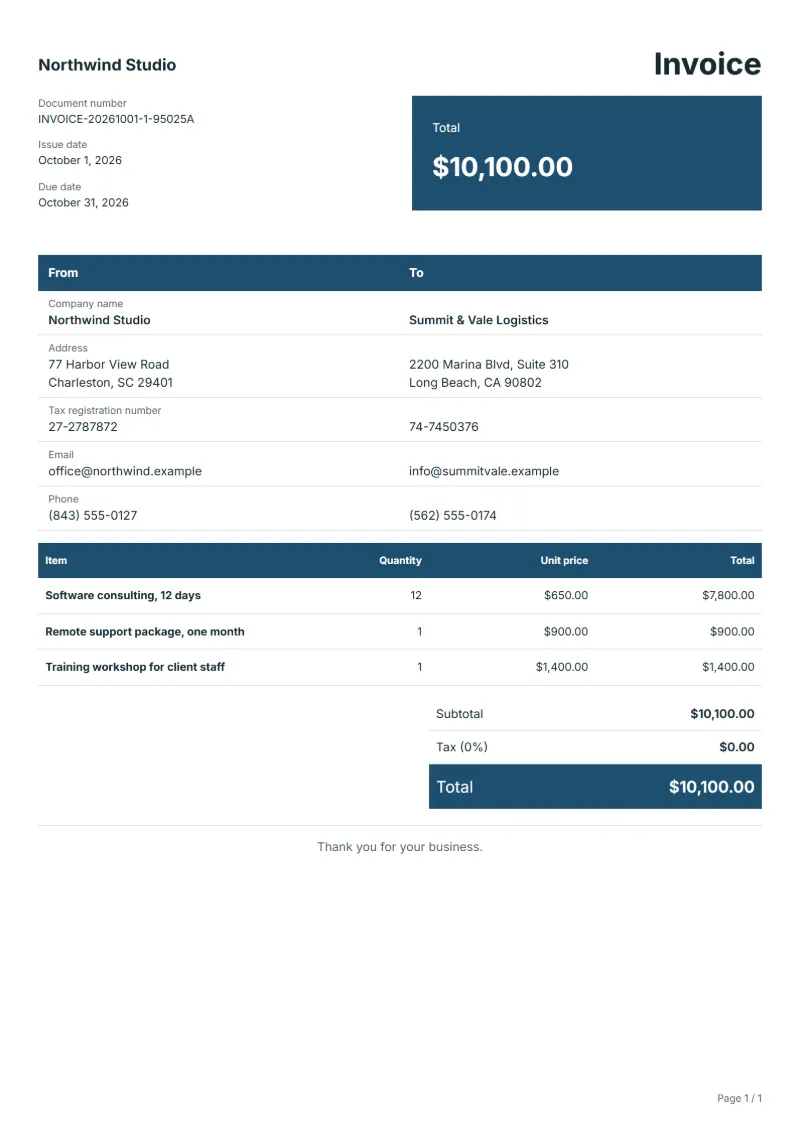
The figures are an example. A software consultant bills a business customer in another country for twelve consulting days at $650, a month of remote support at $900 and a staff workshop at $1,400. The customer accounts for the VAT under the reverse charge.
- Lines: 12 × $650, the support month and the workshop, each with no tax.
- Parties: your VAT number and the customer’s, checked in the official register.
- Notes: the reverse-charge wording your tax authority gives.
| Item | Quantity × unit price | Amount |
|---|---|---|
| Software consulting, 12 days | 12 × $650.00 | $7,800.00 |
| Remote support package, one month | 1 × $900.00 | $900.00 |
| Training workshop for client staff | 1 × $1,400.00 | $1,400.00 |
| Total | $10,100.00 | |
The lines add up to $10,100.00. No tax is added, so the amount due is $10,100.00; the customer works out the tax in its own return.
Common mistakes on a reverse charge invoice
- Charging VAT and writing “reverse charge” on the same invoice.
- Leaving out the customer’s VAT number, or using one that was never checked.
- Using the reverse charge for a private customer.
- Forgetting the note, so the customer does not know it must account for the tax.
- Not keeping proof that the customer is a business in another country.
What the document must show
These details make an invoice easier to approve and to file.
- Your business name, address and registration or tax number
- The customer's name and address
- Issue date and a document number you do not reuse
- Each line item with quantity, unit price and amount
- Tax shown separately from the net amount, and the total payable
- Payment terms: due date, bank details or accepted payment methods
The sales tax depends on where the work is supplied, so set the rate that applies to your customer before sending.
Official rate reference: US government: state and local taxes
Frequently asked questions
Which details must a reverse charge invoice carry?
Usually your VAT number, the customer’s VAT number, a note that the customer accounts for the tax, and no tax amount on the lines. Your tax authority’s list of invoice details decides the exact wording, so take it from their guidance rather than from another business’s invoice.
How do I check that the customer is really a business?
Verify their VAT number in the official register for their country, such as the EU’s VIES service for EU numbers, and keep a record of the check with the invoice. Without it you may be asked to show why you did not charge tax.
What do I enter in the tax field?
Set the rate to 0% for this invoice, as the template does, and put the reverse-charge note in the notes. Do not delete the tax line: a visible 0 next to the note shows that the omission is deliberate.
Can I use a reverse charge for a private customer abroad?
Generally not. Sales to consumers follow other rules, and for some digital services the tax of the customer’s country is due through a registration there. Check before invoicing anyone without a VAT number.
Does a reverse charge ever apply inside my own country?
Some countries apply a domestic reverse charge to particular trades, for example certain construction services or scrap metal. Whether your trade is on the list is set by your national rules; ask your adviser.
How is tax calculated on this template?
The sales tax depends on where the work is supplied, so set the rate that applies to your customer before sending. The editor keeps the net amount, the tax and the total apart, and recalculates all three when you change a quantity, a unit price or the country setting.
Can I email it to the customer?
Yes, from your own mail app. With a free account, the editor’s download menu offers Email this document, which opens your mail app with a message about the document already written. QuoteBill sends nothing itself, so save the PDF and attach it before you send.
Read next
Reading for the Reverse charge invoice template: How to write an invoice: a step-by-step example and Invoice numbering: sequences and corrections. The VAT and GST calculator works out the tax line for you.