Trade-in allowance credit note template
Trade-in allowance credit note template: credit the value agreed for a customer’s old machine against the sales invoice, item by item, after inspection.
Templates by industry
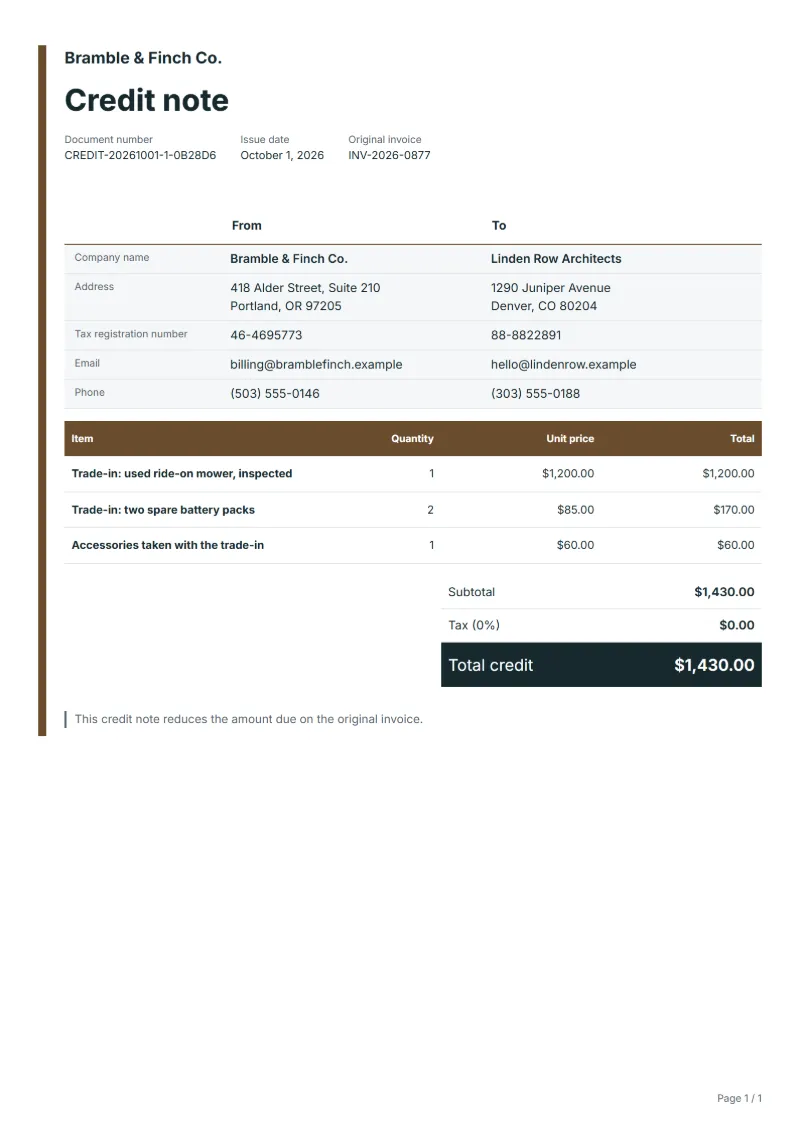
- Trade-in: used ride-on mower, inspected
- Trade-in: two spare battery packs
- Accessories taken with the trade-in
Preparation guide
Example workflow
Identify the invoice and the reason
Example: for "Trade-in: used ride-on mower, inspected", find the original invoice, note its number and date, and record the reason: a return, a price reduction or a cancellation.
Credit the affected lines
Enter the quantity or amount credited for each affected line, down to "Accessories taken with the trade-in", so the tax on it is reversed in proportion.
Send and settle the credit
Send the credit note to the customer, then refund the amount or set it off against the next invoice, and keep both documents together.
Machinery, garden equipment and vehicle dealers often sell the new item first and value the customer’s old one later, once it has been collected and checked. If the sales invoice has already gone out at the full price, the agreed trade-in value comes off it through a credit note. Listing the old machine, its batteries and accessories separately, with serial numbers, keeps the record useful when the dealer resells them.
Fields to prepare
- Deliverables and line items
- Trade-in: used ride-on mower, inspected, Trade-in: two spare battery packs, Accessories taken with the trade-in: only the lines being reduced or cancelled, with the quantity or amount credited.
- Trade-in: used ride-on mower, inspected
- Record the model, serial number and hours or mileage of the machine, and the inspection that set its value.
- Trade-in: two spare battery packs
- Batteries wear out at a different rate from the machine; valuing them on their own line avoids arguments later.
- Accessories taken with the trade-in
- List accessories only if they have a resale value; anything taken for disposal belongs in the notes, not in the credit.
- Original invoice
- Quote the number and date of the invoice being corrected, and the reason: a return, a price reduction or a cancellation.
- Settlement
- Say how the credit is settled: refunded to the customer or set off against the next invoice.
- Scope to agree
- Identify the traded-in item by model and serial number, give the value agreed after inspection, and refer to the sales invoice the allowance reduces.
Before sending
- Is “Trade-in: used ride-on mower, inspected” one of the lines being corrected, at the price on the original invoice?
- Is the quantity or amount credited for “Trade-in: two spare battery packs” no more than was invoiced?
- Does the customer know why “Accessories taken with the trade-in” is credited: a return, a price change or a cancellation?
Show 3 more
- Credit only the affected lines, and reverse the tax on them at the rate the original invoice used.
- Give the credit note a number of its own rather than reusing or changing the original invoice number.
- Agree with the customer whether the credit is refunded or set off before you send it.
Worked example with sample figures
The figures below are invented to show how the template adds up: 3 lines in USD, with an example tax rate of 8%.
| Item | Quantity × unit price | Amount |
|---|---|---|
| Trade-in: used ride-on mower, inspected | 1 × $1,200.00 | $1,200.00 |
| Trade-in: two spare battery packs | 2 × $85.00 | $170.00 |
| Accessories taken with the trade-in | 1 × $60.00 | $60.00 |
| Subtotal | $1,430.00 | |
| Sales tax (8%) | $114.40 | |
| Total | $1,544.40 | |
Credit before tax $1,430.00, sales tax reversed $114.40, total credited $1,544.40.
- The credit corrects invoice INV-2026-0877.
What the document must show
The details a credit note has to show, and why each one matters, are set out in the guide below.
The sales tax depends on where the work is supplied, so set the rate that applies to your customer before sending.
Official rate reference: US government: state and local taxes
Full requirements: Credit note vs invoice (and credit memo): how to issue one
Frequently asked questions
Is a trade-in a credit note or a purchase from the customer?
It can be either. Some dealers treat it as a reduction of the sale, others as a separate purchase of the used item, which matters for tax, especially when the customer is a business or a margin scheme is used on resale. Agree the treatment with your adviser before choosing this template.
The machine was worth less than first estimated. What now?
Credit the value agreed after inspection, not the early estimate, and keep the inspection notes. If the customer refuses the lower figure, the trade-in can be cancelled and the old machine returned.
How is the sales tax worked out on this credit note?
The worked example above uses an example rate of 8%: $114.40 on a net amount of $1,430.00, for a total of $1,544.40. The editor recalculates all three when you change a quantity, a price or the country.
Why issue a credit note instead of editing the invoice?
An invoice you have sent is part of both parties' records. A credit note with its own number, the original invoice number and the reason reduces or cancels it, so both sets of books stay traceable.
Can I download it as Excel, Word or PDF?
Yes. A PDF needs no account: fill in the template and use Print / PDF. The Excel and Word files download from this page with a free account, and the spreadsheet keeps its formulas, so changing a quantity updates the tax and the total.
Read next
Reading for the Trade-in allowance credit note template: Credit note vs invoice (and credit memo): how to issue one and Invoice numbering: sequences and corrections. The VAT and GST calculator helps you credit the tax that went with the goods.