Security camera installation work order template
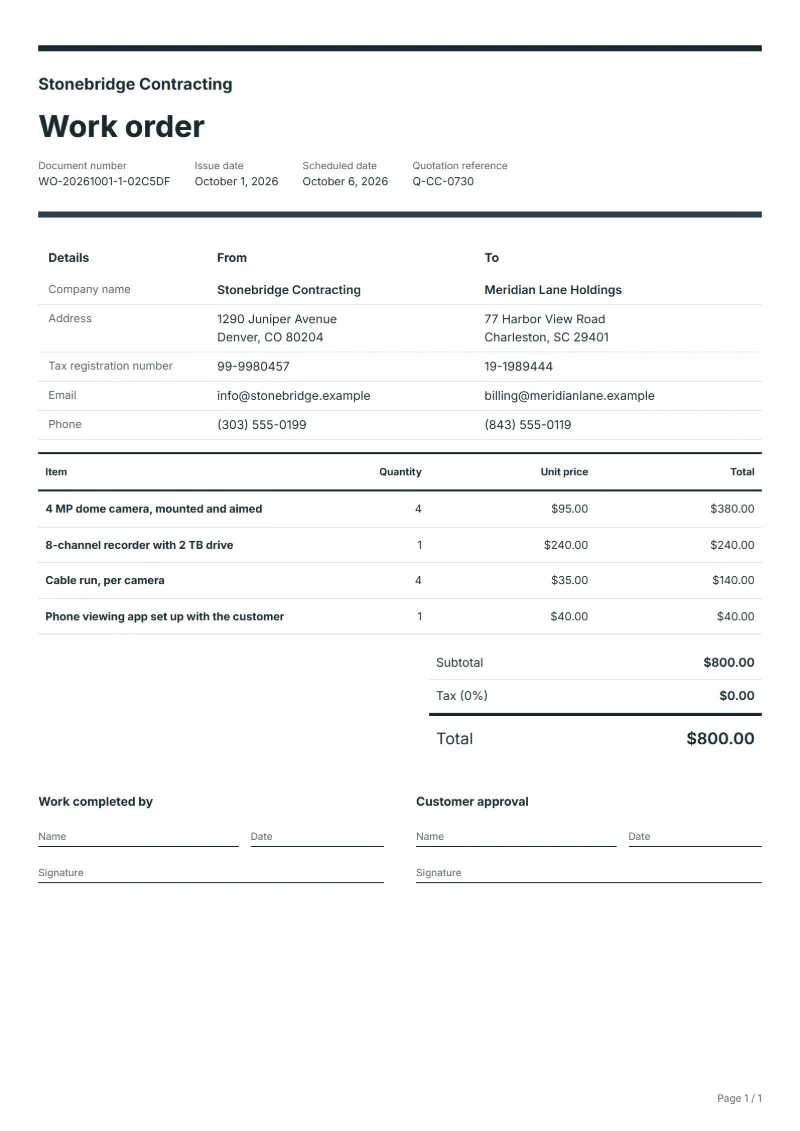
Security camera installation work order template: cameras, recorder, cable runs and app setup as priced lines, with positions, retention and password handover.
Templates by industry
- 4 MP dome camera, mounted and aimed
- 8-channel recorder with 2 TB drive
- Cable run, per camera
- Phone viewing app set up with the customer
Preparation guide
Example workflow
Plan the job
Example: start with "4 MP dome camera, mounted and aimed", set the scheduled date, assign the technician and note how to access the site.
Do the work
Record the time and materials actually used, including "Phone viewing app set up with the customer", and anything found that needs a separate quote.
Sign off and bill
Have the technician and the customer sign the completion lines, then make the invoice from the work order so the lines carry over.
A camera installation is planned on paper, but each position is settled on site with the customer pointing at where a camera should look. This work order records that agreement: the cameras and recorder as priced lines, the cable runs per camera, and the setup of viewing on the customer’s phone. It leaves room for a sketch of the positions and what each covers, the retention period set on the recorder, and how the password was handed over, which never goes on the paper itself.
Fields to prepare
- Deliverables and line items
- 4 MP dome camera, mounted and aimed, 8-channel recorder with 2 TB drive, Cable run, per camera, Phone viewing app set up with the customer: describe the work and materials planned for each line, with the time or quantity expected.
- 4 MP dome camera, mounted and aimed
- Number each camera, give its position and what it covers, and note if the customer moved one from the plan.
- 8-channel recorder with 2 TB drive
- Record the retention period set and the drive size, so the customer knows how far back footage goes.
- Cable run, per camera
- Give the cable length per camera and whether it runs inside, outside or through a wall.
- Phone viewing app set up with the customer
- Note which phones were set up and that the customer tested viewing before you left.
- Job site and schedule
- Give the job site address, the scheduled date and the person assigned, with any access or safety instructions.
- Time and materials
- Record the hours worked and the materials used on each line, as done rather than as planned.
- Scope to agree
- Mark each camera position and what it covers on a plan agreed with the customer, set the recording retention, and hand over the admin password in person, never on the work order.
Before sending
- Is it clear who does “4 MP dome camera, mounted and aimed”, where and when?
- Are the materials for “8-channel recorder with 2 TB drive” listed and on site before the job starts?
- Is there a sign-off for “Cable run, per camera” so the time can be invoiced afterwards?
Show 4 more
- Is it clear who does “Phone viewing app set up with the customer”, where and when?
- Check the job site address, the scheduled date, who is assigned, and any access or safety instructions.
- Agree with the customer which tasks are included, and note anything found on site that needs a separate quote.
- Have the customer check and sign off the work before you make the invoice.
Worked example with sample figures
The figures below are invented to show how the template adds up: 4 lines in USD, with an example tax rate of 8%.
| Item | Quantity × unit price | Amount |
|---|---|---|
| 4 MP dome camera, mounted and aimed | 4 × $95.00 | $380.00 |
| 8-channel recorder with 2 TB drive | 1 × $240.00 | $240.00 |
| Cable run, per camera | 4 × $35.00 | $140.00 |
| Phone viewing app set up with the customer | 1 × $40.00 | $40.00 |
| Subtotal | $800.00 | |
| Sales tax (8%) | $64.00 | |
| Total | $864.00 | |
Planned work $800.00 before tax, $864.00 with sales tax.
- The job follows quotation Q-CC-0730.
- The job is booked 5 days ahead.
What the document must show
These details make a work order easier to approve and to file.
- Work order number and date
- The customer's name and job site address
- Scheduled date and the person assigned
- Each task and the materials needed
- Time or quantity per line, and prices if shown
- Sign-off lines for the worker and the customer
The sales tax depends on where the work is supplied, so set the rate that applies to your customer before sending.
Official rate reference: US government: state and local taxes
Frequently asked questions
Where do I record the camera positions?
On a simple plan or sketch attached to the work order, with each camera numbered as on the lines. Note that the customer chose the views, especially near a boundary or a neighbour’s property.
Should the admin password be on the work order?
No. Hand it over in person or by a separate secure route, ask the customer to change it, and note on the work order only that the handover was done.
How is the sales tax worked out on this work order?
The worked example above uses an example rate of 8%: $64.00 on a net amount of $800.00, for a total of $864.00. The editor recalculates all three when you change a quantity, a price or the country.
Can I use it in another language or currency?
Yes. The document language can be set to any of 33 languages, and changing the country setting updates the currency, the date format and the tax rate.
Can I change the layout and colour?
Yes. The editor offers other layouts and a document colour for the printed page. Changing them moves no figure: the lines and totals stay as they are, and the PDF, Word and Excel files follow the layout you pick.
Read next
Reading for the Security camera installation work order template: How to write a statement of work (SOW), with an example and Estimate vs quote: what binds you, with a remodeling example. When the job is signed off, record it on the Acceptance certificate template.