Roof repair work order template
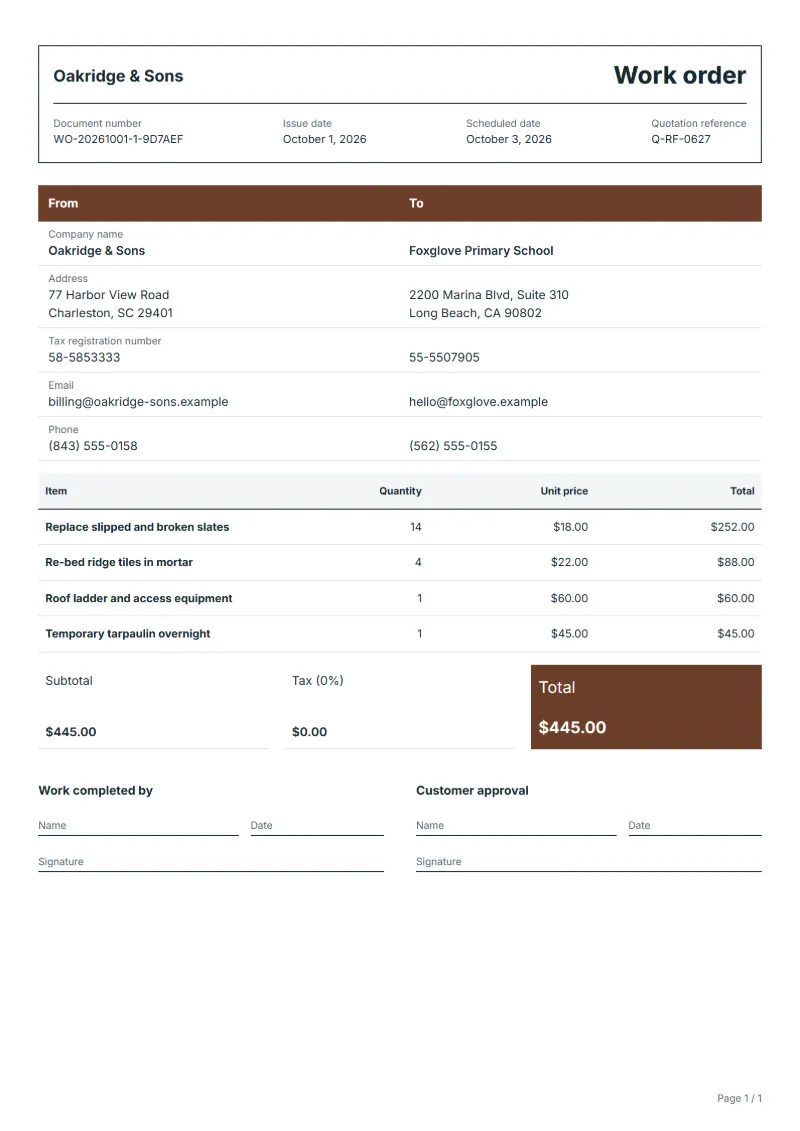
Roof repair work order template: slates, ridge tiles, access and temporary cover as priced lines, with the location on the roof, photos and extra findings.
Templates by industry
- Replace slipped and broken slates
- Re-bed ridge tiles in mortar
- Roof ladder and access equipment
- Temporary tarpaulin overnight
Preparation guide
Example workflow
Plan the job
Example: start with "Replace slipped and broken slates", set the scheduled date, assign the technician and note how to access the site.
Do the work
Record the time and materials actually used, including "Temporary tarpaulin overnight", and anything found that needs a separate quote.
Sign off and bill
Have the technician and the customer sign the completion lines, then make the invoice from the work order so the lines carry over.
A roof repair is usually ordered from the ground, from a photo or from a stain on a ceiling, and the roofer finds the real picture only once up there. This work order fixes the planned repairs as priced lines and says where on the roof each one is, front slope or rear, near the valley or the chimney. Access equipment and any overnight cover are separate lines. What the roofer sees beyond the order, such as cracked flashing, is noted for a quotation, not done on the spot.
Fields to prepare
- Deliverables and line items
- Replace slipped and broken slates, Re-bed ridge tiles in mortar, Roof ladder and access equipment, Temporary tarpaulin overnight: describe the work and materials planned for each line, with the time or quantity expected.
- Replace slipped and broken slates
- Count the slates replaced and say whether they match the existing ones or are the nearest available.
- Re-bed ridge tiles in mortar
- Give the number of ridge tiles re-bedded and whether mortar or a dry-fix system was used.
- Roof ladder and access equipment
- Say how the roof was reached and whether a scaffold will be needed for anything found.
- Temporary tarpaulin overnight
- Record when the tarpaulin went on and came off, and how it was weighted, in case of wind overnight.
- Job site and schedule
- Give the job site address, the scheduled date and the person assigned, with any access or safety instructions.
- Time and materials
- Record the hours worked and the materials used on each line, as done rather than as planned.
- Scope to agree
- Describe where on the roof each repair is, by elevation and position, take photos before and after, and list anything found beyond the order for a separate quotation.
Before sending
- Is it clear who does “Replace slipped and broken slates”, where and when?
- Are the materials for “Re-bed ridge tiles in mortar” listed and on site before the job starts?
- Is there a sign-off for “Roof ladder and access equipment” so the time can be invoiced afterwards?
Show 4 more
- Is it clear who does “Temporary tarpaulin overnight”, where and when?
- Check the job site address, the scheduled date, who is assigned, and any access or safety instructions.
- Agree with the customer which tasks are included, and note anything found on site that needs a separate quote.
- Have the customer check and sign off the work before you make the invoice.
Worked example with sample figures
The figures below are invented to show how the template adds up: 4 lines in USD, with an example tax rate of 8%.
| Item | Quantity × unit price | Amount |
|---|---|---|
| Replace slipped and broken slates | 14 × $18.00 | $252.00 |
| Re-bed ridge tiles in mortar | 4 × $22.00 | $88.00 |
| Roof ladder and access equipment | 1 × $60.00 | $60.00 |
| Temporary tarpaulin overnight | 1 × $45.00 | $45.00 |
| Subtotal | $445.00 | |
| Sales tax (8%) | $35.60 | |
| Total | $480.60 | |
Planned work $445.00 before tax, $480.60 with sales tax.
- The job follows quotation Q-RF-0627.
- The job is booked 2 days ahead.
What the document must show
These details make a work order easier to approve and to file.
- Work order number and date
- The customer's name and job site address
- Scheduled date and the person assigned
- Each task and the materials needed
- Time or quantity per line, and prices if shown
- Sign-off lines for the worker and the customer
The sales tax depends on where the work is supplied, so set the rate that applies to your customer before sending.
Official rate reference: US government: state and local taxes
Frequently asked questions
How do I describe where on the roof the work is?
Name the slope by the side of the building it faces and give a landmark, such as two courses below the ridge near the chimney. Photos with an arrow help the client.
What if more slates are broken than the work order allows?
Do what was ordered, photograph the rest and list it in the notes with a price. Replace more only once the client agrees.
How is the sales tax worked out on this work order?
The worked example above uses an example rate of 8%: $35.60 on a net amount of $445.00, for a total of $480.60. The editor recalculates all three when you change a quantity, a price or the country.
How does a work order become an invoice?
When the job is done, open the work order and make an invoice from it. The lines, customer and prices carry over, and the work order stays as the record of what was agreed and done.
Can I add my logo and signature?
Yes. The From section of the editor has a place for your company logo and for a signature or seal image. Uploading a picture needs a free account, and a member can keep both in settings so that every new document starts with them.
Read next
Reading for the Roof repair work order template: How to write a statement of work (SOW), with an example and Quote, proforma, invoice, receipt, credit note: which to use. When the job is signed off, record it on the Acceptance certificate template.