Price adjustment credit note template
Price adjustment credit note template: invoiced and agreed prices per line, a late volume discount or a freight overcharge, against the original invoice.
Templates by industry
- Unit price correction
- Retroactive volume discount
- Freight overcharge
Preparation guide
Example workflow
Identify the invoice and the reason
Example: for "Unit price correction", find the original invoice, note its number and date, and record the reason: a return, a price reduction or a cancellation.
Credit the affected lines
Enter the quantity or amount credited for each affected line, down to "Freight overcharge", so the tax on it is reversed in proportion.
Send and settle the credit
Send the credit note to the customer, then refund the amount or set it off against the next invoice, and keep both documents together.
Use this credit note when the goods were right but the money was not: a unit price was keyed in wrongly, a volume discount should have applied, or freight was billed above the agreed rate. Each line credits only the difference, so the quantity column carries the units affected and the price column the amount by which each was overcharged. That makes the credit easy to check against the contract or price list, line by line.
Fields to prepare
- Deliverables and line items
- Unit price correction, Retroactive volume discount, Freight overcharge: only the lines being reduced or cancelled, with the quantity or amount credited.
- Unit price correction
- Enter the units affected as the quantity and the overcharge per unit as the price, and quote both the invoiced and the agreed price in the description.
- Retroactive volume discount
- Name the volume threshold that was reached and the period it covers, and credit the discount on the invoices it applies to.
- Freight overcharge
- Quote the agreed freight rate or quotation and the amount billed, and credit only the excess.
- Original invoice
- Quote the number and date of the invoice being corrected, and the reason: a return, a price reduction or a cancellation.
- Settlement
- Say how the credit is settled: refunded to the customer or set off against the next invoice.
- Scope to agree
- Show the price invoiced and the price agreed for each line, so the difference credited can be checked against the contract or price list.
Before sending
- Is “Unit price correction” one of the lines being corrected, at the price on the original invoice?
- Is the quantity or amount credited for “Retroactive volume discount” no more than was invoiced?
- Does the customer know why “Freight overcharge” is credited: a return, a price change or a cancellation?
Show 3 more
- Credit only the affected lines, and reverse the tax on them at the rate the original invoice used.
- Give the credit note a number of its own rather than reusing or changing the original invoice number.
- Agree with the customer whether the credit is refunded or set off before you send it.
Worked example with sample figures
The figures below are invented to show how the template adds up: 3 lines in USD, with an example tax rate of 8%.
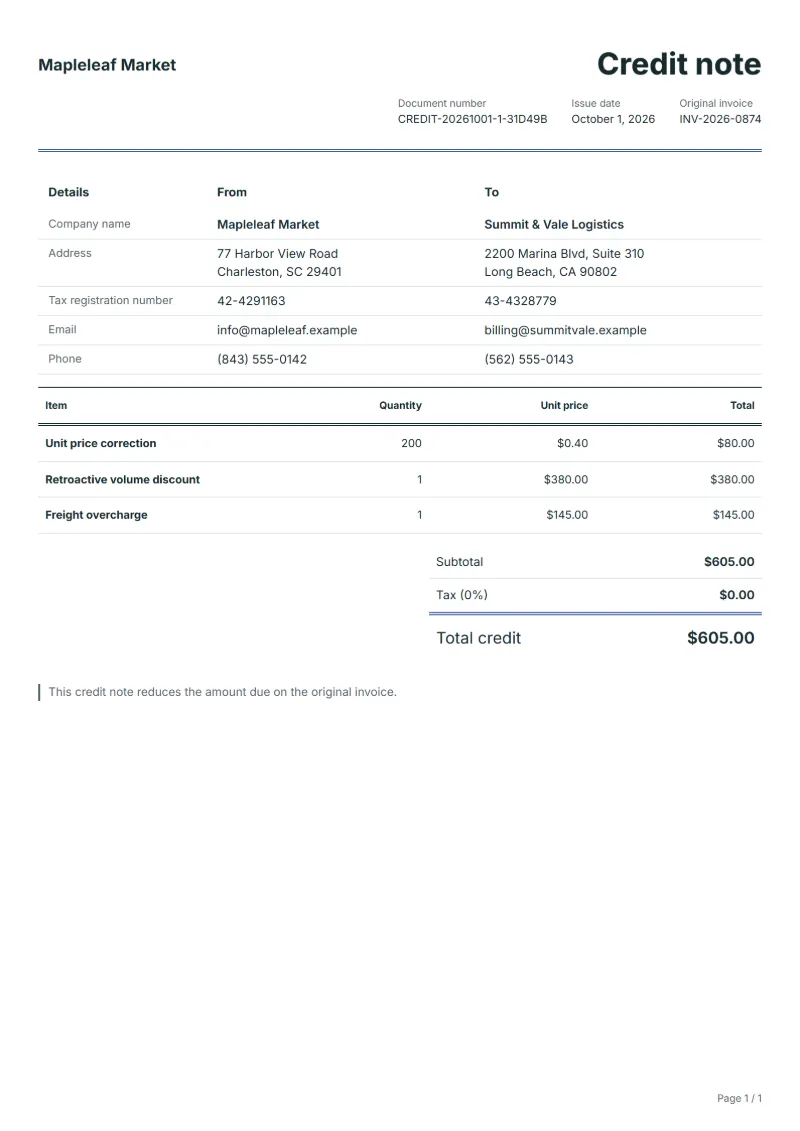
| Item | Quantity × unit price | Amount |
|---|---|---|
| Unit price correction | 200 × $0.40 | $80.00 |
| Retroactive volume discount | 1 × $380.00 | $380.00 |
| Freight overcharge | 1 × $145.00 | $145.00 |
| Subtotal | $605.00 | |
| Sales tax (8%) | $48.40 | |
| Total | $653.40 | |
Credit before tax $605.00, sales tax reversed $48.40, total credited $653.40.
- The credit corrects invoice INV-2026-0874.
What the document must show
The details a credit note has to show, and why each one matters, are set out in the guide below.
The sales tax depends on where the work is supplied, so set the rate that applies to your customer before sending.
Official rate reference: US government: state and local taxes
Full requirements: Credit note vs invoice (and credit memo): how to issue one
Frequently asked questions
What if the customer finds the overcharge months later?
Correct it when it is found, against the invoice that carried the wrong price: the credit note takes today’s date and quotes the original invoice number and date. Check whether your contract limits how far back such claims can go.
The customer has already paid the invoice. What happens to the credit?
Either refund the difference or hold it against the next invoice, and say which on the credit note. If the customer has not paid yet, they pay the original invoice less this credit.
How is the sales tax worked out on this credit note?
The worked example above uses an example rate of 8%: $48.40 on a net amount of $605.00, for a total of $653.40. The editor recalculates all three when you change a quantity, a price or the country.
Can I download it as Excel, Word or PDF?
Yes. A PDF needs no account: fill in the template and use Print / PDF. The Excel and Word files download from this page with a free account, and the spreadsheet keeps its formulas, so changing a quantity updates the tax and the total.
How is the document numbered?
QuoteBill gives each new document a unique number of its own. A member can switch to numbers in sequence in settings, such as CN-2026-0001: one sequence for each kind of document, starting again every calendar year. A number you type yourself is kept as it is.
Read next
Reading for the Price adjustment credit note template: Credit note vs invoice (and credit memo): how to issue one and Quote, proforma, invoice, receipt, credit note: which to use. The VAT and GST calculator helps you credit the tax that went with the goods.