Balance confirmation statement template
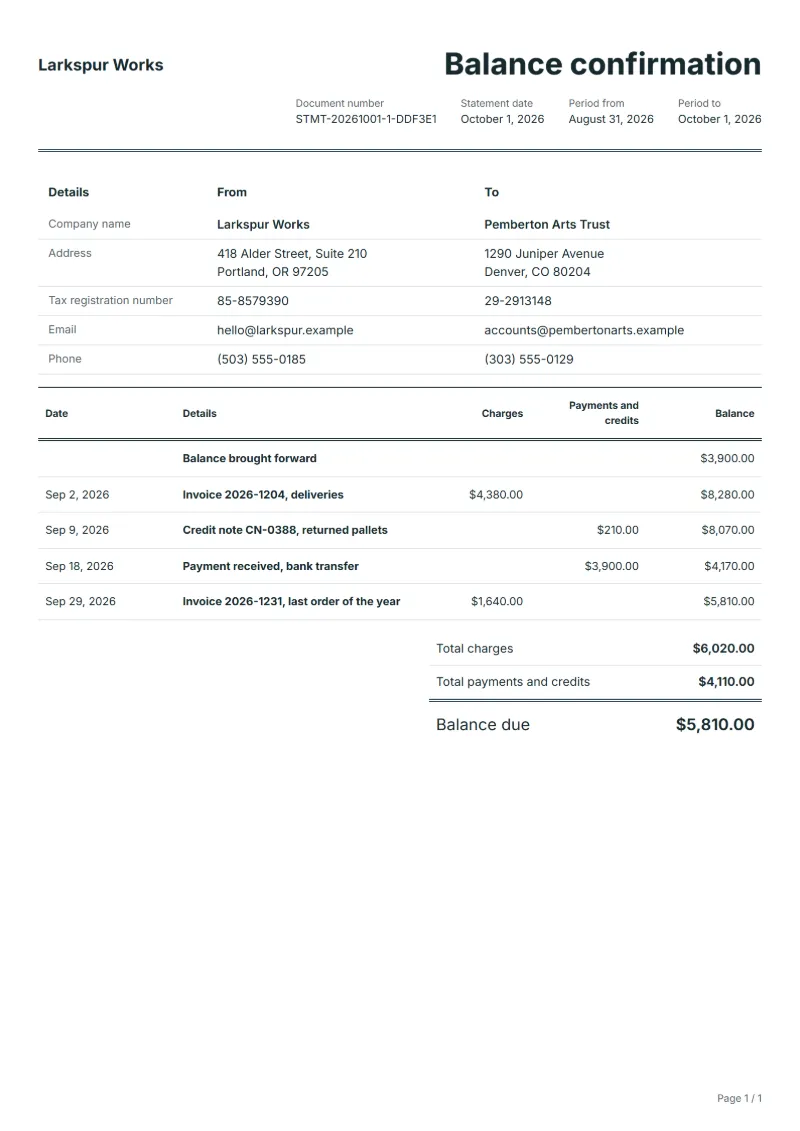
Balance confirmation statement template: the balance at a cut-off date with the open items behind it, for the other party to confirm or mark up before year-end.
Templates by industry
- Invoice 2026-1204, deliveries
- Credit note CN-0388, returned pallets
- Payment received, bank transfer
- Invoice 2026-1231, last order of the year
Preparation guide
Example workflow
Collect the period's documents
Example: list "Invoice 2026-1204, deliveries" and every other invoice, receipt and credit note for the customer in the period, oldest first.
Check the running balance
Confirm the balance after each line, including "Invoice 2026-1231, last order of the year", matches your accounts for this customer.
Send and follow up
Send the statement with the balance due and payment terms, then follow up on invoices past due.
Before closing the year, many businesses and their auditors want proof that receivables and payables agree with the other side’s books. A balance confirmation sends the customer or supplier the balance at the cut-off date, with the last month’s movements behind it, and asks for a signature or a list of differences. Differences found now, a missing credit note or a payment in transit, are cheap to fix; found during an audit, they are not.
Fields to prepare
- Deliverables and line items
- Invoice 2026-1204, deliveries, Credit note CN-0388, returned pallets, Payment received, bank transfer, Invoice 2026-1231, last order of the year: list each invoice, payment and credit by date, with its document number.
- Invoice 2026-1204, deliveries
- List each invoice still open at the cut-off date with its number and date, so the other side can find it quickly.
- Credit note CN-0388, returned pallets
- Show credit notes as they were issued; a credit the customer has not booked yet is the most common difference.
- Payment received, bank transfer
- A payment received shortly before the cut-off is often still in transit on the other side; give its date and amount.
- Invoice 2026-1231, last order of the year
- An invoice dated just before the cut-off may arrive after it; flag it so the customer does not report it as unknown.
- Period and balance brought forward
- Give the statement date and the period it covers, and carry over the balance from the previous statement.
- Charges and payments
- Enter each invoice under charges and each payment or credit note under payments and credits, at the amount on the document itself. "Add from my documents" copies those amounts from your saved documents for this customer.
- Scope to agree
- State the cut-off date, list the open items that make up the balance, and ask the other side to sign the confirmation or list the differences it sees.
Before sending
- Does “Invoice 2026-1204, deliveries” carry the number and amount of the document it comes from?
- Has every payment for “Credit note CN-0388, returned pallets” been entered on the day it arrived?
- Would the customer find “Payment received, bank transfer” in their own ledger at the same amount?
Show 4 more
- Does “Invoice 2026-1231, last order of the year” carry the number and amount of the document it comes from?
- Check the statement period, the balance brought forward and that every payment received is listed.
- List each invoice once, at the total it was issued for, and each credit note with the payments.
- Say how the customer can pay the balance due, and quote the numbers of any invoices past due.
Worked example with sample figures
The entries below are invented to show how the balance runs: 4 entries in USD over a period of 31 days.
- 29 days before the statement date: Invoice 2026-1204, deliveries, charged $4,380.00; balance $8,280.00
- 22 days before the statement date: Credit note CN-0388, returned pallets, paid $210.00; balance $8,070.00
- 13 days before the statement date: Payment received, bank transfer, paid $3,900.00; balance $4,170.00
- 2 days before the statement date: Invoice 2026-1231, last order of the year, charged $1,640.00; balance $5,810.00
Balance due at the end of the period: $5,810.00.
- Balance brought forward at the start: $3,900.00.
What the document must show
These details make a statement of account easier to approve and to file.
- Your company name and address
- The customer's name
- Statement date and period
- Balance brought forward
- Each invoice, payment and credit with date and number
- Running balance and balance due
A statement adds no tax of its own: each line carries an invoice, a payment or a credit at the amount on that document, and the balance runs on from the balance brought forward.
Frequently asked questions
Does the other side have to reply?
There is usually no obligation, but most businesses answer because they need the same check for their own audit. Give a reply date and a simple way to answer: sign as correct, or list the items that differ.
Is this the same as an ordinary statement of account?
The layout is similar, but the purpose differs: a statement asks for payment, a confirmation asks for agreement on a balance at a fixed date. Say clearly that no payment is requested by this document.
How is the balance on this statement worked out?
A statement adds no tax of its own: each line carries an invoice, a payment or a credit at the amount on that document, and the balance runs on from the balance brought forward. In the worked example above the entries end at a balance of $5,810.00.
Can I download it as Excel, Word or PDF?
Yes. A PDF needs no account: fill in the template and use Print / PDF. The Excel and Word files download from this page with a free account, and the spreadsheet keeps its formulas, so changing a charge or a payment updates the running balance and the balance due.
Can I use it in another language or currency?
Yes. The document language can be set to any of 33 languages, and changing the country setting updates the currency, the date format and the tax rate.
Read next
Reading for the Balance confirmation statement template: Unpaid invoice: follow-ups, part payments and statements and Quote, proforma, invoice, receipt, credit note: which to use. For an account that is overdue, the Payment reminder template is the next step.