Final balance invoice template
Final balance invoice template for the end of a job paid partly in advance: bill what remains after the deposit, add approved extras, show the contract sum.
Templates by industry
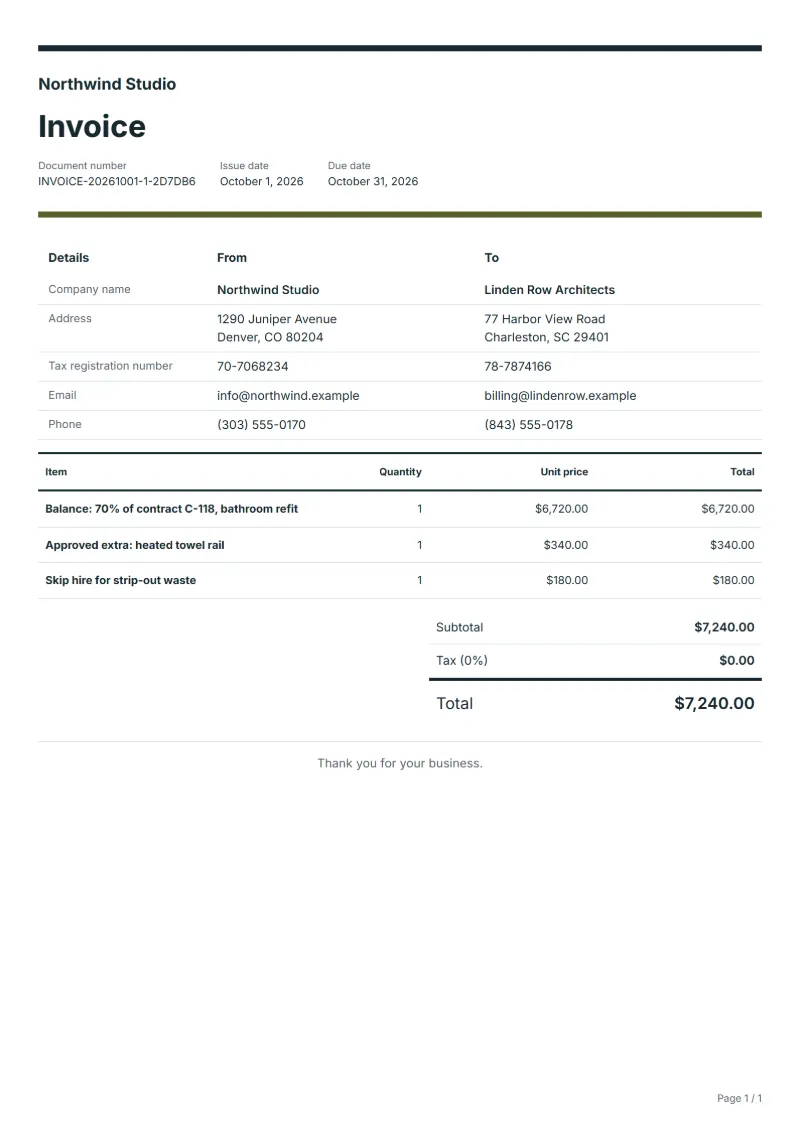
- Balance: 70% of contract C-118, bathroom refit
- Approved extra: heated towel rail
- Skip hire for strip-out waste
Preparation guide
Example workflow
Confirm scope and quantities
Example: reconcile the approval and work record for "Balance: 70% of contract C-118, bathroom refit" to establish the quantity for this invoice.
Record delivery and acceptance
Check completion for every line, including "Skip hire for strip-out waste". Match the delivery record to approved quantities and record who accepted the work.
Send the billing record
Send the final charges, delivery reference and due date to the customer, then reconcile payment against the invoice number.
This is the last invoice of a job that began with a deposit or a down payment. Its task is arithmetic the client can follow: the contract sum, what was invoiced in advance, what is billed now, and anything agreed along the way. The template bills the remaining share as one line, puts approved extras and unplanned costs below it, and leaves the notes for the contract sum and the earlier invoice number.
Fields to prepare
- Deliverables and line items
- Balance: 70% of contract C-118, bathroom refit, Approved extra: heated towel rail, Skip hire for strip-out waste: record the quantities actually supplied and the service period.
- Balance: 70% of contract C-118, bathroom refit
- Write the remaining percentage and the contract number; the client checks it against the deposit invoice they already paid.
- Approved extra: heated towel rail
- Bill an extra only with the date or reference of the client’s approval, so it cannot be mistaken for scope creep.
- Skip hire for strip-out waste
- Costs nobody priced, such as waste removal, need a sentence explaining why they arose before they are accepted.
- Quantity and billing unit
- Use the agreed unit, such as hours, units or a fixed project, and record both quantity and rate.
- Reference and dates
- Add the purchase reference, service period and delivery date to distinguish this work from other orders.
- Scope to agree
- Bill what is left of the contract after the deposit, keep extras agreed during the job on their own lines, and repeat the contract sum and the deposit invoice in the notes.
Before sending
- Does “Balance: 70% of contract C-118, bathroom refit” show the quantity actually supplied, not the quantity first quoted?
- Is “Approved extra: heated towel rail” charged at the rate the customer agreed to, with any change approved?
- Is “Skip hire for strip-out waste” finished and accepted, or does it belong on a later invoice?
Show 3 more
- Separate additional work from the original scope and check its approval record.
- Distinguish included expenses from separately billed expenses and reconcile supporting records.
- Match completed work to the order or approval record, and confirm the payment due date and amounts already received.
Worked example: closing a bathroom refit after a 30% deposit
The figures are an example, with an example tax rate of 8%. A bathroom fitter agreed a contract of $9,600 and was paid a 30% deposit of $2,880 before starting. The job ended with one extra the client approved on site and a skip nobody had priced.
- Balance: 70% of $9,600 is $6,720, billed with the contract number.
- Extra and skip: one line each, the extra with the date the client approved it.
- Notes: the contract sum of $9,600, the deposit invoice number and the date it was paid.
| Item | Quantity × unit price | Amount |
|---|---|---|
| Balance: 70% of contract C-118, bathroom refit | 1 × $6,720.00 | $6,720.00 |
| Approved extra: heated towel rail | 1 × $340.00 | $340.00 |
| Skip hire for strip-out waste | 1 × $180.00 | $180.00 |
| Subtotal | $7,240.00 | |
| Sales tax (8%) | $579.20 | |
| Total | $7,819.20 | |
The lines come to $7,240.00, tax at 8% adds $579.20, and the client is asked for $7,819.20. Together with the deposit, the client has paid the contract sum plus the two additions, and nothing twice.
Common mistakes on a final invoice
- Billing the whole contract price again without subtracting the deposit.
- Treating an unpaid deposit invoice as paid and closing the account too early.
- Leaving the deposit invoice number out, so the client cannot match the two.
- Folding approved extras into the balance line where nobody can see them.
- Charging tax a second time on the share that was taxed with the deposit.
What the document must show
These details make an invoice easier to approve and to file.
- Your business name, address and registration or tax number
- The customer's name and address
- Issue date and a document number you do not reuse
- Each line item with quantity, unit price and amount
- Tax shown separately from the net amount, and the total payable
- Payment terms: due date, bank details or accepted payment methods
The sales tax depends on where the work is supplied, so set the rate that applies to your customer before sending.
Official rate reference: US government: state and local taxes
Frequently asked questions
Should the final invoice show the full price or only what is left?
Either can work if the client can follow it. This template bills the remaining share and puts the contract sum and the deposit in the notes. Some tax systems want each advance deducted with its own tax amount shown, so check which form you need.
What if the deposit was larger than the amount left to pay?
Do not issue an invoice with a negative total. Close the job with a credit note for the difference, naming the deposit invoice, and refund or set off the amount as agreed.
The client never paid the deposit invoice. What now?
Do not treat it as paid. Bill the remaining share here and leave the deposit invoice open; a short note that it is still outstanding stops the client from thinking the final invoice covers everything.
Can I send the final invoice while snags are still open?
Only when your contract says the work is complete at that point. If a few items remain, either wait or agree in writing to hold back a sum until they are fixed, and say so in the notes.
Where do extras approved by phone go?
On their own lines, with the date of the call, and ideally a message confirming it. Extras folded into the balance line are the first thing a client questions.
How is tax calculated on this template?
The sales tax depends on where the work is supplied, so set the rate that applies to your customer before sending. The editor keeps the net amount, the tax and the total apart, and recalculates all three when you change a quantity, a unit price or the country setting.
Can I email it to the customer?
Yes, from your own mail app. With a free account, the editor’s download menu offers Email this document, which opens your mail app with a message about the document already written. QuoteBill sends nothing itself, so save the PDF and attach it before you send.
Read next
Reading for the Final balance invoice template: How to write an invoice: a step-by-step example and Invoice numbering: sequences and corrections. The VAT and GST calculator works out the tax line for you.