Payroll processing invoice
Invoice template for HR and accounting firms: payroll data collection, payslip preparation and payroll payment file generation. Download it as Excel or Word.
Templates by industry
- Payroll data collection
- Payslip preparation
- Payroll payment file generation
Preparation guide
Example workflow
Confirm scope and quantities
Example: reconcile the approval and work record for "Payroll data collection" to establish the quantity for this invoice.
Record delivery and acceptance
Check completion for every line, including "Payroll payment file generation". Match the client-approved version to the delivered file list and record unresolved items separately.
Send the billing record
Send the final charges, delivery reference and due date to the customer, then reconcile payment against the invoice number.
Payroll bureaus and accounting firms send this invoice for running a client’s payroll each pay period. It bills the service only: collecting hours and changes, producing the payslips and generating the bank file that pays the staff. The wages, taxes and contributions themselves are not on this invoice. The fee usually follows the number of employees paid, so give the headcount and the pay period, and keep employee names and salaries out of it; they belong in the payroll reports.
Fields to prepare
- Deliverables and line items
- Payroll data collection, Payslip preparation, Payroll payment file generation: record the quantities actually supplied and the service period.
- Payroll data collection
- Give the pay period and the cutoff date for the changes you collected, such as new starters and overtime.
- Payslip preparation
- Enter the number of payslips produced as the quantity; extra runs for corrections go on a separate line.
- Payroll payment file generation
- Name the pay date the file was prepared for and the date the client approved it.
- Processing period and volume
- Record the service month, transaction or headcount volume, source-data cutoff and missing inputs.
- Approval and delivery
- Name the client reviewer and define delivered files, submission date and included correction rounds.
- Scope to agree
- Record the payroll month and headcount, payslip counts, payment-file generation scope and client approval date.
Before sending
- Does “Payroll data collection” show the quantity actually supplied, not the quantity first quoted?
- Is “Payslip preparation” charged at the rate the customer agreed to, with any change approved?
- Is “Payroll payment file generation” finished and accepted, or does it belong on a later invoice?
Show 3 more
- Agree charges for late inputs and corrections after the cutoff.
- Use necessary service references on the invoice without including detailed personal records.
- Match completed work to the order or approval record, and confirm the payment due date and amounts already received.
Worked example with sample figures
The figures below are invented to show how the template adds up: 3 lines in USD, with an example tax rate of 8%.
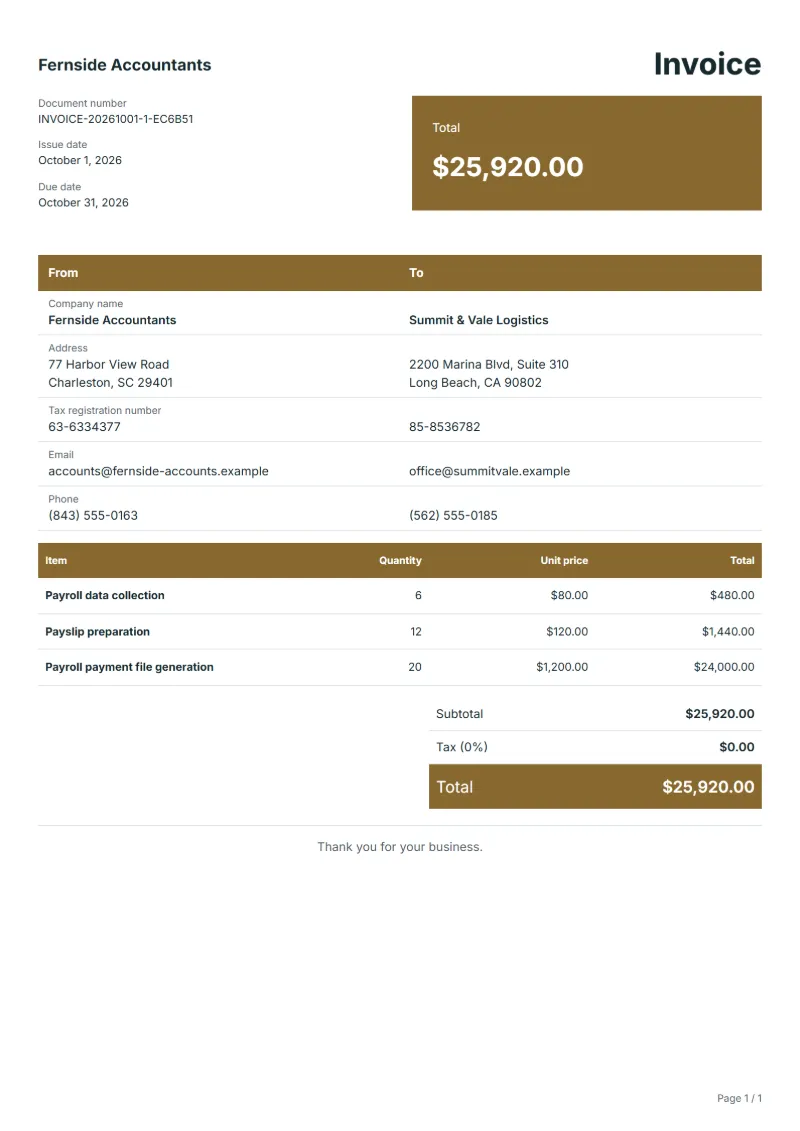
| Item | Quantity × unit price | Amount |
|---|---|---|
| Payroll data collection | 6 × $80.00 | $480.00 |
| Payslip preparation | 12 × $120.00 | $1,440.00 |
| Payroll payment file generation | 20 × $1,200.00 | $24,000.00 |
| Subtotal | $25,920.00 | |
| Sales tax (8%) | $2,073.60 | |
| Total | $27,993.60 | |
Net amount $25,920.00, sales tax $2,073.60, total payable $27,993.60.
What the document must show
The details an invoice has to show, and why each one matters, are set out in the guide below.
The sales tax depends on where the work is supplied, so set the rate that applies to your customer before sending.
Official rate reference: US government: state and local taxes
Full requirements: How to write an invoice: a step-by-step example
Frequently asked questions
How do I bill an off-cycle payroll run?
Add it as its own line with the date and the number of employees paid, at your rate for extra runs. A bonus payment outside the normal cycle or a correction after the main run are the usual reasons, and naming the reason helps the client approve it.
Should year-end payroll work be on the monthly invoice?
Bill annual tasks, such as year-end statements for employees, as separate lines in the month they are done. The regular monthly fee then stays comparable from month to month, and the client can see the annual work as a one-off.
How do I charge for setting up new employees?
Charge a one-off setup per new starter if you agreed it, with the number of starters as the quantity and no names on the invoice. The client can match the count with their own hiring records.
How is the sales tax worked out on this invoice?
The worked example above uses an example rate of 8%: $2,073.60 on a net amount of $25,920.00, for a total of $27,993.60. The editor recalculates all three when you change a quantity, a price or the country.
Can I download it as Excel, Word or PDF?
Yes. A PDF needs no account: fill in the template and use Print / PDF. The Excel and Word files download from this page with a free account, and the spreadsheet keeps its formulas, so changing a quantity updates the tax and the total.
Read next
Reading for the Payroll processing invoice: How to write an invoice: a step-by-step example and Credit note vs invoice (and credit memo): how to issue one. The VAT and GST calculator works out the tax line for you.