E-commerce website quotation template
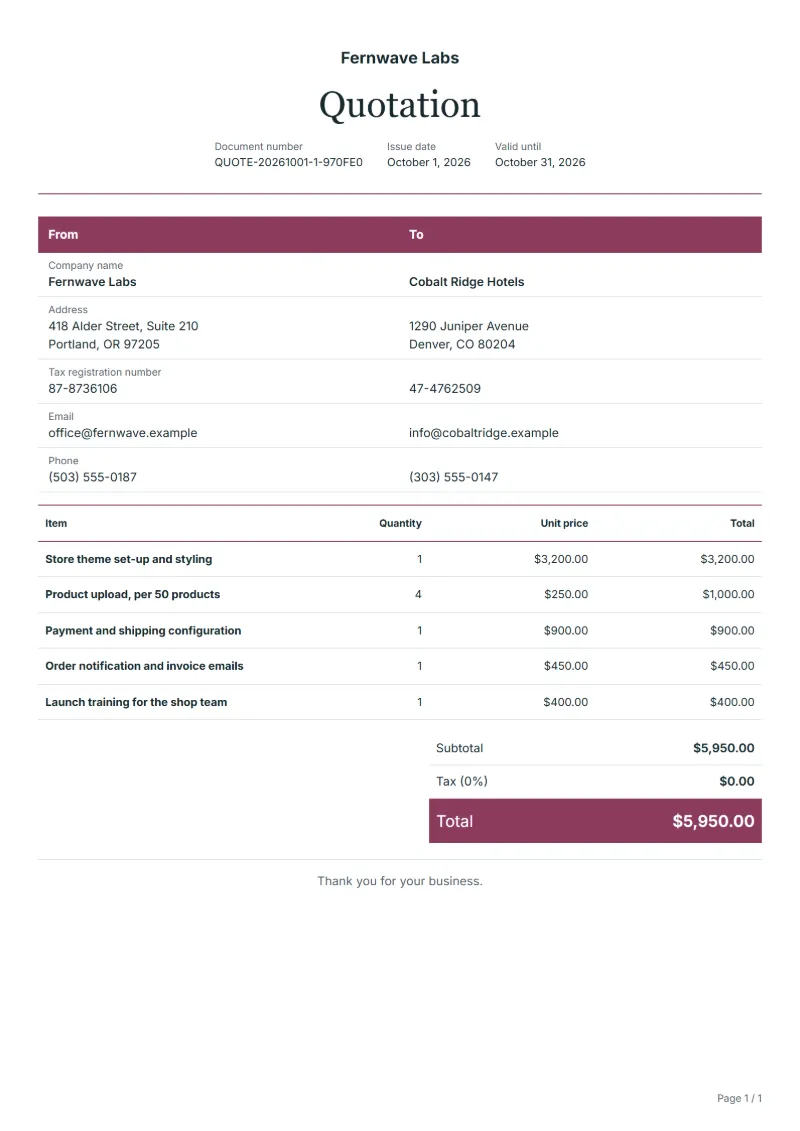
E-commerce website quotation template: theme set-up, product upload in batches, payment and shipping set-up, order emails and launch training.
Templates by industry
- Store theme set-up and styling
- Product upload, per 50 products
- Payment and shipping configuration
- Order notification and invoice emails
- Launch training for the shop team
Preparation guide
Example workflow
Confirm scope and quantities
Example: start with "Store theme set-up and styling", confirm the required quantity and client inputs, then agree completion criteria for each item.
Review and approve the quotation
Confirm acceptance evidence for "Launch training for the shop team", all line quantities, exclusions and quote validity with the customer, and retain the approved version.
Deliver and prepare billing
Deliver the agreed test results and configuration notes, and assign owners for outstanding items. When the agreed milestone is complete, prepare an invoice using actual quantities and approved changes.
Most small online shops are built on a hosted shop platform rather than from scratch, so a studio's quotation is mainly about design, content and settings. The work that grows fastest is product upload: two hundred products with photos, variants and descriptions take far longer than the theme. This template prices the design once, uploads in batches of fifty, payment and shipping configuration, the emails customers receive, and a short handover so the client's team can run the shop.
Fields to prepare
- Deliverables and line items
- Store theme set-up and styling, Product upload, per 50 products, Payment and shipping configuration, Order notification and invoice emails, Launch training for the shop team: specify the planned quantity and delivery scope for each item.
- Store theme set-up and styling
- Say how many page templates the design covers, such as home, category, product and checkout, and how many design rounds.
- Product upload, per 50 products
- Define what one product includes, for example up to five photos and three variants, and who supplies texts and pictures.
- Payment and shipping configuration
- List the payment methods and shipping zones set up; the client opens the payment accounts in its own name.
- Order notification and invoice emails
- Name the emails customised, such as order confirmation and shipping notice, and the languages they come in.
- Launch training for the shop team
- Give the length of the session and what the team will be able to do afterwards, such as adding products and refunding orders.
- Environment and dependencies
- Record target systems, integration counts, data volume and who supplies test access.
- Acceptance and support
- Set acceptance scenarios, the review window, support duration after handover and excluded work.
- Scope to agree
- Price product upload in batches, name the payment and shipping methods configured, and keep platform plans, apps and transaction fees out of your price.
Before sending
- Does “Store theme set-up and styling” say what is included and what quantity the price assumes?
- Would the customer read “Product upload, per 50 products” the way you do, including what it leaves out?
- Can you still honour the price of “Payment and shipping configuration” on the last day the quotation is valid?
Show 5 more
- Does “Order notification and invoice emails” say what is included and what quantity the price assumes?
- Would the customer read “Launch training for the shop team” the way you do, including what it leaves out?
- Separate third-party service charges from implementation fees.
- Agree who handles the production transition and what recovery work is included if it fails.
- Check quote validity, the customer approval method and payment milestones.
Worked example: a shop with two hundred products
The figures are an example, with an example tax rate of 8%. A studio quotes the theme design, upload of two hundred products in four batches, payment and shipping set-up, the order emails and one training session.
| Item | Quantity × unit price | Amount |
|---|---|---|
| Store theme set-up and styling | 1 × $3,200.00 | $3,200.00 |
| Product upload, per 50 products | 4 × $250.00 | $1,000.00 |
| Payment and shipping configuration | 1 × $900.00 | $900.00 |
| Order notification and invoice emails | 1 × $450.00 | $450.00 |
| Launch training for the shop team | 1 × $400.00 | $400.00 |
| Subtotal | $5,950.00 | |
| Sales tax (8%) | $476.00 | |
| Total | $6,426.00 | |
The five lines come to $5,950.00; tax at 8% is $476.00; the quotation total is $6,426.00. The platform plan and payment fees are named in the notes as the client's own running costs.
Common mistakes on an online shop quotation
- Pricing product upload as part of the design, so a larger catalogue swallows the margin.
- Not saying who supplies the product photos and texts.
- Reselling platform plans and payment fees inside the build price.
- Writing legal pages for the client without the expertise to do so.
- Launching without training, so every small change comes back as a support request.
What the document must show
These details make a quotation easier to approve and to file.
- Your business name, address and registration or tax number
- The customer's name and address
- Issue date and a document number you do not reuse
- Each line item with quantity, unit price and amount
- Tax shown separately from the net amount, and the total payable
- Payment terms: due date, bank details or accepted payment methods
The sales tax depends on where the work is supplied, so set the rate that applies to your customer before sending.
Official rate reference: US government: state and local taxes
Frequently asked questions
The client has 600 products, not 200. How does the price change?
Because upload is priced per batch of fifty, the line simply changes from four batches to twelve. Check whether the larger catalogue also needs more categories or filters, which belong in the design line.
Should the shop platform's monthly plan be on my quotation?
Name the plan the shop needs in the notes, but let the client subscribe directly. Plans, paid apps and payment fees then stay the client's running costs and never look like your margin.
Who writes the legal pages, such as returns and privacy?
Say in the notes that the client supplies them or has them checked. You can place them in the shop, but writing legal terms is not part of building it.
Can I quote a maintenance plan with the build?
Yes, as an option on a separate line with a monthly price and a list of what it covers. The client can accept the build alone and add the plan later.
How is tax calculated on this template?
The sales tax depends on where the work is supplied, so set the rate that applies to your customer before sending. The editor keeps the net amount, the tax and the total apart, and recalculates all three when you change a quantity, a unit price or the country setting.
Can I change the layout and colour?
Yes. The editor offers other layouts and a document colour for the printed page. Changing them moves no figure: the lines and totals stay as they are, and the PDF, Word and Excel files follow the layout you pick.
Read next
Reading for the E-commerce website quotation template: How to write a quotation: format, example and checklist and Estimate vs quote: what binds you, with a remodeling example. The VAT and GST calculator adds tax to your quoted prices.