Duplicate invoice credit note template
Duplicate invoice credit note template: cancel an invoice sent twice for the same order by crediting the copy in full, with both invoice numbers named.
Templates by industry
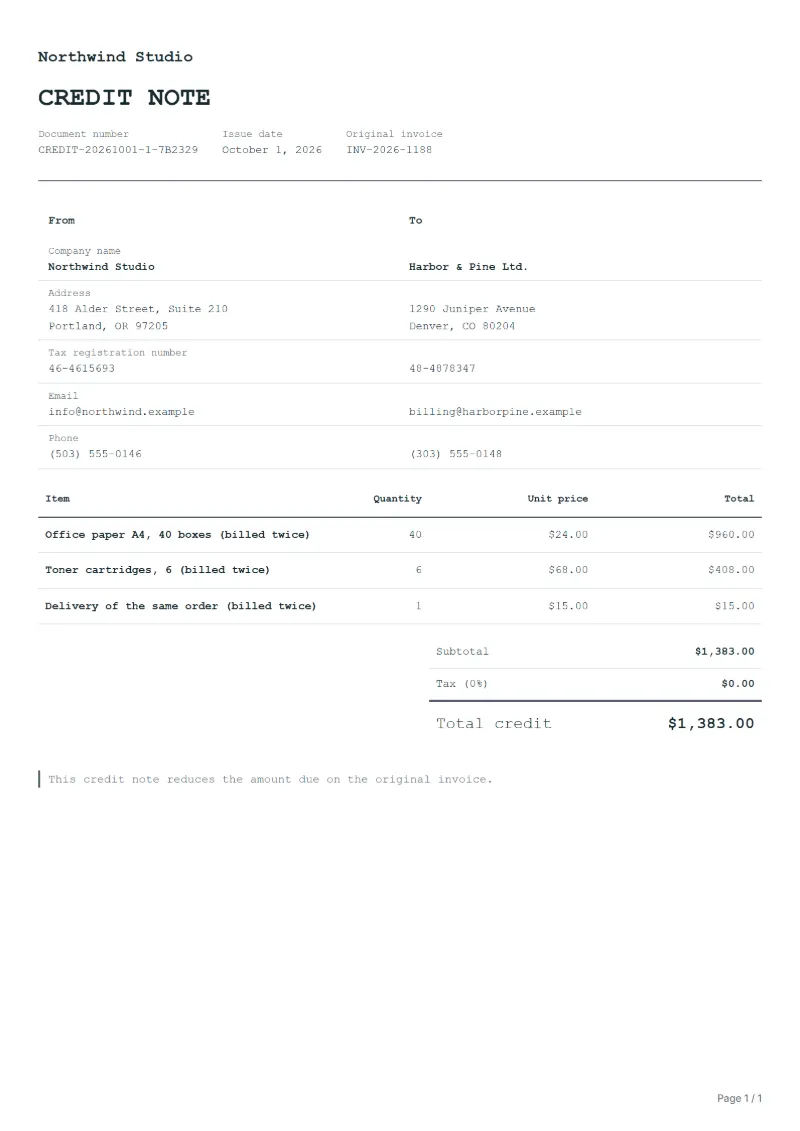
- Office paper A4, 40 boxes (billed twice)
- Toner cartridges, 6 (billed twice)
- Delivery of the same order (billed twice)
Preparation guide
Example workflow
Identify the invoice and the reason
Example: for "Office paper A4, 40 boxes (billed twice)", find the original invoice, note its number and date, and record the reason: a return, a price reduction or a cancellation.
Credit the affected lines
Enter the quantity or amount credited for each affected line, down to "Delivery of the same order (billed twice)", so the tax on it is reversed in proportion.
Send and settle the credit
Send the credit note to the customer, then refund the amount or set it off against the next invoice, and keep both documents together.
A system glitch, two people handling the same order, or an invoice re-sent with a new number instead of as a copy: duplicates happen, and an issued invoice cannot simply be deleted. The clean way out is a credit note that reverses the duplicate in full, line for line, so the customer’s ledger and yours show the same net result. This template repeats the duplicated lines exactly and names both invoice numbers.
Fields to prepare
- Deliverables and line items
- Office paper A4, 40 boxes (billed twice), Toner cartridges, 6 (billed twice), Delivery of the same order (billed twice): only the lines being reduced or cancelled, with the quantity or amount credited.
- Office paper A4, 40 boxes (billed twice)
- Copy the quantity and price exactly from the duplicate; any difference would leave a small balance open on both sides.
- Toner cartridges, 6 (billed twice)
- Credit every line of the duplicate, even small ones such as consumables, or the copy is only partly cancelled.
- Delivery of the same order (billed twice)
- If the delivery was charged on both invoices, the second charge goes too; only one truck arrived.
- Original invoice
- Quote the number and date of the invoice being corrected, and the reason: a return, a price reduction or a cancellation.
- Settlement
- Say how the credit is settled: refunded to the customer or set off against the next invoice.
- Scope to agree
- Name both invoices, the one that stays and the duplicate being cancelled, credit the duplicate line for line, and check whether the customer has already paid it.
Before sending
- Is “Office paper A4, 40 boxes (billed twice)” one of the lines being corrected, at the price on the original invoice?
- Is the quantity or amount credited for “Toner cartridges, 6 (billed twice)” no more than was invoiced?
- Does the customer know why “Delivery of the same order (billed twice)” is credited: a return, a price change or a cancellation?
Show 3 more
- Credit only the affected lines, and reverse the tax on them at the rate the original invoice used.
- Give the credit note a number of its own rather than reusing or changing the original invoice number.
- Agree with the customer whether the credit is refunded or set off before you send it.
Worked example with sample figures
The figures below are invented to show how the template adds up: 3 lines in USD, with an example tax rate of 8%.
| Item | Quantity × unit price | Amount |
|---|---|---|
| Office paper A4, 40 boxes (billed twice) | 40 × $24.00 | $960.00 |
| Toner cartridges, 6 (billed twice) | 6 × $68.00 | $408.00 |
| Delivery of the same order (billed twice) | 1 × $15.00 | $15.00 |
| Subtotal | $1,383.00 | |
| Sales tax (8%) | $110.64 | |
| Total | $1,493.64 | |
Credit before tax $1,383.00, sales tax reversed $110.64, total credited $1,493.64.
- The credit corrects invoice INV-2026-1188.
What the document must show
The details a credit note has to show, and why each one matters, are set out in the guide below.
The sales tax depends on where the work is supplied, so set the rate that applies to your customer before sending.
Official rate reference: US government: state and local taxes
Full requirements: Credit note vs invoice (and credit memo): how to issue one
Frequently asked questions
The customer paid both invoices. What now?
Issue the credit note, then refund the second payment or, if the customer agrees in writing, set it against the next invoice. Name the credit note in the refund reference.
Can I reuse the duplicate invoice number later?
No. Numbers must stay unique and in sequence; the duplicate keeps its number and is cancelled by this credit note, which gets a number of its own.
How is the sales tax worked out on this credit note?
The worked example above uses an example rate of 8%: $110.64 on a net amount of $1,383.00, for a total of $1,493.64. The editor recalculates all three when you change a quantity, a price or the country.
Is this template free?
Yes. You can fill in this template and print it or save it as a PDF without an account, and there is no payment step and no watermark on the document. Saving it to your account and downloading Excel or Word files need a free account.
Can I change the layout and colour?
Yes. The editor offers other layouts and a document colour for the printed page. Changing them moves no figure: the lines and totals stay as they are, and the PDF, Word and Excel files follow the layout you pick.
Read next
Reading for the Duplicate invoice credit note template: Credit note vs invoice (and credit memo): how to issue one and Unpaid invoice: follow-ups, part payments and statements. The VAT and GST calculator helps you credit the tax that went with the goods.