Auto repair work order template
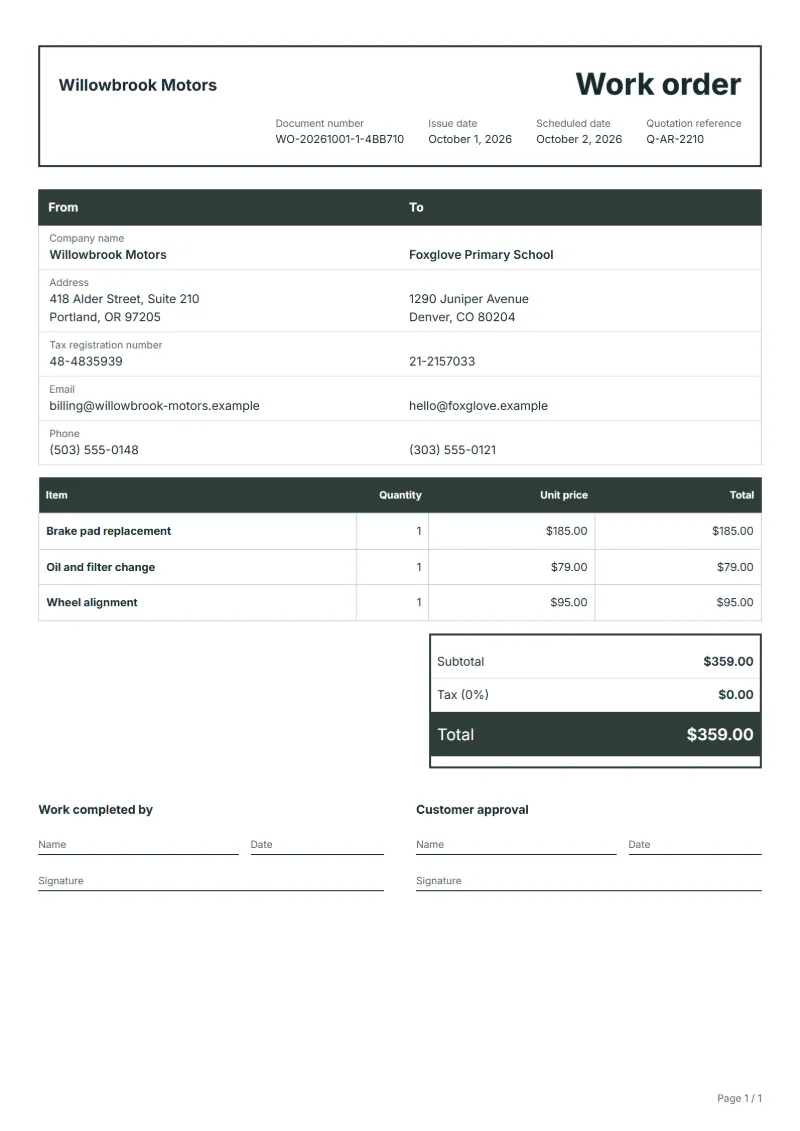
Auto repair work order template: plate number, mileage, the complaint, parts and labor per job, and customer approval before any work beyond the estimate.
Templates by industry
- Brake pad replacement
- Oil and filter change
- Wheel alignment
Preparation guide
Example workflow
Plan the job
Example: start with "Brake pad replacement", set the scheduled date, assign the technician and note how to access the site.
Do the work
Record the time and materials actually used, including "Wheel alignment", and anything found that needs a separate quote.
Sign off and bill
Have the technician and the customer sign the completion lines, then make the invoice from the work order so the lines carry over.
Garages open this work order, often called a job card, when a car is dropped off. The service desk writes down the plate, the mileage and the customer’s complaint in their own words, the technician works from the listed jobs, and anything found beyond them waits for the customer’s approval. Each job carries its parts and labour, so the finished work order becomes the invoice, and the customer can see what was replaced and what was only checked.
Fields to prepare
- Deliverables and line items
- Brake pad replacement, Oil and filter change, Wheel alignment: describe the work and materials planned for each line, with the time or quantity expected.
- Brake pad replacement
- Say which axle, the pad part number and the disc thickness you measured; new discs are a separate job that needs the customer’s approval.
- Oil and filter change
- Write the oil grade and the litres used as the manufacturer specifies, the filter part number and the mileage for the next service.
- Wheel alignment
- Attach the before and after readings from the alignment machine, and note tyre wear found while the car was on the rig.
- Job site and schedule
- Give the job site address, the scheduled date and the person assigned, with any access or safety instructions.
- Time and materials
- Record the hours worked and the materials used on each line, as done rather than as planned.
- Scope to agree
- Record the plate number, the mileage on arrival and the customer's complaint, and get approval before any work beyond the estimate.
Before sending
- Is it clear who does “Brake pad replacement”, where and when?
- Are the materials for “Oil and filter change” listed and on site before the job starts?
- Is there a sign-off for “Wheel alignment” so the time can be invoiced afterwards?
Show 3 more
- Check the job site address, the scheduled date, who is assigned, and any access or safety instructions.
- Agree with the customer which tasks are included, and note anything found on site that needs a separate quote.
- Have the customer check and sign off the work before you make the invoice.
Worked example with sample figures
The figures below are invented to show how the template adds up: 3 lines in USD, with an example tax rate of 8%.
| Item | Quantity × unit price | Amount |
|---|---|---|
| Brake pad replacement | 1 × $185.00 | $185.00 |
| Oil and filter change | 1 × $79.00 | $79.00 |
| Wheel alignment | 1 × $95.00 | $95.00 |
| Subtotal | $359.00 | |
| Sales tax (8%) | $28.72 | |
| Total | $387.72 | |
Planned work $359.00 before tax, $387.72 with sales tax.
- The job follows quotation Q-AR-2210.
- The job is booked for the next day.
What the document must show
These details make a work order easier to approve and to file.
- Work order number and date
- The customer's name and job site address
- Scheduled date and the person assigned
- Each task and the materials needed
- Time or quantity per line, and prices if shown
- Sign-off lines for the worker and the customer
The sales tax depends on where the work is supplied, so set the rate that applies to your customer before sending.
Official rate reference: US government: state and local taxes
Frequently asked questions
The technician finds worn discs halfway through. How is the extra work added?
Stop and contact the customer before fitting anything. Record on the work order who approved it, when, how and for what amount, then add the job as a new line; work done without that record is hard to charge.
Should old parts go back to the customer?
Offer them, and tick on the work order whether the customer wants them back. Some parts are returned to the supplier for an exchange credit instead, which is worth noting so the customer is not surprised to find them gone.
What should be recorded when the car is dropped off?
Besides plate, mileage and complaint, note existing scratches or dents, the fuel level and any warning lights already on, ideally with photos and the customer’s initials. It settles questions about damage before they arise.
How is the sales tax worked out on this work order?
The worked example above uses an example rate of 8%: $28.72 on a net amount of $359.00, for a total of $387.72. The editor recalculates all three when you change a quantity, a price or the country.
How does a work order become an invoice?
When the job is done, open the work order and make an invoice from it. The lines, customer and prices carry over, and the work order stays as the record of what was agreed and done.
Read next
Reading for the Auto repair work order template: How to write a statement of work (SOW), with an example and Quote to invoice: how to convert a quote, step by step. When the job is signed off, record it on the Acceptance certificate template.