Voice-over invoice template
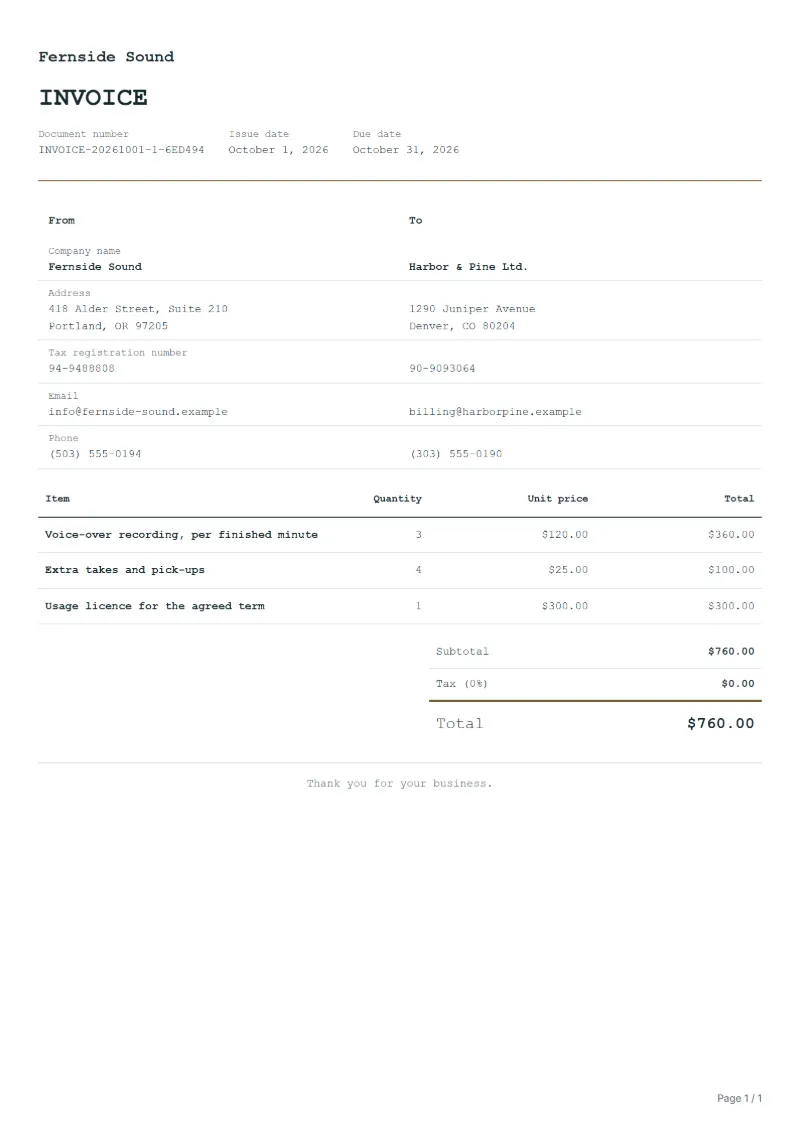
Voice-over invoice: recording by the finished minute, extra takes and pick-ups, and a usage licence for the agreed term, on separate lines. Word, Excel or PDF.
Templates by industry
- Voice-over recording, per finished minute
- Extra takes and pick-ups
- Usage licence for the agreed term
Preparation guide
Example workflow
Confirm scope and quantities
Example: reconcile the approval and work record for "Voice-over recording, per finished minute" to establish the quantity for this invoice.
Record delivery and acceptance
Check completion for every line, including "Usage licence for the agreed term". Hand over approved versions and a file manifest, confirming usage scope and completed revisions.
Send the billing record
Send the final charges, delivery reference and due date to the customer, then reconcile payment against the invoice number.
Voice actors and narrators send this invoice for corporate videos, e-learning, adverts and games. The recording is paid once, but the right to use it is limited to the media, territory and period agreed, which is why the licence has a line and dates of its own. When that period ends and the client wants to keep using the voice, the renewal is a new invoice for the licence alone. Pick-ups caused by script changes are billable; fixes for your own slips usually are not.
Fields to prepare
- Deliverables and line items
- Voice-over recording, per finished minute, Extra takes and pick-ups, Usage licence for the agreed term: record the quantities actually supplied and the service period.
- Voice-over recording, per finished minute
- Give the script title and the finished minutes, and say whether file editing and clean-up are included in the rate.
- Extra takes and pick-ups
- Bill pick-ups caused by script changes after the session, with the date of the change, and leave out fixes of your own slips.
- Usage licence for the agreed term
- Write the media, the territory and the start and end dates, so a renewal can be invoiced when the term runs out.
- Quantity and output format
- Record pages, images, word counts or running time, final file formats and whether editable source files are included.
- Review and usage scope
- Specify the draft approver, revision rounds, intended media and duration, and who supplies third-party assets.
- Scope to agree
- Give the finished minutes or word count, the session or studio fee and how many pick-ups are included. State the use the fee covers, meaning where, in which medium and for how long, and show a wider licence on a line of its own.
Before sending
- Does “Voice-over recording, per finished minute” show the quantity actually supplied, not the quantity first quoted?
- Is “Extra takes and pick-ups” charged at the rate the customer agreed to, with any change approved?
- Is “Usage licence for the agreed term” finished and accepted, or does it belong on a later invoice?
Show 3 more
- Agree when a change of direction after draft approval becomes additional work.
- Check separately whether editable sources and final delivery files are included.
- Match completed work to the order or approval record, and confirm the payment due date and amounts already received.
Worked example with sample figures
The figures below are invented to show how the template adds up: 3 lines in USD, with an example tax rate of 8%.
| Item | Quantity × unit price | Amount |
|---|---|---|
| Voice-over recording, per finished minute | 3 × $120.00 | $360.00 |
| Extra takes and pick-ups | 4 × $25.00 | $100.00 |
| Usage licence for the agreed term | 1 × $300.00 | $300.00 |
| Subtotal | $760.00 | |
| Sales tax (8%) | $60.80 | |
| Total | $820.80 | |
Net amount $760.00, sales tax $60.80, total payable $820.80.
What the document must show
The details an invoice has to show, and why each one matters, are set out in the guide below.
The sales tax depends on where the work is supplied, so set the rate that applies to your customer before sending.
Official rate reference: US government: state and local taxes
Full requirements: How to write an invoice: a step-by-step example
Frequently asked questions
The client wants the recording split into many named clips. Is that extra?
Delivering in one standard format is usually part of the fee. Cutting the recording into dozens of named files, for example one per e-learning slide, takes time, so agree it beforehand and price it as a line of its own.
Is a directed session billed differently?
If the client directs live by phone or video, the session usually runs longer, so many voice actors bill it by the hour or as a session fee rather than per finished minute. Agree which before the booking.
How is the sales tax worked out on this invoice?
The worked example above uses an example rate of 8%: $60.80 on a net amount of $760.00, for a total of $820.80. The editor recalculates all three when you change a quantity, a price or the country.
Can I download it as Excel, Word or PDF?
Yes. A PDF needs no account: fill in the template and use Print / PDF. The Excel and Word files download from this page with a free account, and the spreadsheet keeps its formulas, so changing a quantity updates the tax and the total.
Can I use it in another language or currency?
Yes. The document language can be set to any of 33 languages, and changing the country setting updates the currency, the date format and the tax rate.
Read next
Reading for the Voice-over invoice template: How to write an invoice: a step-by-step example and Credit note vs invoice (and credit memo): how to issue one. The VAT and GST calculator works out the tax line for you.