UX/UI design invoice template
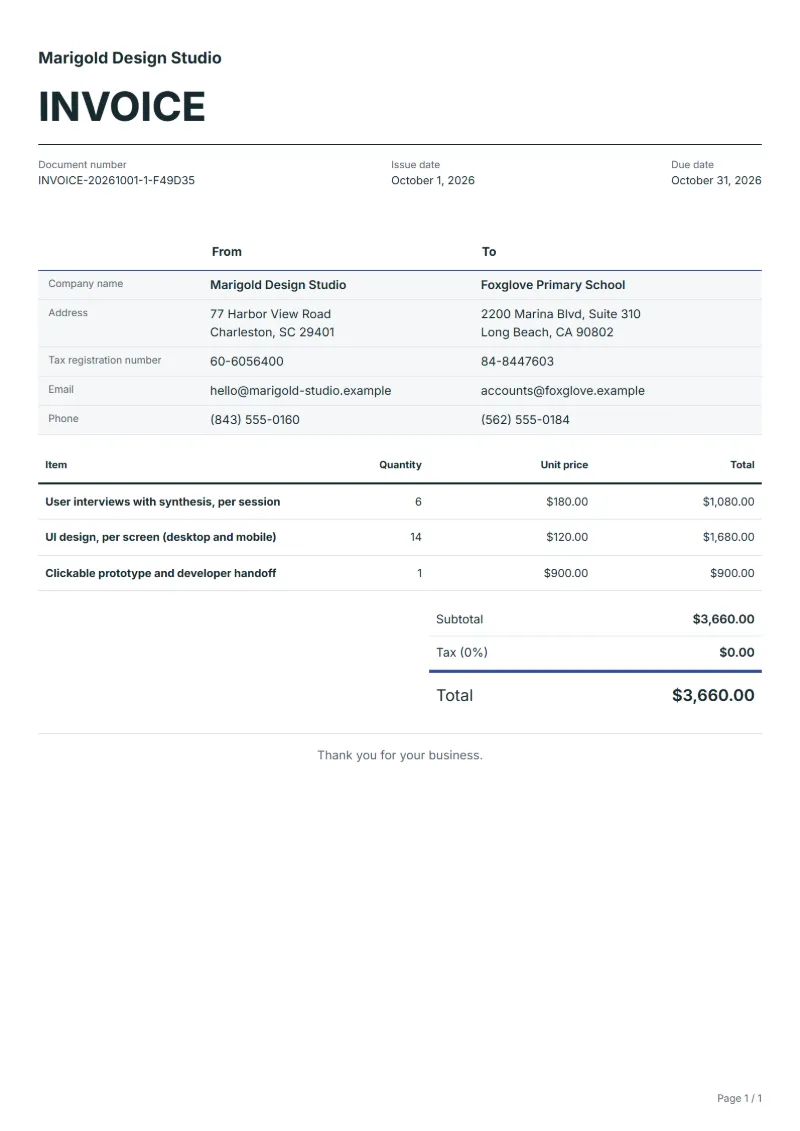
UX/UI design invoice template: bill user interviews, desktop and mobile screens and a clickable prototype on separate lines, with the file version handed over.
Templates by industry
- User interviews with synthesis, per session
- UI design, per screen (desktop and mobile)
- Clickable prototype and developer handoff
Preparation guide
Example workflow
Confirm scope and quantities
Example: reconcile the approval and work record for "User interviews with synthesis, per session" to establish the quantity for this invoice.
Record delivery and acceptance
Check completion for every line, including "Clickable prototype and developer handoff". Hand over approved versions and a file manifest, confirming usage scope and completed revisions.
Send the billing record
Send the final charges, delivery reference and due date to the customer, then reconcile payment against the invoice number.
Product design work usually reaches the client in three forms: findings from user interviews, finished screens, and a prototype the developers can click through. This invoice keeps them apart. Research is billed per session, interface design per screen with the device sizes stated, and the prototype together with its handoff as one deliverable. When the client later asks why the screen count grew, the line shows which layouts were added, and the handoff line records the design file version delivered.
Fields to prepare
- Deliverables and line items
- User interviews with synthesis, per session, UI design, per screen (desktop and mobile), Clickable prototype and developer handoff: record the quantities actually supplied and the service period.
- User interviews with synthesis, per session
- Count only sessions that took place and attach the synthesis; a no-show caused by the client is billable only if the proposal said so.
- UI design, per screen (desktop and mobile)
- Count a screen once per unique layout; hover, error and empty states of the same screen belong to it, not to new lines.
- Clickable prototype and developer handoff
- Name the design file and its version at handoff, so later change requests are measured against what was delivered.
- Quantity and output format
- Record pages, images, word counts or running time, final file formats and whether editable source files are included.
- Review and usage scope
- Specify the draft approver, revision rounds, intended media and duration, and who supplies third-party assets.
- Scope to agree
- Bill research, screens and the prototype on separate lines, count screens by unique layout rather than by state, and say which file version the client receives.
Before sending
- Does “User interviews with synthesis, per session” show the quantity actually supplied, not the quantity first quoted?
- Is “UI design, per screen (desktop and mobile)” charged at the rate the customer agreed to, with any change approved?
- Is “Clickable prototype and developer handoff” finished and accepted, or does it belong on a later invoice?
Show 3 more
- Agree when a change of direction after draft approval becomes additional work.
- Check separately whether editable sources and final delivery files are included.
- Match completed work to the order or approval record, and confirm the payment due date and amounts already received.
Worked example: redesigning a booking app
The figures are an example, with an example tax rate of 8%. A designer ran six user interviews, designed fourteen screens for desktop and mobile, and delivered a clickable prototype with the handoff file.
| Item | Quantity × unit price | Amount |
|---|---|---|
| User interviews with synthesis, per session | 6 × $180.00 | $1,080.00 |
| UI design, per screen (desktop and mobile) | 14 × $120.00 | $1,680.00 |
| Clickable prototype and developer handoff | 1 × $900.00 | $900.00 |
| Subtotal | $3,660.00 | |
| Sales tax (8%) | $292.80 | |
| Total | $3,952.80 | |
The lines come to $3,660.00, tax at 8% adds $292.80, and the invoice total is $3,952.80. Error and empty states were counted inside the fourteen screens, not billed again.
Common mistakes on a UX/UI design invoice
- Counting every state of a screen as a new screen, which inflates the total and invites a dispute.
- Billing interviews that were cancelled without pointing to the clause that allows it.
- Handing over files without a version number, so later changes cannot be told apart from fixes.
- Lumping research and screens into one fee the client cannot check against the proposal.
What the document must show
These details make an invoice easier to approve and to file.
- Your business name, address and registration or tax number
- The customer's name and address
- Issue date and a document number you do not reuse
- Each line item with quantity, unit price and amount
- Tax shown separately from the net amount, and the total payable
- Payment terms: due date, bank details or accepted payment methods
The sales tax depends on where the work is supplied, so set the rate that applies to your customer before sending.
Official rate reference: US government: state and local taxes
Frequently asked questions
How do I bill extra screens the client added halfway through?
Add them at the same per-screen price and name them, or move them to a later invoice if the proposal fixed the count. A short note that the client asked for them keeps the higher total from looking like an error.
Should the design tool subscription appear on the invoice?
Only if you agreed to pass it on, for example a seat bought for the client's own team. Tools you use yourself are part of your prices and get no line.
What if the client wants the source files as well as the exports?
Say on the handoff line whether editable source files are included. If they are an extra, bill them on a line of their own so their price is visible.
Can I invoice the research before the screens are finished?
Yes, when the project is billed in phases. Invoice the interview sessions when the synthesis is delivered, and put the screens and the prototype on the next invoice.
How is tax calculated on this template?
The sales tax depends on where the work is supplied, so set the rate that applies to your customer before sending. The editor keeps the net amount, the tax and the total apart, and recalculates all three when you change a quantity, a unit price or the country setting.
Can I change the layout and colour?
Yes. The editor offers other layouts and a document colour for the printed page. Changing them moves no figure: the lines and totals stay as they are, and the PDF, Word and Excel files follow the layout you pick.
Read next
Reading for the UX/UI design invoice template: How to write an invoice: a step-by-step example and Invoice numbering: sequences and corrections. The VAT and GST calculator works out the tax line for you.