Photography quotation template
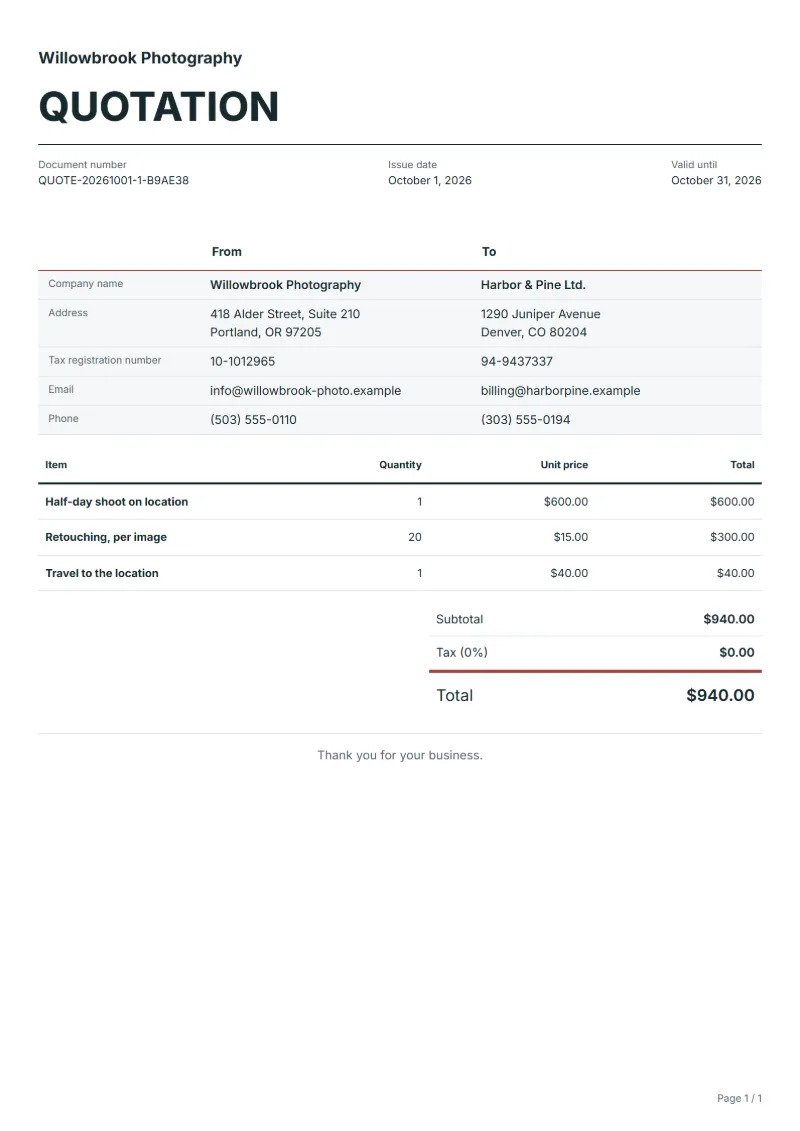
Photography quotation for a shoot on location: the session, retouching priced per image and travel, with the delivery format and how the images may be used.
Templates by industry
- Half-day shoot on location
- Retouching, per image
- Travel to the location
How to quote for a photo shoot
Example workflow
Price the shoot
Start with "Half-day shoot on location": the session length, the date and the place.
Review and approve the quotation
Go through every line down to "Travel to the location" with the customer, the uses of the images and what is excluded, and keep the approved version.
Shoot, deliver and invoice
Shoot and deliver the images; when the agreed milestone is complete, prepare the invoice from the actual quantities and any approved changes.
Photographers send this quotation to shops, small companies and families booking a shoot on location: products, staff portraits, an event or a family session at home. The customer will compare it with other quotes, so the basics that set the price, hours on site, the number of finished images and travel, sit on separate lines. Two questions are easily forgotten until the day itself: who arranges consent from the people in the photos, and whether you may show the images in your own portfolio.
Fields to prepare
- Deliverables and line items
- Half-day shoot on location, Retouching, per image, Travel to the location: price the shoot by the session, retouching by the image, and travel to the location as a separate line.
- Half-day shoot on location
- Say what happens if the shoot runs past the half day, for example a rate per extra hour agreed now rather than on the day.
- Retouching, per image
- Say which retouching the per-image price includes, such as colour, exposure and cropping, and what a deeper edit like removing objects costs.
- Travel to the location
- Quote travel as a fixed amount or by distance, and add parking or a location fee here if the customer is not paying it directly.
- Shoot and delivery
- State the date, the place, the length of the session, the number of retouched images, the format and resolution, and when and how they are delivered.
- Use and conditions
- Say how the customer may use the images (a website, print, advertising, and for how long), whether unedited files are included, and what happens if the shoot is moved for rain or cancelled.
- Scope to agree
- Set the shooting time and place, the number and format of retouched images delivered, how the images may be used, and what happens if it rains or the shoot is cancelled.
Before sending
- Does “Half-day shoot on location” say what is included and what quantity the price assumes?
- Would the customer read “Retouching, per image” the way you do, including what it leaves out?
- Can you still honour the price of “Travel to the location” on the last day the quotation is valid?
Show 3 more
- Agree the number of retouched images in advance, and the price of each extra one.
- Say who arranges permission to shoot at the location and pays any location fee.
- Check the quote validity, how the customer gives approval and the payment milestones, such as a booking deposit and the balance on delivery.
Worked example: a half-day shoot on location
The figures are an example, in dollars, with an example tax rate of 8%. A shop books a half-day product and portrait shoot at its premises, with 20 retouched images and travel.
| Item | Quantity × unit price | Amount |
|---|---|---|
| Half-day shoot on location | 1 × $600.00 | $600.00 |
| Retouching, per image | 20 × $15.00 | $300.00 |
| Travel to the location | 1 × $40.00 | $40.00 |
| Subtotal | $940.00 | |
| Sales tax (8%) | $75.20 | |
| Total | $1,015.20 | |
The shoot, the retouching and the travel add up to $940.00; tax at 8% is $75.20; the quote comes to $1,015.20. Each image beyond the 20 would be priced at the retouching rate.
Common mistakes on a photography quote
- Promising "all the photos" instead of a number of retouched images.
- Leaving out how the customer may use the images.
- Not saying whether unedited or RAW files are included.
- Forgetting travel or a location fee.
- Having no plan for rain or for a cancelled date.
What the document must show
These details make a quotation easier to approve and to file.
- Your business name, address and registration or tax number
- The customer's name and address
- Issue date and a document number you do not reuse
- Each line item with quantity, unit price and amount
- Tax shown separately from the net amount, and the total payable
- Payment terms: due date, bank details or accepted payment methods
The sales tax depends on where the work is supplied, so set the rate that applies to your customer before sending.
Official rate reference: US government: state and local taxes
Frequently asked questions
Photography quotation template: what should it include?
Start with the lines the template carries (Half-day shoot on location, Retouching, per image, Travel to the location) and change them to the shoot you are quoting. Then add your details, the customer, the date and place, and how long the quote is valid.
How many images should I promise?
A number you can deliver at the quality you show: say how many retouched images are included and what each extra one costs, rather than "all the good ones".
Do I hand over the unedited files?
Only if you agree to. Say on the quote whether unedited or RAW files are included, and price them if they are.
What may the customer do with the images?
Write the uses you agree to, such as their website and social media for a year, print, or advertising. A wider use can be quoted as its own line.
What if it rains on the day?
For an outdoor shoot, say how a new date is set and whether moving it costs anything, so neither side has to decide on the morning.
Should I ask for a deposit?
Many photographers take a deposit to hold the date. Say how much, when it is paid and whether it is refunded if the customer cancels.
Read next
Reading for the Photography quotation template: How to write a quotation: format, example and checklist and Quote to invoice: how to convert a quote, step by step. The VAT and GST calculator adds tax to your quoted prices.