UAE invoice template
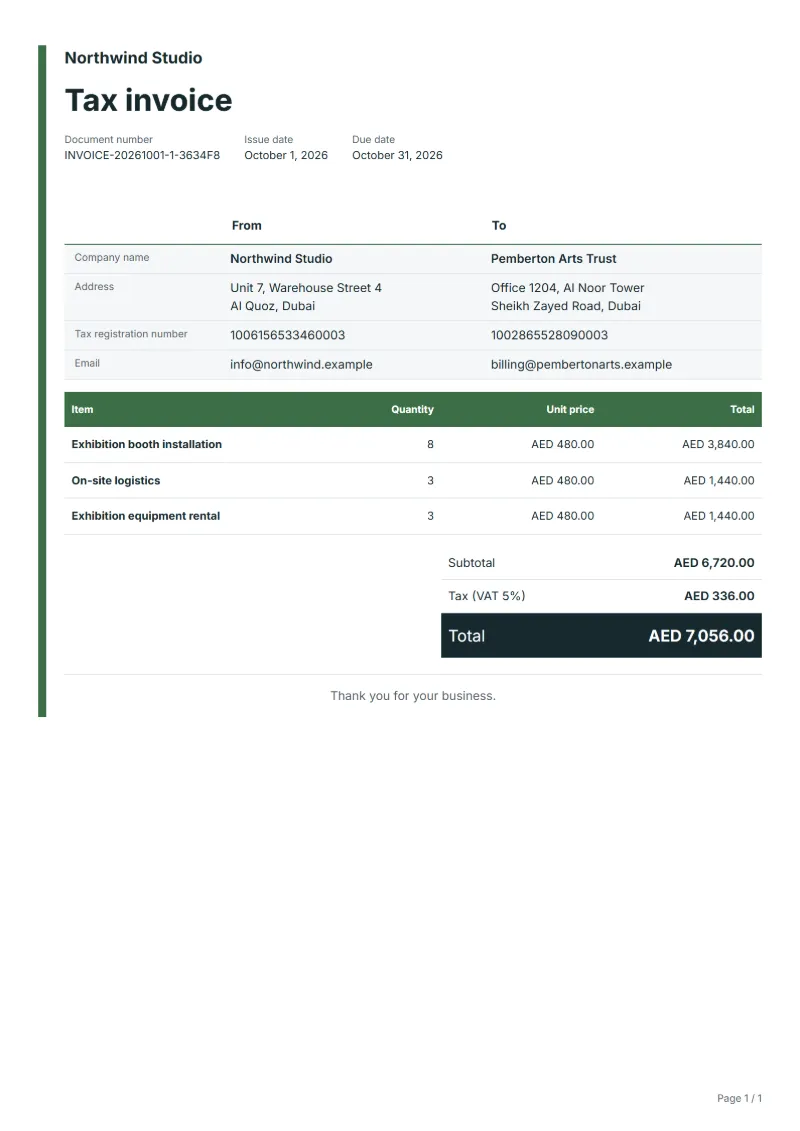
UAE invoice template with VAT shown on its own line and sample lines for exhibition booth installation, on-site logistics and equipment rental. Excel or Word.
Templates by country
- Exhibition booth installation
- On-site logistics
- Exhibition equipment rental
Preparation guide
Example workflow
Confirm scope and quantities
Example: reconcile the approval and work record for "Exhibition booth installation" to establish the quantity for this invoice.
Record delivery and acceptance
Check completion for every line, including "Exhibition equipment rental". Confirm actual operating hours and supplied quantities with the event contact and record approved extras.
Send the billing record
Send the final charges, delivery reference and due date to the customer, then reconcile payment against the invoice number.
Exhibition contractors in the UAE work to fixed show dates: build-up before opening, logistics while the show runs and breakdown right after it closes. This template invoices that job on a tax invoice, with the stand build, the on-site logistics and the rented equipment on separate lines. Exhibitors are often companies based abroad that pay from head office, so the invoice has to be complete enough for someone who never saw the stand to approve it.
Fields to prepare
- Deliverables and line items
- Exhibition booth installation, On-site logistics, Exhibition equipment rental: record the quantities actually supplied and the service period.
- Exhibition booth installation
- Name the show, hall and stand number, give the stand size in square meters, and state the build-up and breakdown dates.
- On-site logistics
- List the movements billed, such as unloading, storage of empty crates and reloading, with the number of pallets or forklift hours.
- Exhibition equipment rental
- List rented items with quantities and rental days, and state the condition they should come back in, so damage can be charged later on its own invoice.
- Event details and time
- Record the date, venue, attendance, and setup, rehearsal, operating and removal times.
- Staffing and supplies
- Specify staff counts and hours, supplied items and the responsibilities of external vendors.
- Scope to agree
- Record booth dimensions and installation and removal times, logistics routes, rental equipment and return dates.
Before sending
- Does “Exhibition booth installation” show the quantity actually supplied, not the quantity first quoted?
- Is “On-site logistics” charged at the rate the customer agreed to, with any change approved?
- Is “Exhibition equipment rental” finished and accepted, or does it belong on a later invoice?
Show 4 more
- Agree when attendance and schedules are finalized and how later changes are charged.
- Check whether overtime, transport, setup and removal are included.
- Match completed work to the order or approval record, and confirm the payment due date and amounts already received.
- Confirm document language (en), country setting (AE), and the customer's currency and date-format requirements.
Worked example with sample figures
The figures below are invented to show how the template adds up: 3 lines in AED, with VAT at 5%.
| Item | Quantity × unit price | Amount |
|---|---|---|
| Exhibition booth installation | 8 × AED 480.00 | AED 3,840.00 |
| On-site logistics | 3 × AED 480.00 | AED 1,440.00 |
| Exhibition equipment rental | 3 × AED 480.00 | AED 1,440.00 |
| Subtotal | AED 6,720.00 | |
| VAT (5%) | AED 336.00 | |
| Total | AED 7,056.00 | |
Net amount AED 6,720.00, VAT AED 336.00, total payable AED 7,056.00.
What the document must show
These details make an invoice easier to approve and to file.
- Your business name, address and registration or tax number
- The customer's name and address
- Issue date and a document number you do not reuse
- Each line item with quantity, unit price and amount
- Tax shown separately from the net amount, and the total payable
- Payment terms: due date, bank details or accepted payment methods
- A UAE tax invoice shows the words “Tax invoice”, the supplier’s name, address and TRN, the customer’s name and address (and TRN if registered), a sequential number, the date, and for each line the description, unit price, quantity, VAT rate and VAT amount in AED, plus the gross total.
- In the United Arab Emirates, invoices may have to be issued as e-invoices (an accredited Peppol-based service provider). A document made in QuoteBill is a printable copy, not a registered e-invoice. Check the rules that apply to you.
The VAT here is 5%, applied to the net amount and shown as its own line.
Required details in the United Arab Emirates
The Federal Tax Authority’s guide to tax invoices lists what a full tax invoice must show and says to issue it within 14 calendar days of the supply. QuoteBill has a field for most of these; for the others, write the detail in the notes or in the customer field.
- The words “Tax invoice”
- This template prints “Tax invoice” as the document title.
- Supplier’s name, address and TRN
- Your Tax Registration Number, with your name and address. Enter it as your tax registration number in the company details.
- Recipient’s name, address and TRN
- The TRN is shown when the customer is registered. Enter it as the customer’s tax registration number.
- Invoice number and dates
- A sequential or unique number and the date of issue; if the date of supply is different, that too. QuoteBill has no field for the date of supply: write it in the notes.
- Description, unit price, quantity, VAT rate and amount
- For each line, in UAE dirhams. Set the country to the United Arab Emirates so the currency and the VAT rate follow.
- Totals and discount
- The gross amount payable, the total VAT and any discount offered. If you invoice in another currency, the VAT must also be given in dirhams with the exchange rate used: write that in the notes.
- Reverse charge
- When the customer must account for the VAT, a statement saying so and a reference to the relevant provision of the federal VAT law. QuoteBill has no field for it: write it in the notes.
Official source: Federal Tax Authority, Tax invoices (2026-10-06)
Official rate reference: UAE Ministry of Finance: Value Added Tax (VAT)
Frequently asked questions
The exhibitor is a company outside the UAE. Do I still charge VAT?
It depends on where your service is treated as supplied, and services connected with an event can follow their own place-of-supply rule. Check the Federal Tax Authority’s guidance on exhibition and event services before you set the rate on this invoice.
Can I bill damage to rented equipment after the show?
Yes, on a separate invoice after the return check. Refer to the original invoice, describe the damage and keep the photos taken at return on file. Building a damage charge into the first invoice in advance is rarely accepted.
Should I ask for payment before the show opens?
Many contractors ask for most of the price before build-up, because a client abroad is hard to chase once the show is over. Issue a tax invoice for that advance, then a final one after breakdown for the balance and any extras ordered on site.
How is the VAT worked out on this invoice?
In the worked example above, VAT at 5% on the net amount of AED 6,720.00 is AED 336.00, so the total is AED 7,056.00. The editor recalculates all three when you change a quantity, a price or the country.
Is this template free?
Yes. You can fill in this template and print it or save it as a PDF without an account, and there is no payment step and no watermark on the document. Saving it to your account and downloading Excel or Word files need a free account.
Read next
Reading for the UAE invoice template: How to write an invoice: a step-by-step example and Invoice numbering: sequences and corrections. The VAT and GST calculator works out the tax line for you.