Returned goods credit note template
Credit note template for returned goods: the original invoice, the return authorization, the items that came back and whether the credit is refunded.
Templates by industry
- Returned items
- Return shipping
- Unopened accessories
Preparation guide
Example workflow
Identify the invoice and the reason
Example: for "Returned items", find the original invoice, note its number and date, and record the reason: a return, a price reduction or a cancellation.
Credit the affected lines
Enter the quantity or amount credited for each affected line, down to "Unopened accessories", so the tax on it is reversed in proportion.
Send and settle the credit
Send the credit note to the customer, then refund the amount or set it off against the next invoice, and keep both documents together.
Wholesalers and online sellers issue this credit note once returned goods have arrived and been checked, not when the customer announces the return. It credits what actually came back against the original invoice: the items themselves, the return postage if you agreed to cover it, and accessories that are still sealed. Goods that come back damaged or used may be credited at a reduced amount or not at all, as your returns policy and consumer law allow, so record their condition on arrival.
Fields to prepare
- Deliverables and line items
- Returned items, Return shipping, Unopened accessories: only the lines being reduced or cancelled, with the quantity or amount credited.
- Returned items
- Credit only the quantity received in resaleable condition, quoting the return authorisation number and the date the goods arrived.
- Return shipping
- Credit return postage only when you agreed to pay it, for example because the goods were faulty or sent in error.
- Unopened accessories
- Credit sealed accessories in full; opened ones may carry a deduction where your returns policy and consumer law allow it.
- Original invoice
- Quote the number and date of the invoice being corrected, and the reason: a return, a price reduction or a cancellation.
- Settlement
- Say how the credit is settled: refunded to the customer or set off against the next invoice.
- Scope to agree
- Quote the return authorization number and the date the goods came back, credit only what arrived fit to resell, and say whether it is refunded or kept on account.
Before sending
- Is “Returned items” one of the lines being corrected, at the price on the original invoice?
- Is the quantity or amount credited for “Return shipping” no more than was invoiced?
- Does the customer know why “Unopened accessories” is credited: a return, a price change or a cancellation?
Show 3 more
- Credit only the affected lines, and reverse the tax on them at the rate the original invoice used.
- Give the credit note a number of its own rather than reusing or changing the original invoice number.
- Agree with the customer whether the credit is refunded or set off before you send it.
Worked example with sample figures
The figures below are invented to show how the template adds up: 3 lines in USD, with an example tax rate of 8%.
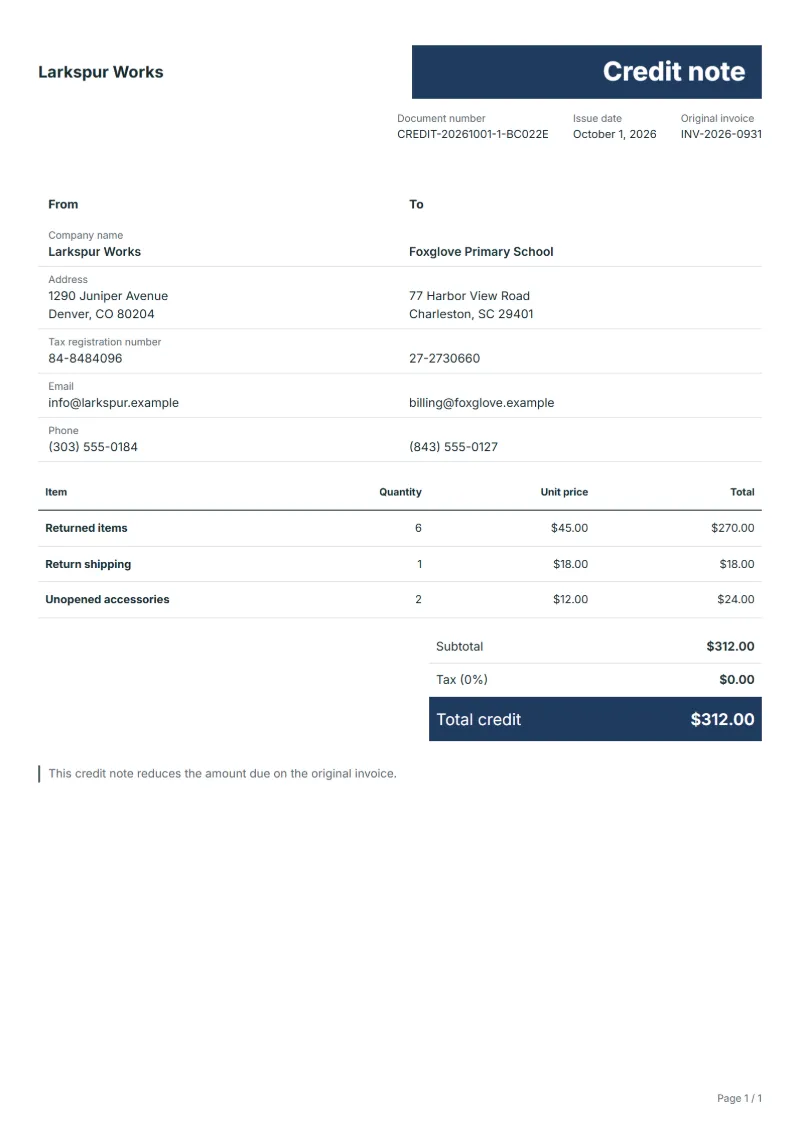
| Item | Quantity × unit price | Amount |
|---|---|---|
| Returned items | 6 × $45.00 | $270.00 |
| Return shipping | 1 × $18.00 | $18.00 |
| Unopened accessories | 2 × $12.00 | $24.00 |
| Subtotal | $312.00 | |
| Sales tax (8%) | $24.96 | |
| Total | $336.96 | |
Credit before tax $312.00, sales tax reversed $24.96, total credited $336.96.
- The credit corrects invoice INV-2026-0931.
What the document must show
The details a credit note has to show, and why each one matters, are set out in the guide below.
The sales tax depends on where the work is supplied, so set the rate that applies to your customer before sending.
Official rate reference: US government: state and local taxes
Full requirements: Credit note vs invoice (and credit memo): how to issue one
Frequently asked questions
Can I charge a restocking fee on a return?
Only if your terms stated one before the sale, and consumer law in some places rules it out, for example when a consumer withdraws from a distance sale in the EU. Show it by crediting less than the full price and name the fee in the notes, so the customer sees why the credit is lower.
What if fewer items arrive than the customer says were sent?
Credit what arrived and tell the customer about the difference straight away, quoting the return authorisation number. If the missing items turn up or the carrier pays a claim, issue a second credit note then.
How is the sales tax worked out on this credit note?
The worked example above uses an example rate of 8%: $24.96 on a net amount of $312.00, for a total of $336.96. The editor recalculates all three when you change a quantity, a price or the country.
Can I change the layout and colour?
Yes. The editor offers other layouts and a document colour for the printed page. Changing them moves no figure: the lines and totals stay as they are, and the PDF, Word and Excel files follow the layout you pick.
How is the document numbered?
QuoteBill gives each new document a unique number of its own. A member can switch to numbers in sequence in settings, such as CN-2026-0001: one sequence for each kind of document, starting again every calendar year. A number you type yourself is kept as it is.
Read next
Reading for the Returned goods credit note template: Credit note vs invoice (and credit memo): how to issue one and Quote, proforma, invoice, receipt, credit note: which to use. The VAT and GST calculator helps you credit the tax that went with the goods.