Retail stock purchase order template
Retail purchase order template for store stock: styles by size and color, the ship window, the cancel date and in-store displays. Word, Excel or PDF.
Templates by industry
- Seasonal apparel
- Footwear
- In-store displays
Preparation guide
Example workflow
Match the quotation
Example: take "Seasonal apparel" from the supplier's quotation and copy its quantity, unit price and specification exactly.
Approve and send
Confirm the delivery date and address for every line, including "In-store displays", then sign the authorized-by line and send the order.
Receive and reconcile
When the goods arrive, check them against the order, then match the supplier's invoice to the order number before paying.
Store buyers place this order with a brand or wholesaler, usually months before the season. It sets the quantity of each style with its size and color breakdown, the wholesale cost, the ship window and a cancel date after which late stock may be refused, along with displays that come with the range. For a shop the dates matter as much as the price, because stock that arrives after the selling season has begun is hard to sell at full price.
Fields to prepare
- Deliverables and line items
- Seasonal apparel, Footwear, In-store displays: state the quantity, unit and agreed price for each line, as the supplier quoted it.
- Seasonal apparel
- Enter the style total as the quantity at the wholesale cost per unit, and give the size and color split in the description or an attached sheet.
- Footwear
- Count footwear in pairs and order in size runs, the pairs per size that one carton holds, as the brand packs them.
- In-store displays
- Note whether displays come free with a minimum order or are charged, and when they must arrive so they are up before the stock.
- Supplier and quotation
- Name the supplier and quote the number of the quotation this order accepts, so each price can be traced to the offer.
- Delivery
- Give the delivery date, the address the goods go to, the shipping method and who receives them.
- Scope to agree
- List styles by size and color, the ship window, and the cancel date after which late stock may be refused.
Before sending
- Does “Seasonal apparel” match the supplier’s quotation in specification, quantity and price?
- Are a delivery date and a receiver agreed for “Footwear”?
- Has the budget holder approved the spend on “In-store displays”?
Show 3 more
- Check the supplier's quotation number, the delivery date and address, and who approved the order.
- Check that each quantity, unit and unit price matches the supplier's quotation.
- Give the order a number of its own, so the supplier can quote it on the delivery note and the invoice.
Worked example with sample figures
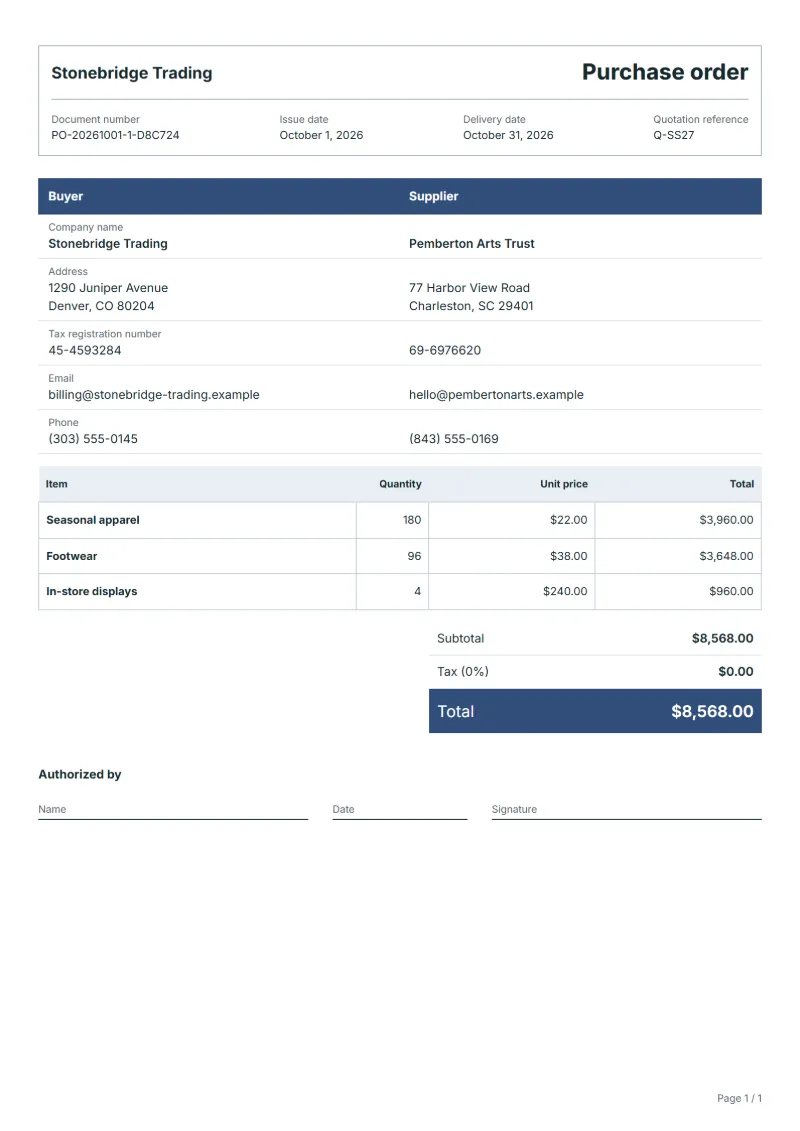
The figures below are invented to show how the template adds up: 3 lines in USD, with an example tax rate of 8%.
| Item | Quantity × unit price | Amount |
|---|---|---|
| Seasonal apparel | 180 × $22.00 | $3,960.00 |
| Footwear | 96 × $38.00 | $3,648.00 |
| In-store displays | 4 × $240.00 | $960.00 |
| Subtotal | $8,568.00 | |
| Sales tax (8%) | $685.44 | |
| Total | $9,253.44 | |
Order value $8,568.00, sales tax $685.44, order total $9,253.44.
- The order accepts quotation Q-SS27.
- Delivery is due 30 days after the order date.
What the document must show
These details make a purchase order easier to approve and to file.
- Your company name and address as the buyer
- The supplier's name and address
- Order number and date
- Each item with quantity, unit price and amount
- Delivery date, delivery address and shipping method
- Payment terms and the total, with tax shown separately
- Who authorized the order
The sales tax depends on where the work is supplied, so set the rate that applies to your customer before sending.
Official rate reference: US government: state and local taxes
Frequently asked questions
Stock arrived after the cancel date. What are my options?
Decide before it ships if you can: cancel the open quantity in writing, or agree a discount for late delivery. A cancel date only helps when you act on it, so tell the supplier which option you chose and record it on the order.
Can I change the size breakdown after placing the order?
Ask before the brand allocates or produces the stock. Send a revised order with the same number and a revision mark, so the warehouse picks from the latest breakdown and the invoice matches it.
Where do I record the retail price we plan to sell at?
The order is priced at wholesale cost, and its total must stay that way. You can add the planned retail price to each line description for your own margin planning; it does not change what the supplier invoices.
How is the sales tax worked out on this purchase order?
The worked example above uses an example rate of 8%: $685.44 on a net amount of $8,568.00, for a total of $9,253.44. The editor recalculates all three when you change a quantity, a price or the country.
Can I download it as Excel, Word or PDF?
Yes. A PDF needs no account: fill in the template and use Print / PDF. The Excel and Word files download from this page with a free account, and the spreadsheet keeps its formulas, so changing a quantity updates the tax and the total.
Read next
Reading for the Retail stock purchase order template: Quote, proforma, invoice, receipt, credit note: which to use and How to write a quotation: format, example and checklist. When the goods arrive, match them to this order with the Delivery note template.