Online factuur template
Invoice template in Dutch (factuur), set up for the Netherlands, with sample lines for transport planning, cargo handling and shipment tracking. Excel or Word.
Templates by language
- Transport scheduling
- Cargo handling
- Shipment tracking service
Preparation guide
Example workflow
Confirm scope and quantities
Example: reconcile the approval and work record for "Transport scheduling" to establish the quantity for this invoice.
Record delivery and acceptance
Check completion for every line, including "Shipment tracking service". Deliver dispatch details, delivery or storage records and the quantities confirmed by the customer.
Send the billing record
Send the final charges, delivery reference and due date to the customer, then reconcile payment against the invoice number.
For a logistics client in the Netherlands, an invoice that reads in Dutch goes straight into processing. Online factuur template prints its labels in Dutch, starts with the Netherlands as the country, shows amounts in euros and names the tax btw. Its sample lines describe the work of freight forwarders, warehouse operators and small transport firms: planning transports, handling cargo and tracking shipments for the client.
Fields to prepare
- Deliverables and line items
- Transport scheduling, Cargo handling, Shipment tracking service: record the quantities actually supplied and the service period.
- Transport scheduling
- Bill planning per route or per week of planning, and name the routes, for example “Rotterdam–Venlo, 3 runs”.
- Cargo handling
- Use pallets, containers or tons as the unit, and give the handling date and location.
- Shipment tracking service
- State the tracking period and the number of shipments followed, and whether status reports went out daily or on request.
- Goods and volume
- Record item codes, counts, weight or volume, packing units and handling conditions.
- Route and period
- Define origin and destination, storage or transport period, loading responsibilities and proof of delivery.
- Scope to agree
- Record transport schedules and routes, handled cargo quantities and the shipment-tracking period.
Before sending
- Does “Transport scheduling” show the quantity actually supplied, not the quantity first quoted?
- Is “Cargo handling” charged at the rate the customer agreed to, with any change approved?
- Is “Shipment tracking service” finished and accepted, or does it belong on a later invoice?
Show 4 more
- Check extra-charge conditions for waiting, redelivery, returns and special handling.
- Reconcile dispatch, arrival and received quantities and explain discrepancies.
- Match completed work to the order or approval record, and confirm the payment due date and amounts already received.
- Confirm document language (nl), country setting (NL), and the customer's currency and date-format requirements.
Worked example with sample figures
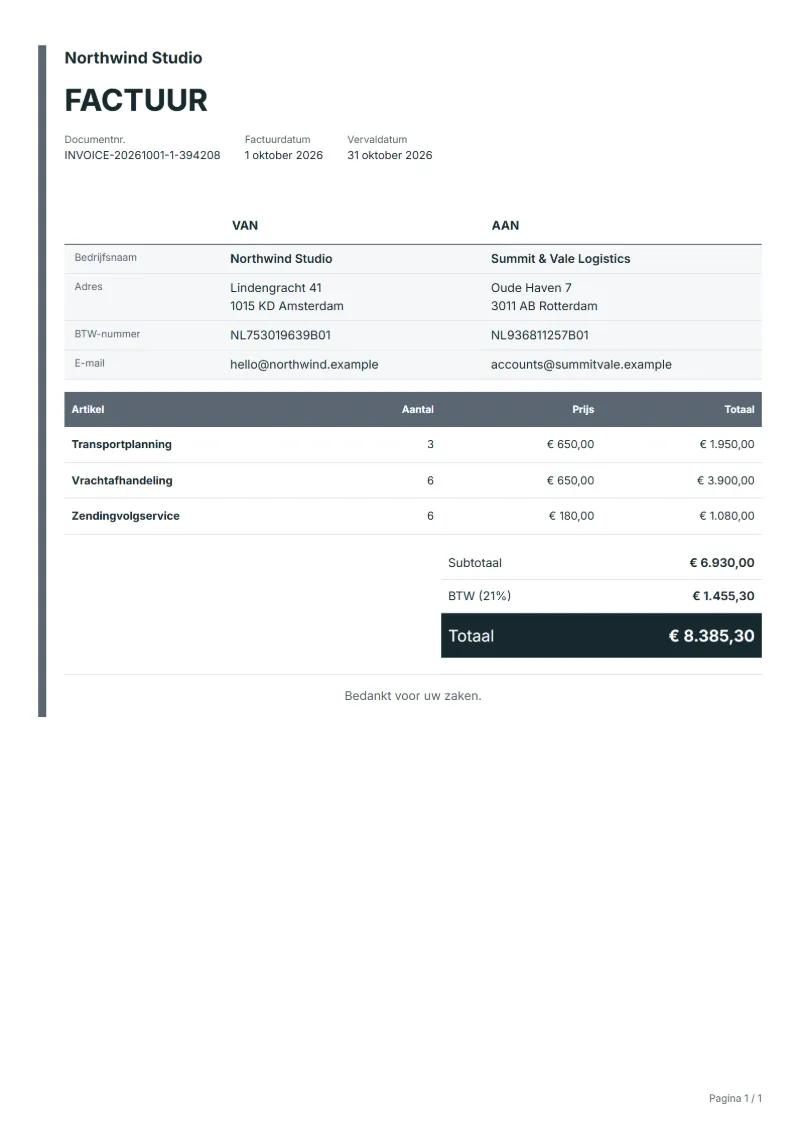
The figures below are invented to show how the template adds up: 3 lines in EUR, with VAT at 21%.
| Item | Quantity × unit price | Amount |
|---|---|---|
| Transport scheduling | 3 × €650.00 | €1,950.00 |
| Cargo handling | 6 × €650.00 | €3,900.00 |
| Shipment tracking service | 6 × €180.00 | €1,080.00 |
| Subtotal | €6,930.00 | |
| VAT (21%) | €1,455.30 | |
| Total | €8,385.30 | |
Net amount €6,930.00, VAT €1,455.30, total payable €8,385.30.
What the document must show
These details make an invoice easier to approve and to file.
- Your business name, address and registration or tax number
- The customer's name and address
- Issue date and a document number you do not reuse
- Each line item with quantity, unit price and amount
- Tax shown separately from the net amount, and the total payable
- Payment terms: due date, bank details or accepted payment methods
The VAT here is 21%, applied to the net amount and shown as its own line.
Official rate reference: European Commission: VAT rates
Frequently asked questions
Which registration numbers does a Dutch customer look for?
Dutch business invoices usually show the seller’s KvK number from the Chamber of Commerce and its VAT identification number. Enter both in your company details so they print on every invoice, and check the Netherlands Tax Administration’s list if you are unsure what else applies.
Can I invoice a Belgian client in Dutch with this template?
Yes. Keep the Dutch wording but change the country setting to Belgium, so the tax line follows Belgian rules. For a business client in another EU country, check whether the reverse charge applies to your service before you charge VAT.
Should waiting time at a terminal be billed?
If your terms allow it, bill waiting time beyond the agreed free time as its own line, with the hours and the terminal. Without such a clause in the agreement, raise it with the client before you put it on an invoice.
How is the VAT worked out on this invoice?
In the worked example above, VAT at 21% on the net amount of €6,930.00 is €1,455.30, so the total is €8,385.30. The editor recalculates all three when you change a quantity, a price or the country.
Can I change the layout and colour?
Yes. The editor offers other layouts and a document colour for the printed page. Changing them moves no figure: the lines and totals stay as they are, and the PDF, Word and Excel files follow the layout you pick.
Read next
Reading for the Online factuur template: How to write an invoice: a step-by-step example and Invoice numbering: sequences and corrections. The VAT and GST calculator works out the tax line for you.