Progress billing invoice template
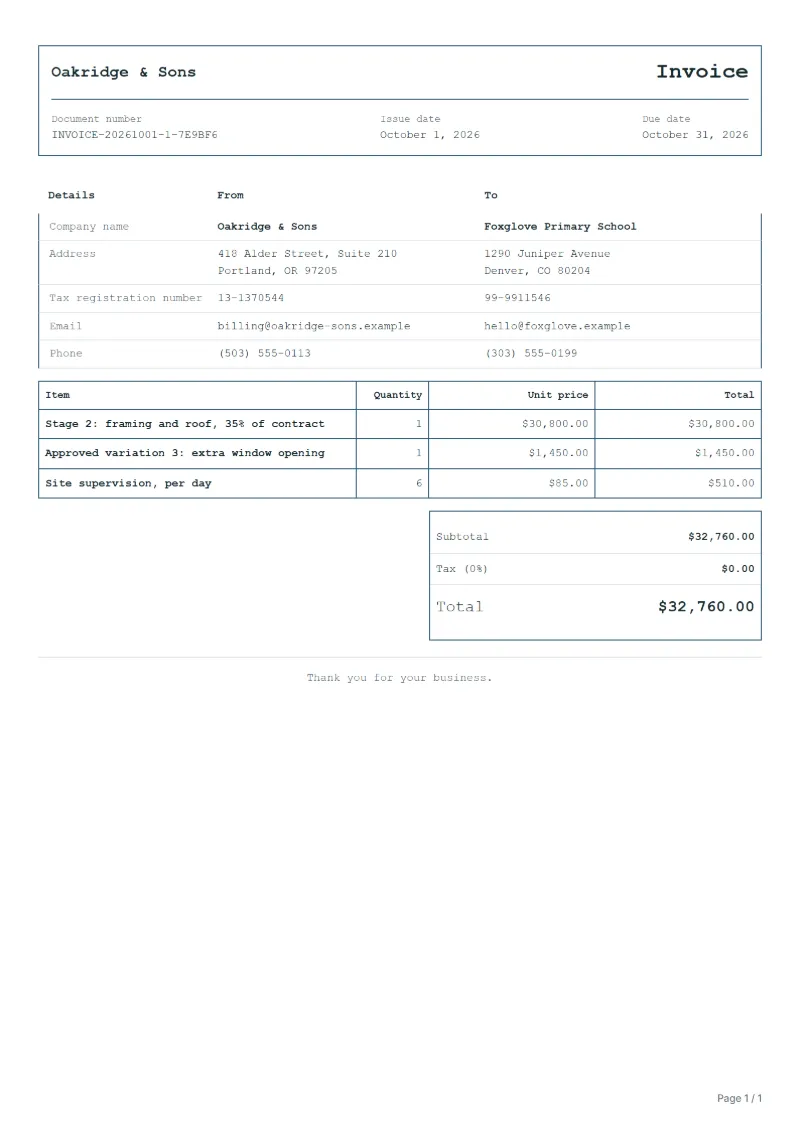
Progress billing invoice template for staged building contracts: claim a stage as a share of the contract sum, list approved variations, show the total to date.
Templates by industry
- Stage 2: framing and roof, 35% of contract
- Approved variation 3: extra window opening
- Site supervision, per day
Preparation guide
Example workflow
Confirm scope and quantities
Example: reconcile the approval and work record for "Stage 2: framing and roof, 35% of contract" to establish the quantity for this invoice.
Record delivery and acceptance
Check completion for every line, including "Site supervision, per day". Confirm completed quantities, site photos, agreed test results and any remaining remedial work.
Send the billing record
Send the final charges, delivery reference and due date to the customer, then reconcile payment against the invoice number.
A progress billing invoice asks for payment of one stage of a larger contract, such as the framing of a house or one floor of a fit-out. Instead of billing labour and materials line by line, it claims an agreed share of the contract sum once that stage is complete. This template keeps the stage, any approved variations and site costs on separate lines, so the client can check the claim against the payment schedule in the contract.
Fields to prepare
- Deliverables and line items
- Stage 2: framing and roof, 35% of contract, Approved variation 3: extra window opening, Site supervision, per day: record the quantities actually supplied and the service period.
- Stage 2: framing and roof, 35% of contract
- Name the stage as the contract’s payment schedule does and give its percentage; the client checks the claim against that schedule.
- Approved variation 3: extra window opening
- Bill only variations the client approved in writing, and quote the variation number so it can be matched to the instruction.
- Site supervision, per day
- Count supervision days from your site diary for this stage only; days billed with an earlier stage must not appear again.
- Site and measured quantities
- Record the site, work zones, areas, lengths or counts, and access hours.
- Materials and work stages
- Specify materials, labor, removal, disposal and making-good allowances, and completion criteria for each stage.
- Scope to agree
- Name the stage and the share of the contract sum it claims, keep approved variations on their own lines, and quote the total claimed so far.
Before sending
- Does “Stage 2: framing and roof, 35% of contract” show the quantity actually supplied, not the quantity first quoted?
- Is “Approved variation 3: extra window opening” charged at the rate the customer agreed to, with any change approved?
- Is “Site supervision, per day” finished and accepted, or does it belong on a later invoice?
Show 3 more
- Agree how quantity changes following measurement or drawing revisions will be approved.
- Confirm client-supplied materials and work that other contractors must finish first.
- Match completed work to the order or approval record, and confirm the payment due date and amounts already received.
Worked example: the second stage of a house build
The figures are an example, in dollars, with an example tax rate of 8%. A builder claims the framing stage at 35% of an $88,000 contract, one approved variation and six days of site supervision.
| Item | Quantity × unit price | Amount |
|---|---|---|
| Stage 2: framing and roof, 35% of contract | 1 × $30,800.00 | $30,800.00 |
| Approved variation 3: extra window opening | 1 × $1,450.00 | $1,450.00 |
| Site supervision, per day | 6 × $85.00 | $510.00 |
| Subtotal | $32,760.00 | |
| Sales tax (8%) | $2,620.80 | |
| Total | $35,380.80 | |
The three lines come to $32,760.00; tax at 8% is $2,620.80; the client is asked to pay $35,380.80 for this stage. The first stage and the payments already received go in the notes, not in the lines.
Common mistakes on a progress invoice
- Claiming the next stage before it is finished, which the client can refuse under the payment schedule.
- Repeating site days or materials that were already on an earlier progress invoice.
- Adding variations nobody approved in writing.
- Leaving out the contract and the stage number, so the claim cannot be matched.
- Showing only this stage, so nobody can see the total claimed to date.
What the document must show
These details make an invoice easier to approve and to file.
- Your business name, address and registration or tax number
- The customer's name and address
- Issue date and a document number you do not reuse
- Each line item with quantity, unit price and amount
- Tax shown separately from the net amount, and the total payable
- Payment terms: due date, bank details or accepted payment methods
The sales tax depends on where the work is supplied, so set the rate that applies to your customer before sending.
Official rate reference: US government: state and local taxes
Frequently asked questions
How do I show what was paid on earlier progress invoices?
Add a note under the lines with the contract sum, the total claimed before this invoice and what has been paid. The lines stay for this stage only, so nothing is counted twice.
Can I bill a stage that is only partly finished?
Only if the contract allows it. Otherwise wait until the stage is complete, or agree a smaller percentage with the client in writing and name it on the line.
Where does a retention go?
If the contract holds back a retention, state its rate and the amount withheld in the notes, next to the amount the client is asked to pay now.
Does each stage need a new invoice number?
Yes. Each progress invoice is an invoice of its own with its own number and date; name the contract and the stage so the client can file them in order.
How is tax calculated on this template?
The sales tax depends on where the work is supplied, so set the rate that applies to your customer before sending. The editor keeps the net amount, the tax and the total apart, and recalculates all three when you change a quantity, a unit price or the country setting.
Is this template free?
Yes. You can fill in this template and print it or save it as a PDF without an account, and there is no payment step and no watermark on the document. Saving it to your account and downloading Excel or Word files need a free account.
Read next
Reading for the Progress billing invoice template: How to write an invoice: a step-by-step example and Invoice numbering: sequences and corrections. The VAT and GST calculator works out the tax line for you.