Plumbing work order template
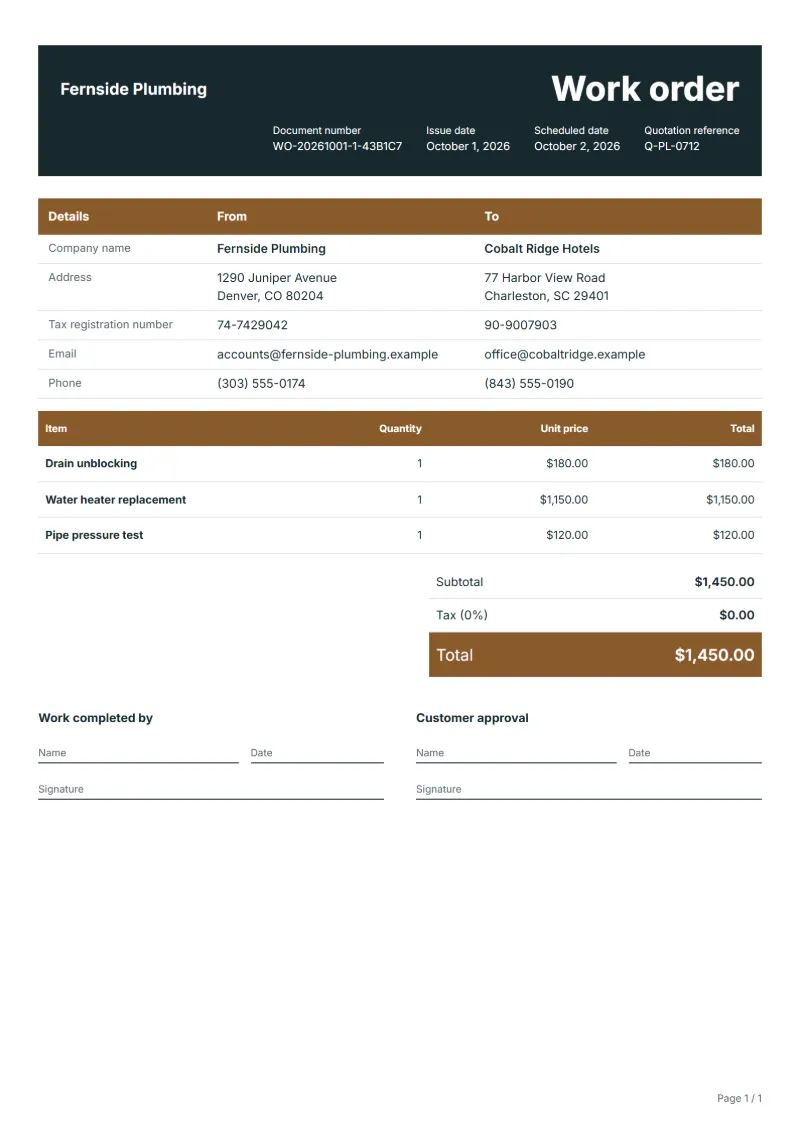
Plumbing work order template: drain, water heater and pipework jobs, where the water is shut off, the pressure test result and sign-off by plumber and customer.
Templates by industry
- Drain unblocking
- Water heater replacement
- Pipe pressure test
Preparation guide
Example workflow
Plan the job
Example: start with "Drain unblocking", set the scheduled date, assign the technician and note how to access the site.
Do the work
Record the time and materials actually used, including "Pipe pressure test", and anything found that needs a separate quote.
Sign off and bill
Have the technician and the customer sign the completion lines, then make the invoice from the work order so the lines carry over.
Plumbers use this work order for call-outs and planned jobs in homes and small businesses: a blocked drain, a water heater swap, a new run of pipe that has to be tested. It records where the water was shut off and what was protected before work began, because water damage to floors and ceilings is the risk customers worry about most. The test result goes on the order before the customer signs, so the job is closed on a measured result rather than a look.
Fields to prepare
- Deliverables and line items
- Drain unblocking, Water heater replacement, Pipe pressure test: describe the work and materials planned for each line, with the time or quantity expected.
- Drain unblocking
- Name the drain, the method used, such as rods or jetting, the cause found and the camera result if you inspected the pipe.
- Water heater replacement
- Give the old and new model and capacity, the new unit’s serial number for warranty registration, and whether the old one was taken away.
- Pipe pressure test
- Record the test pressure, the duration and the reading at the end, and who was present when it was read.
- Job site and schedule
- Give the job site address, the scheduled date and the person assigned, with any access or safety instructions.
- Time and materials
- Record the hours worked and the materials used on each line, as done rather than as planned.
- Scope to agree
- Note where the water is shut off, the fixtures to protect, and the pressure or flow test result before the customer signs.
Before sending
- Is it clear who does “Drain unblocking”, where and when?
- Are the materials for “Water heater replacement” listed and on site before the job starts?
- Is there a sign-off for “Pipe pressure test” so the time can be invoiced afterwards?
Show 3 more
- Check the job site address, the scheduled date, who is assigned, and any access or safety instructions.
- Agree with the customer which tasks are included, and note anything found on site that needs a separate quote.
- Have the customer check and sign off the work before you make the invoice.
Worked example with sample figures
The figures below are invented to show how the template adds up: 3 lines in USD, with an example tax rate of 8%.
| Item | Quantity × unit price | Amount |
|---|---|---|
| Drain unblocking | 1 × $180.00 | $180.00 |
| Water heater replacement | 1 × $1,150.00 | $1,150.00 |
| Pipe pressure test | 1 × $120.00 | $120.00 |
| Subtotal | $1,450.00 | |
| Sales tax (8%) | $116.00 | |
| Total | $1,566.00 | |
Planned work $1,450.00 before tax, $1,566.00 with sales tax.
- The job follows quotation Q-PL-0712.
- The job is booked for the next day.
What the document must show
These details make a work order easier to approve and to file.
- Work order number and date
- The customer's name and job site address
- Scheduled date and the person assigned
- Each task and the materials needed
- Time or quantity per line, and prices if shown
- Sign-off lines for the worker and the customer
The sales tax depends on where the work is supplied, so set the rate that applies to your customer before sending.
Official rate reference: US government: state and local taxes
Frequently asked questions
The drain blocks again a week later. Is the return visit free?
That depends on the guarantee you give, so write its length on the work order along with the cause found. If the cause was something the customer controls, such as wipes or fat, note that too; it helps when deciding whether the second visit is chargeable.
Should the new water heater be a separate line from the labour?
The template keeps it as one job line, which suits a fixed price. If the customer wants to see the unit and the fitting apart, split it into two lines; either way, record the new unit’s serial number for the warranty.
A tenant lets us in but the landlord pays. Who signs?
The tenant can sign that the work was done, with name and role. Chargeable extras should be approved before the work by whoever pays, usually the landlord or the managing agent, and that approval belongs on the order.
How is the sales tax worked out on this work order?
The worked example above uses an example rate of 8%: $116.00 on a net amount of $1,450.00, for a total of $1,566.00. The editor recalculates all three when you change a quantity, a price or the country.
Can I add my logo and signature?
Yes. The From section of the editor has a place for your company logo and for a signature or seal image. Uploading a picture needs a free account, and a member can keep both in settings so that every new document starts with them.
Read next
Reading for the Plumbing work order template: How to write a statement of work (SOW), with an example and Quote to invoice: how to convert a quote, step by step. When the job is signed off, record it on the Acceptance certificate template.