Contractor invoice template
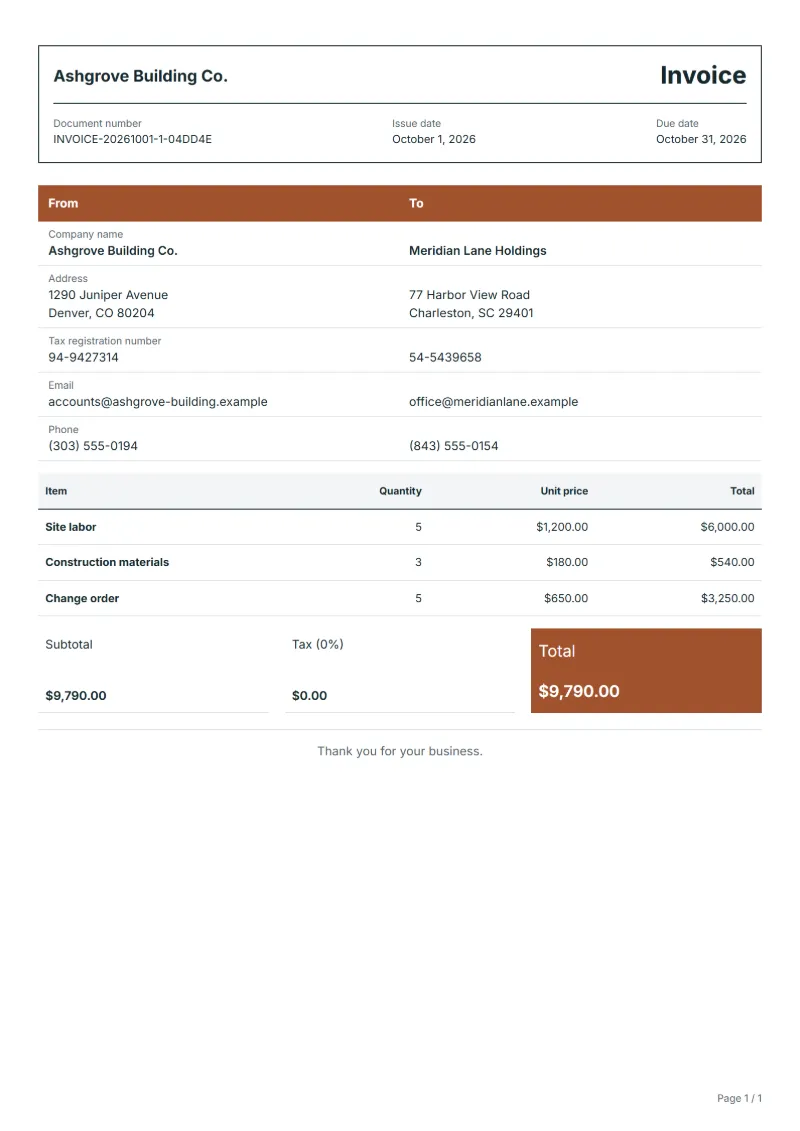
Prepare a contractor invoice for labor, materials and approved change orders. Edit quantities and prices, check the tax, then save a PDF or download Word.
Templates by industry
- Site labor
- Construction materials
- Change order
Invoicing site work: labor, materials and change orders
Example workflow
Bill the labor
Start with "Site labor": the dates, the hours and the rate for each crew member or trade, against the contract number.
Add materials and changes
Add the materials, then the change orders down to "Change order", each with its approval date.
Send and reconcile
Send the invoice to the person who approves site invoices, and reconcile payment against the invoice number.
Whether you are a trade subcontractor billing a main contractor or a small builder billing a homeowner, the invoice is checked against a contract agreed before work began. This template is for jobs billed on time and materials, and for the final account of a fixed-price job that picked up extras along the way. Stage payments on a larger contract fit the progress billing invoice better, because it claims a share of the contract sum instead of hours.
Fields to prepare
- Deliverables and line items
- Site labor, Construction materials, Change order: bill labor by hours and rate, materials at cost or with the agreed mark-up, and each change order as a line that quotes its approval.
- Site labor
- Split labor by trade or crew when the rates differ, such as electrician hours and laborer hours, instead of one blended rate.
- Construction materials
- Group small items by delivery docket, and give major items such as timber, cabinets or fixtures lines of their own.
- Change order
- Write the change order number and a short description, like “CO-3 extra sockets, kitchen”, so it matches the signed change form.
- Contract and site
- Quote the contract or order number, the site address and the period the invoice covers, so the client can match it to the job.
- Labor, materials and changes
- List hours and rate for labor, quantities and prices for materials, and every change to the original scope on a line of its own with the date it was approved.
- Scope to agree
- Tie dated labor hours, the materials used and the number of each approved change order to the original contract.
Before sending
- Does “Site labor” show the quantity actually supplied, not the quantity first quoted?
- Is “Construction materials” charged at the rate the customer agreed to, with any change approved?
- Is “Change order” finished and accepted, or does it belong on a later invoice?
Show 3 more
- Check the hours against the timesheets or the site diary before you bill them.
- State whether materials are billed at cost or with a mark-up.
- Compare the completed work on site with the lines billed, then confirm the due date and the amounts already received.
Worked example: a site job with a change order
The figures are an example, in dollars, with an example tax rate of 8%. A contractor bills 32 hours of site labor, one batch of construction materials and one approved change order.
| Item | Quantity × unit price | Amount |
|---|---|---|
| Site labor | 32 × $48.00 | $1,536.00 |
| Construction materials | 1 × $2,150.00 | $2,150.00 |
| Change order | 1 × $860.00 | $860.00 |
| Subtotal | $4,546.00 | |
| Sales tax (8%) | $363.68 | |
| Total | $4,909.68 | |
Labor, materials and the change order add up to $4,546.00; tax at 8% is $363.68; the total is $4,909.68. The change order stays on a line of its own.
Common mistakes on a contractor invoice
- Billing extra work with no approval, which invites a dispute over the whole invoice.
- Hiding a mark-up inside the unit price of materials.
- Writing "Labor, 1" with no hours, so nobody can compare it with the timesheets.
- Leaving off the contract number, so the invoice waits while the client looks for the job.
- Billing the whole contract again after a stage invoice instead of showing what was billed earlier.
What the document must show
These details make an invoice easier to approve and to file.
- Your business name, address and registration or tax number
- The customer's name and address
- Issue date and a document number you do not reuse
- Each line item with quantity, unit price and amount
- Tax shown separately from the net amount, and the total payable
- Payment terms: due date, bank details or accepted payment methods
The sales tax depends on where the work is supplied, so set the rate that applies to your customer before sending.
Official rate reference: US government: state and local taxes
Frequently asked questions
Contractor invoice template: what should it include?
Start with the lines the template carries — Site labor, Construction materials, Change order — and replace them with your own labor, materials and approved changes. Then add the contract number, the site, the client and a number you have not used before.
How do I bill a change order?
Give each change order a line of its own, quote its approval date or number, and bill only what was approved. Work the client has not approved belongs in a request, not on the invoice.
Should materials carry a mark-up?
That depends on your contract. Whatever it says, show the materials on their own line, and if you add a mark-up, say so rather than hiding it in the unit price.
Can I invoice in stages?
Yes, if the contract allows it. Bill each stage on its own invoice that names the stage and the work done, and show what has been billed so far.
What belongs in the site address and the reference?
The address where the work was done and the contract or order number. A client with several sites needs both to know which budget the invoice belongs to.
What if the client disputes a line?
Ask which line, and answer with the hours, the materials records or the approval behind it. A clear invoice makes it possible to settle one line without holding up the others.
Read next
Reading for the Contractor invoice template: How to write an invoice: a step-by-step example and Invoice payment terms: Net 15, Net 30, due dates. The VAT and GST calculator works out the tax line for you.