Partial payment receipt template
Partial payment receipt template: show how one payment was applied across open invoices, what remains on each, and the date and method of payment.
Templates by industry
- Part payment, invoice INV-2026-0412
- Balance cleared, invoice INV-2026-0377
- Late fee on INV-2026-0377, as agreed
Preparation guide
Example workflow
Match the payment to the invoice
Example: check the payment for "Part payment, invoice INV-2026-0412" against the invoice it settles: the invoice number, the amount received and any balance still owed.
Record the payment
Enter the payment date, the payment method and the amount received, and check each line this payment covers, down to "Late fee on INV-2026-0377, as agreed".
Send the receipt
Send the receipt to the customer and mark the invoice as paid; if a balance remains, keep the invoice open for it.
Customers who pay in parts rarely pay neatly: a single transfer may cover half of one invoice, clear the rest of an older one and settle a small fee. A partial payment receipt records how you applied that money, so the customer’s accounts and yours show the same open amounts afterwards. This template gives each invoice its own line with its number, and leaves the notes for what is still owed on each.
Fields to prepare
- Deliverables and line items
- Part payment, invoice INV-2026-0412, Balance cleared, invoice INV-2026-0377, Late fee on INV-2026-0377, as agreed: the lines this payment covers, as they appear on the invoice it settles.
- Part payment, invoice INV-2026-0412
- Quote the invoice number and write what remains on it after this payment, in the notes or on the line itself.
- Balance cleared, invoice INV-2026-0377
- Say the older invoice is now cleared, so the customer can close it in their own books and stop chasing it.
- Late fee on INV-2026-0377, as agreed
- Charge a late fee only if your terms or a written agreement provide for it, and name the invoice it belongs to.
- Payment details
- Record the payment date, the method (bank transfer, card or cash) and the amount received, exactly as it arrived.
- Invoice reference
- Quote the number of the invoice this payment settles; for a part payment, note the balance still owed.
- Scope to agree
- Show which invoice each part of the payment went to, what is still open on each, and the date and method, so both ledgers agree after every instalment.
Before sending
- Does “Part payment, invoice INV-2026-0412” match the line on the invoice this payment settles?
- Has the money for “Balance cleared, invoice INV-2026-0377” actually arrived, in full or in part?
- Is “Late fee on INV-2026-0377, as agreed” shown at the amount received, with any balance still owed noted?
Show 3 more
- Confirm the money has actually arrived before you issue the receipt.
- Check that the amount received matches the invoice, and note any difference as a balance or an overpayment.
- Quote the invoice number it settles, and keep receipt numbers in a sequence of their own.
Worked example: one transfer across two invoices
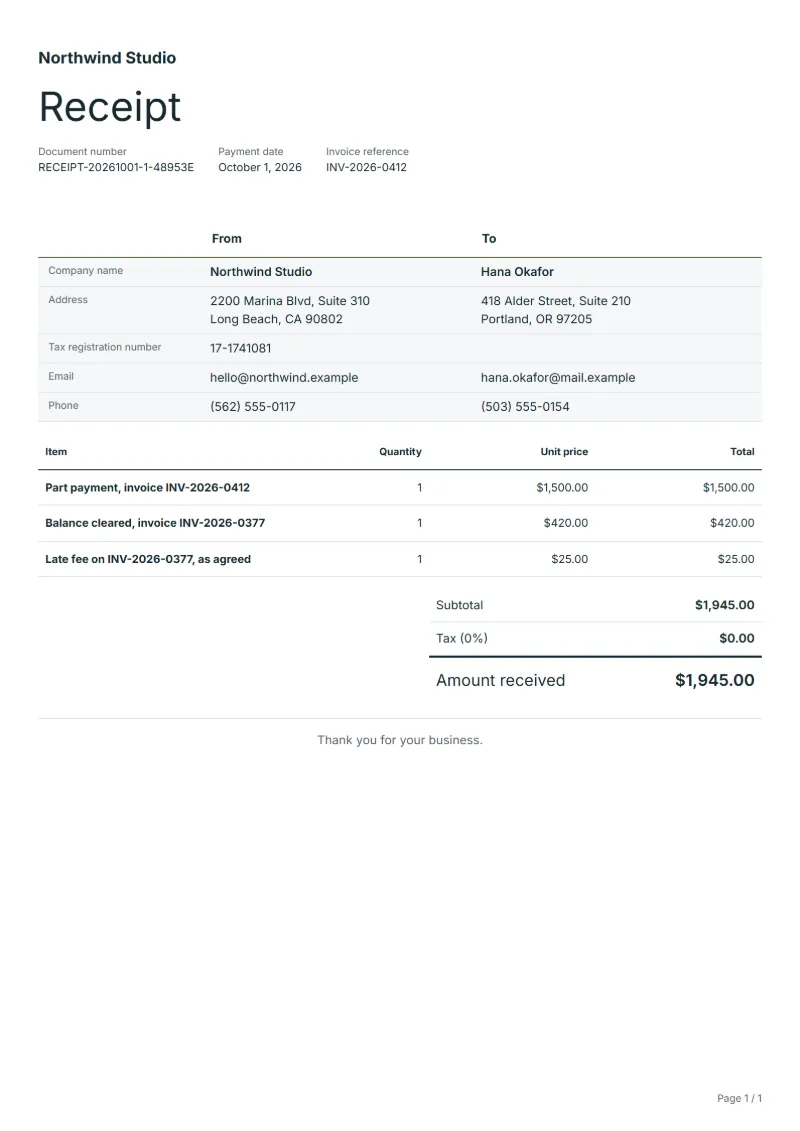
The figures are an example, in dollars. A customer owes $4,000 on invoice 0412 and has $420 outstanding on invoice 0377, plus a $25 late fee they agreed to. One transfer covers part of the first invoice and everything on the second.
| Item | Quantity × unit price | Amount |
|---|---|---|
| Part payment, invoice INV-2026-0412 | 1 × $1,500.00 | $1,500.00 |
| Balance cleared, invoice INV-2026-0377 | 1 × $420.00 | $420.00 |
| Late fee on INV-2026-0377, as agreed | 1 × $25.00 | $25.00 |
| Invoice total | $1,945.00 | |
| Received | $1,945.00 | |
| Still owed | $0.00 | |
The receipt confirms $1,945.00 received. Invoice 0377 and its fee are closed; for invoice 0412 the notes say $2,500 remains unpaid: the $4,000 billed less the $1,500 applied today.
Common mistakes with part payments
- Writing the instalment that was due instead of the amount that actually arrived.
- Applying the money to a newer invoice when the customer named an older one.
- Leaving out what is still open, so the customer believes the account is settled.
- Adding tax on the receipt that was already charged on the invoice.
- Giving several instalments the same receipt number.
What the document must show
These details make a receipt easier to approve and to file.
- Your business name and address, and your tax number if you are registered
- Receipt number and issue date (the date the payment arrived)
- Who paid
- How they paid: bank transfer, card or cash
- What the payment is for, and the number of the invoice it settles
- The amount received, with any tax it includes shown separately
- For a part payment, the balance still owed
The sales tax depends on where the work is supplied, so set the rate that applies to your customer before sending.
Official rate reference: US government: state and local taxes
Frequently asked questions
Which invoice should a part payment go to first?
Follow what the customer tells you, for example in the transfer reference. If they say nothing, many businesses apply money to the oldest invoice first; state the order you used on the receipt.
Should I issue a new receipt for every instalment?
Yes. Each payment gets its own receipt with its own number and date; the notes can repeat the total paid so far, so the latest receipt tells the whole story.
The customer paid less than the agreed instalment. What now?
Record exactly what arrived, not the instalment that was due. Write the shortfall in the notes and agree in writing when it will be made up.
Is a partial payment receipt also a tax invoice?
No. It confirms money received against invoices you already issued, and the tax was shown on those invoices. Do not add tax again on the receipt.
What if bank charges were taken off the transfer?
Receipt the amount that actually arrived and note the difference. Whether you ask the customer for it depends on your payment terms.
How is tax calculated on this template?
The sales tax depends on where the work is supplied, so set the rate that applies to your customer before sending. The editor keeps the net amount, the tax and the total apart, and recalculates all three when you change a quantity, a unit price or the country setting.
Can I change the layout and colour?
Yes. The editor offers other layouts and a document colour for the printed page. Changing them moves no figure: the lines and totals stay as they are, and the PDF, Word and Excel files follow the layout you pick.
Read next
Reading for the Partial payment receipt template: What a receipt must show (and receipt vs invoice) and Deposit invoice: bill upfront, then invoice the balance. To add tax or check a total, use the VAT and GST calculator.