Volume rebate credit note template
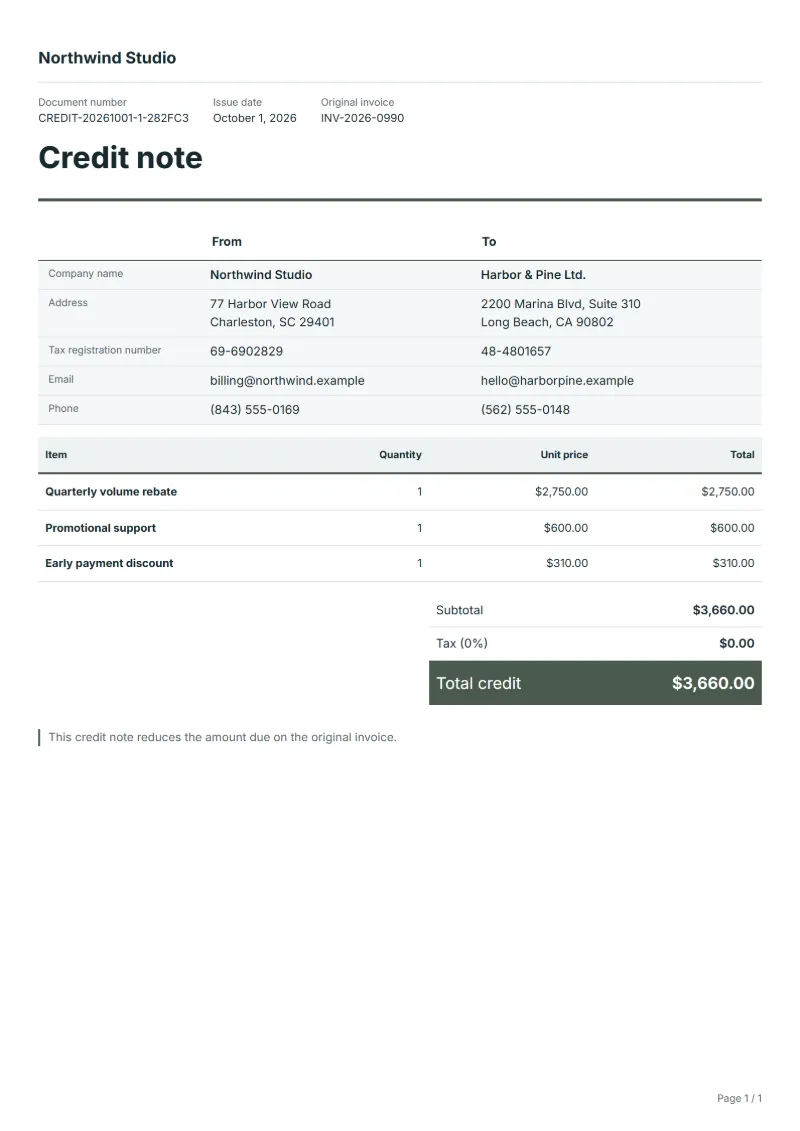
Volume rebate credit note template: the period and purchases the rebate is worked out on, the tier reached, promotional support and early payment discounts.
Templates by industry
- Quarterly volume rebate
- Promotional support
- Early payment discount
Preparation guide
Example workflow
Identify the invoice and the reason
Example: for "Quarterly volume rebate", find the original invoice, note its number and date, and record the reason: a return, a price reduction or a cancellation.
Credit the affected lines
Enter the quantity or amount credited for each affected line, down to "Early payment discount", so the tax on it is reversed in proportion.
Send and settle the credit
Send the credit note to the customer, then refund the amount or set it off against the next invoice, and keep both documents together.
A volume rebate credit note is issued by a manufacturer or wholesaler after a rebate period closes and the reseller’s purchases have reached a tier in the trading agreement. Nothing is returned: the rebate lowers, after the event, the price of goods already invoiced over the whole period. This template keeps the rebate, the promotional support agreed for the same period and an early payment discount on separate lines, so the buyer’s accounts team can match each amount to the clause that grants it.
Fields to prepare
- Deliverables and line items
- Quarterly volume rebate, Promotional support, Early payment discount: only the lines being reduced or cancelled, with the quantity or amount credited.
- Quarterly volume rebate
- Enter the rebate as a single amount, purchases in the period times the tier rate, and write both figures in the description so the buyer can redo the sum.
- Promotional support
- Credit only support agreed in writing for activity that actually ran, such as a shelf promotion or a leaflet, and name the campaign and its dates.
- Early payment discount
- Credit the discount only for invoices paid inside the discount period and list their numbers; a payment that arrived late does not earn it.
- Original invoice
- Quote the number and date of the invoice being corrected, and the reason: a return, a price reduction or a cancellation.
- Settlement
- Say how the credit is settled: refunded to the customer or set off against the next invoice.
- Scope to agree
- State the period and the purchases the rebate is worked out on, the rate or tier reached and the agreement it comes from.
Before sending
- Is “Quarterly volume rebate” one of the lines being corrected, at the price on the original invoice?
- Is the quantity or amount credited for “Promotional support” no more than was invoiced?
- Does the customer know why “Early payment discount” is credited: a return, a price change or a cancellation?
Show 3 more
- Credit only the affected lines, and reverse the tax on them at the rate the original invoice used.
- Give the credit note a number of its own rather than reusing or changing the original invoice number.
- Agree with the customer whether the credit is refunded or set off before you send it.
Worked example with sample figures
The figures below are invented to show how the template adds up: 3 lines in USD, with an example tax rate of 8%.
| Item | Quantity × unit price | Amount |
|---|---|---|
| Quarterly volume rebate | 1 × $2,750.00 | $2,750.00 |
| Promotional support | 1 × $600.00 | $600.00 |
| Early payment discount | 1 × $310.00 | $310.00 |
| Subtotal | $3,660.00 | |
| Sales tax (8%) | $292.80 | |
| Total | $3,952.80 | |
Credit before tax $3,660.00, sales tax reversed $292.80, total credited $3,952.80.
- The credit corrects invoice INV-2026-0990.
What the document must show
The details a credit note has to show, and why each one matters, are set out in the guide below.
The sales tax depends on where the work is supplied, so set the rate that applies to your customer before sending.
Official rate reference: US government: state and local taxes
Full requirements: Credit note vs invoice (and credit memo): how to issue one
Frequently asked questions
Which invoice number goes in the reference when the rebate covers a whole quarter?
A rebate rarely belongs to one invoice. Many suppliers put the trading agreement and the period in the reference and list the invoice range or the purchase total in the notes. Ask the buyer’s accounts team what they match on before you send it.
Why not simply deduct the rebate from the next invoice?
The rebate is earned on past purchases, so a line on the next invoice mixes two periods and hides what the agreement paid out. A credit note with its own number shows the period and the tier, and can still be set off against that next invoice.
What if the customer’s purchase figure differs from ours?
Send the calculation before the credit note: the period, the purchase total by your records, the tier thresholds and the rate. Agree the figure first, including any returns in the period; a credit note issued on a disputed total usually has to be cancelled and issued again.
How is the sales tax worked out on this credit note?
The worked example above uses an example rate of 8%: $292.80 on a net amount of $3,660.00, for a total of $3,952.80. The editor recalculates all three when you change a quantity, a price or the country.
Can I use it in another language or currency?
Yes. The document language can be set to any of 33 languages, and changing the country setting updates the currency, the date format and the tax rate.
Read next
Reading for the Volume rebate credit note template: Credit note vs invoice (and credit memo): how to issue one and Unpaid invoice: follow-ups, part payments and statements. The VAT and GST calculator helps you credit the tax that went with the goods.