Order confirmation template
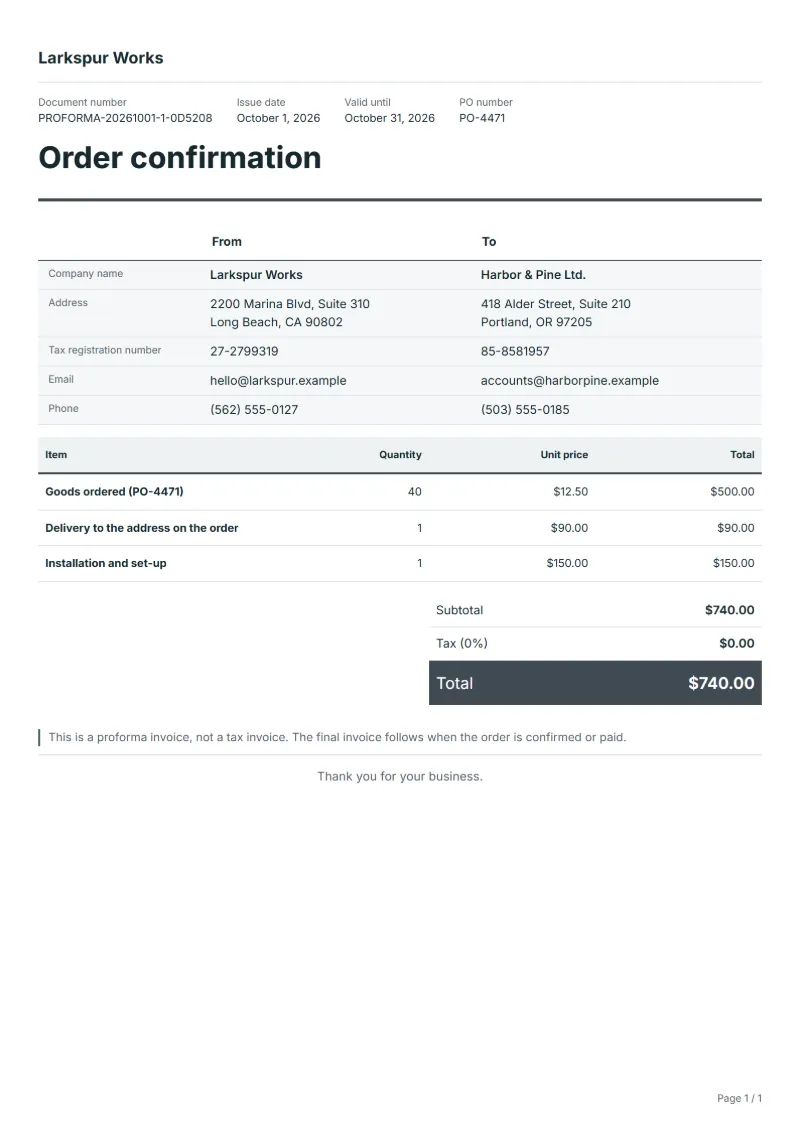
Order confirmation template: confirm a customer's order with their PO number, items, prices and terms. Not a tax invoice; the invoice follows separately.
Free generators
- Goods ordered (PO-4471)
- Delivery to the address on the order
- Installation and set-up
Preparation guide
Example workflow
Match the order
Example: compare "Goods ordered (PO-4471)" and the other lines with the customer's order, and confirm the quantity and price of each.
Add delivery and terms
Check every line down to "Installation and set-up", then enter the delivery date, the address and the payment terms, and send the confirmation to the customer.
Invoice once supplied
When the order has been supplied, issue the invoice for it. The confirmation stays as the record of what was agreed.
Suppliers send this confirmation after a customer’s order arrives, to say what they accept and on what terms. It is the moment for differences to surface: a price that changed since the quotation, a substitute product, a later delivery week. The template carries the full prices and totals, so the customer can compare it with their order line by line. Flag every change above the lines rather than letting the customer discover it when the goods arrive.
Fields to prepare
- Deliverables and line items
- Goods ordered (PO-4471), Delivery to the address on the order, Installation and set-up: each item, service or cost the customer ordered, with the quantity and price you confirm.
- Goods ordered (PO-4471)
- Quote the customer’s order number and confirm the quantity and unit price exactly as you accept them.
- Delivery to the address on the order
- Repeat the delivery address from the order and give the confirmed date or week, so the customer can plan to receive it.
- Installation and set-up
- Say what set-up includes, such as unpacking and connecting, and what the customer must have ready on site.
- Order reference
- Quote the customer's order number and date, and say whether you accept the order as it stands or with changes.
- Delivery and terms
- Give the delivery date and address and the payment terms, so the customer can check them against the order.
- Scope to agree
- Quote the customer's order number and confirm each item, quantity and price, with the delivery date and payment terms in the terms box. It is not a tax invoice, so the invoice follows separately.
Before sending
- Match every item, quantity and price to the customer's order, and point out any change you had to make.
- Give a delivery date and payment terms you can actually keep.
- Remember that it is not a tax invoice: issue the invoice separately once the order has been supplied.
Worked example with sample figures
The figures below are invented to show how the template adds up: 3 lines in USD, with an example tax rate of 8%.
| Item | Quantity × unit price | Amount |
|---|---|---|
| Goods ordered (PO-4471) | 40 × $12.50 | $500.00 |
| Delivery to the address on the order | 1 × $90.00 | $90.00 |
| Installation and set-up | 1 × $150.00 | $150.00 |
| Subtotal | $740.00 | |
| Sales tax (8%) | $59.20 | |
| Total | $799.20 | |
Net amount $740.00, sales tax $59.20, total $799.20.
- Buyer’s order number: PO-4471.
What the document must show
These details make an order confirmation easier to approve and to file.
- Your business name and address, and the customer's name and address
- Confirmation number and date
- The customer's order number and the date of the order
- Each item with the quantity and price you confirm
- Delivery date and address, and the payment terms
- A statement that it is not a tax invoice
The sales tax depends on where the work is supplied, so set the rate that applies to your customer before sending.
Official rate reference: US government: state and local taxes
Frequently asked questions
I cannot supply the full quantity by the date requested. What do I confirm?
Confirm what you can supply and when, line by line, and state the change above the lines. The customer can then accept it or cancel before anything ships, rather than finding out when the goods arrive.
Does the customer have to sign the confirmation?
Not usually, since it answers their own order. Where you changed something, ask them to reply in writing that they accept the change, and keep that reply with the order.
How is the sales tax worked out on this document?
The worked example above uses an example rate of 8%: $59.20 on a net amount of $740.00, for a total of $799.20. The editor recalculates all three when you change a quantity, a price or the country.
Is an order confirmation the same as an invoice?
No. An order confirmation says you have accepted the order and on what terms; it is not a tax invoice. Issue the invoice separately once the order has been supplied.
Can I use it in another language or currency?
Yes. The document language can be set to any of 33 languages, and changing the country setting updates the currency, the date format and the tax rate.
Read next
Reading for the Order confirmation template: Quotation vs invoice: differences and timing and Unpaid invoice: follow-ups, part payments and statements. It answers the Purchase order template the customer sent.