Modele de facture
Invoice template in French (modèle de facture), set up for France, with sample lines for editorial planning, proofreading and print-ready files. Excel or Word.
Templates by language
- Editorial planning
- Manuscript proofreading
- Publication file production
Preparation guide
Example workflow
Confirm scope and quantities
Example: reconcile the approval and work record for "Editorial planning" to establish the quantity for this invoice.
Record delivery and acceptance
Check completion for every line, including "Publication file production". Hand over approved versions and a file manifest, confirming usage scope and completed revisions.
Send the billing record
Send the final charges, delivery reference and due date to the customer, then reconcile payment against the invoice number.
A French publisher’s accounts department files invoices faster when every label on them is already French. Modèle de facture prints that way, with France preset as the country, amounts in euros and VAT shown as TVA. Its sample lines come from book work: planning an edition, proofreading the manuscript and preparing files for print or e-book, which suits freelance editors, proofreaders and small studios billing a publisher, an author or an association.
Fields to prepare
- Deliverables and line items
- Editorial planning, Manuscript proofreading, Publication file production: record the quantities actually supplied and the service period.
- Editorial planning
- Describe the planning delivered, such as an editorial calendar or a style sheet, and bill it as a fixed fee or in days.
- Manuscript proofreading
- French publishing often counts text in characters or standard pages (feuillets); state the unit and the count rather than hours.
- Publication file production
- Name the formats delivered, such as a print-ready PDF and an EPUB, and the version number of the final file.
- Quantity and output format
- Record pages, images, word counts or running time, final file formats and whether editable source files are included.
- Review and usage scope
- Specify the draft approver, revision rounds, intended media and duration, and who supplies third-party assets.
- Scope to agree
- Record manuscript length, proofreading rounds, publication formats and the final proof approver.
Before sending
- Does “Editorial planning” show the quantity actually supplied, not the quantity first quoted?
- Is “Manuscript proofreading” charged at the rate the customer agreed to, with any change approved?
- Is “Publication file production” finished and accepted, or does it belong on a later invoice?
Show 4 more
- Agree when a change of direction after draft approval becomes additional work.
- Check separately whether editable sources and final delivery files are included.
- Match completed work to the order or approval record, and confirm the payment due date and amounts already received.
- Confirm document language (fr), country setting (FR), and the customer's currency and date-format requirements.
Worked example with sample figures
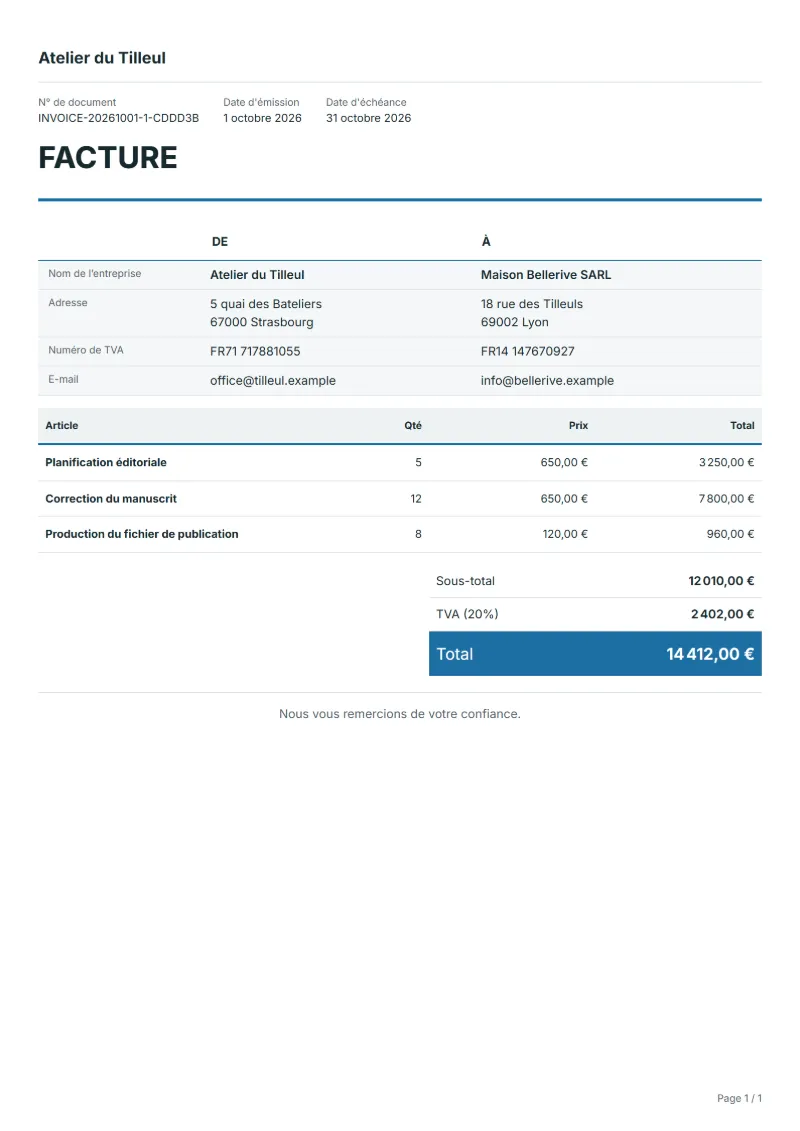
The figures below are invented to show how the template adds up: 3 lines in EUR, with VAT at 20%.
| Item | Quantity × unit price | Amount |
|---|---|---|
| Editorial planning | 5 × €650.00 | €3,250.00 |
| Manuscript proofreading | 12 × €650.00 | €7,800.00 |
| Publication file production | 8 × €120.00 | €960.00 |
| Subtotal | €12,010.00 | |
| VAT (20%) | €2,402.00 | |
| Total | €14,412.00 | |
Net amount €12,010.00, VAT €2,402.00, total payable €14,412.00.
What the document must show
These details make an invoice easier to approve and to file.
- Your business name, address and registration or tax number
- The customer's name and address
- Issue date and a document number you do not reuse
- Each line item with quantity, unit price and amount
- Tax shown separately from the net amount, and the total payable
- Payment terms: due date, bank details or accepted payment methods
- In France, invoices may have to be issued as e-invoices (an approved e-invoicing platform). A document made in QuoteBill is a printable copy, not a registered e-invoice. Check the rules that apply to you.
The VAT here is 20%, applied to the net amount and shown as its own line.
Official rate reference: European Commission: VAT rates
Frequently asked questions
What extra details do French business invoices usually carry?
Commonly the SIREN or SIRET number, the VAT number where you have one, and the terms that apply to late payment. Check the official French list of mandatory invoice details before your first invoice, since it is longer than in many countries, and check from when the move to electronic invoicing between businesses applies to you.
Can a freelance editor who does not charge VAT use it?
Yes. Set the rate to 0 and write the exemption statement that applies to you in the notes; under the French franchise scheme it is usually “TVA non applicable” with a reference to article 293 B of the French tax code. Confirm the wording for your situation before sending.
How do I bill a second proofreading round the author asked for?
As a new line, or on a new invoice if the first has gone out, naming the round, for example “second proofreading, chapters 4–9”. Agree the price before you start, since the original quotation covered one round.
How is the VAT worked out on this invoice?
In the worked example above, VAT at 20% on the net amount of €12,010.00 is €2,402.00, so the total is €14,412.00. The editor recalculates all three when you change a quantity, a price or the country.
Can I email it to the customer?
Yes, from your own mail app. With a free account, the editor’s download menu offers Email this document, which opens your mail app with a message about the document already written. QuoteBill sends nothing itself, so save the PDF and attach it before you send.
Read next
Reading for the Modele de facture: How to write an invoice: a step-by-step example and Invoice numbering: sequences and corrections. The VAT and GST calculator works out the tax line for you.